


Sales and enablement leaders are being handed a job they didn't sign up for: enable your reps on AI prompts and prove they're driving revenue—while you're still figuring out AI's best use cases yourself.
Your reps aren't waiting for direction. They're already using AI prompts for sales that they found from some random YouTuber.
Some reps are crushing it, but most are sending robotic ChatGPT essays as follow-ups. Most are somewhere in between, using AI inconsistently with wildly different results.
Scattered AI usage is creating chaos, not solving it. You've got version-control nightmares, methodology drift (because generic ChatGPT outputs don't enforce MEDDIC), and zero visibility into ROI. Leadership wants to know if AI is helping you close deals. You have no good answer.
But your sales teams shouldn’t have to become prompt engineers. They need repeatable AI prompt templates that enforce your sales process and work in the flow of actual deals.
Instead, enablement teams should build a library of AI prompts for sales teams that:
- Auto-populate with CRM data (no copy-pasting)
- Enforce your methodology (MEDDIC, value selling, whatever you use)
- Solve systematic problems (like champion enablement gaps)
- Connect to revenue outcomes so you can prove ROI
This guide covers which AI prompts to prioritize, how to implement sales AI prompts without becoming the AI help desk, and how to prove they're moving deals.
The cost of letting reps run their own AI experiments
The AI adoption problem isn't that reps won't use it. They love it. The problem is that when every rep runs their own workflow, you get no visibility into it—and you can't scale what you can't see.
Here's what that costs in practice:
Your best prompts stay with your best reps. Your top AE found a LinkedIn research prompt that generates sharp business cases. She's closing 40% faster. She's not sharing it, not because she's being territorial, but because nobody asked. Meanwhile, another rep is sending AI follow-ups that read like they were translated from another language.
Content chaos compounds. Reps generate one-off documents with no version control. Last quarter's pricing appears in AI-drafted proposals. Your approved content library becomes irrelevant because ChatGPT will just make something new on demand—something that has never been reviewed by Legal, Marketing, or anyone else.
AI speeds up a bad process. You spent six months training your team on MEDDIC. Now they're using AI to generate discovery recaps that skip the economic buyer entirely. Generic LLMs don't enforce your methodology. They help reps execute poorly, faster.
You still can't prove ROI. Leadership asks whether AI is helping close deals. You have no good answer. You can't track which prompts get used, whether AI content correlates with wins, or what the actual time savings are.
According to Handle’s Ryan Vanshur, the enablement leaders figuring this out fastest are becoming disproportionately valuable.
"More companies are going to start to need the people that do the systems of intelligence... as long as you do good discovery and as long as you run the sales process well, I know how to tap into that and serve you as best I can... More companies are going to start to need the people that do the systems of intelligence, right? The AI automation, the dashboard, the coaching tools, enablement content."
— Ryan Vanshur, VP of GTM Intelligence & AI Solutions at Handle
Justin Driesse, Director of Sales Enablement at Legora agrees.
"I think enablement needs to detach itself from the content making business as quickly as possible... my biggest learning from the last six months in AI is how labor intensive learning used to be, what it used to take to enable an entire global sales org on account planning. That's probably another one to two quarter enablement program that you're going to have to run. But now, we launched account planning within nine business days, there's close to 300 account plans."
— Justin Driesse, Director, Sales Enablement at Legora
But running a prompt training session won’t cut it. Enablement leaders have to systematize how their teams use AI with repeatable prompt templates that enforce their process, draw from approved content, and connect to measurable outcomes.
What makes a great repeatable sales AI prompt?
The difference between a prompt that gets used once and one that becomes part of your sales process comes down to five characteristics.
Great AI prompts for sales teams have:
1. Specificity
Generic prompts produce generic outputs that reps spend 20 minutes editing. Specific prompts produce consistent, usable outputs.
❌ Bad: "Write a business case."
✅ Good: "Generate a business case for [Account Name] that includes: current-state costs from [Discovery Notes], proposed solution with [Product Package], 3-year ROI using [Industry Benchmark], and success metrics tied to [Pain Points]."
The more specific the input, the less editing the output needs.
2. Context-awareness
Good prompts pre-populate with CRM data (deal stage, account info, contacts), call transcripts, and content from your content library. Reps fill in gaps instead of starting from scratch.
❌ Bad: "Summarize the key points from our last call."
✅ Good: "Using the Gong transcript from [Date] and the Salesforce opportunity record for [Account], summarize the top 3 pain points discussed, the stakeholders who spoke, and any commitments made."
If your prompt requires reps to manually copy and paste from five different sources, they won't use it. Context should flow in automatically from your tech stack.
3. Process enforcement
Your prompts should make it harder to skip qualification than to do it right. A MEDDIC prompt that flags every missing discovery field enforces your methodology even when the training has faded. If a rep didn't identify the economic buyer, the output indicates that.
❌ Bad: "Analyze this discovery call."
✅ Good: "Using the transcript below, identify whether each MEDDIC criterion was addressed. For any criterion not discussed, write '[Not identified in call]' and flag it as a gap to address in the next meeting."
4. Measurability
If you can't track which prompts get used and which deals they're attached to, you can't prove ROI. Build prompts within systems that log adoption rate, time saved, and correlation with win rate.
The prompt itself can help here, too. Outputs that include a deal stage tag, account name, and date are trackable. Outputs that are just free-form paragraphs aren't.
❌ Bad: "Write a summary of this deal's status."
✅ Good: "Write a deal status summary for {{account.name}} at stage {{deal.stage}} as of {{date}}. Include: current status, top risk, and next step with owner and due date."
If your current stack can't connect prompt outputs to deal outcomes, that's a gap worth closing.
5. Built-in governance
Use AI platforms with proper data handling. Prompts should draw from approved content, enforce approval workflows where needed (e.g., legal docs, pricing), and keep sensitive customer data within your systems.
❌ Bad: Pasting a client's contract details and pricing sheet into a free ChatGPT tab to draft a proposal.
✅ Good: "Using the approved pricing template in [your content library] and the deal parameters for {{account.name}}, generate a proposal draft for review."
Data sources for your sales AI prompts
The more context your AI prompts have, the better the outputs—and the less work your reps do.
Here are the data sources that make AI prompts actually useful:
- CRM data (Salesforce, HubSpot): Auto-populate prompts with deal stage, account info, contact details, opportunity fields, and deal history.
- Call transcripts (Gong, Chorus, Zoom, Fathom, Avoma): Use transcripts to generate meeting recaps, extract discovery criteria, identify objections, and flag next steps.
- Your content library (Dock): Connect prompts to approved battlecards, case studies, one-pagers, and product docs. AI should reference your latest materials—not outdated content or hallucinated features.
- Company documents (Dock, Notion, Confluence): Link to security docs, legal terms, compliance certifications, and pricing sheets.
- Structured data (CSV, spreadsheets): Pull in ROI benchmarks, industry data, competitor pricing, and historical win rates. For business cases and value props that need real numbers, not made-up statistics.
- Public intelligence Company websites, LinkedIn profiles, recent news, and earnings reports. For account research and personalized outreach that doesn't sound generic.
Why can’t I just copy-paste all this into ChatGPT?
LLMs like ChatGPT and Claude have a "context window"—a limit on how much information they can process at once. Try pasting a full Gong transcript, your CRM data, three case studies, and a battlecard into ChatGPT, and you'll hit that limit fast. The AI will quietly truncate your inputs and work with incomplete information—without warning you
Apologies for getting technical, but this is where tools (like Dock) built with an MCP (Model Context Protocol) layer matter. These platforms can more efficiently and intelligently pull compressed data from multiple sources without exceeding context limits as quickly.
And instead of you manually copying and pasting, the system automatically retrieves exactly what's needed for each promspt.
.png)
AI implementation tip
Look for AI prompt platforms that connect directly to your tech stack. It's the difference between a prompt that saves 5 minutes and one that saves an hour.
Must-have AI prompts for sales teams
Each prompt below follows the same format: when to use it, what to feed in, what you get back, why it works, the actual prompt text, what to review before sending, and a pro tip from the field.
Copy them as-is or adapt them to your methodology.
1. Meeting recap & action items prompt
When to use it: After every customer call. Sends within an hour instead of two days later (or never).
Input: Call transcript (from Gong, Chorus, Zoom, or any recording tool)
Output: Professional meeting recap with purpose, key takeaways, topics discussed, and next steps with clear owners and due dates
Why it works: Saves 30+ minutes per call and ensures consistent follow-up across all reps. Buyers feel heard and get clarity on what happens next.
The prompt:
Using the call transcript below, write a recap for the customer call.
[PASTE CALL TRANSCRIPT HERE]
Structure your output as follows:
Meeting purpose: Outline the purpose of the meeting in 1-2 sentences.
Key takeaways: Write list of the top 3-5 takeaways as bullet points.
Topics discussed: Write list of the top 3-5 topics discussed as bullet points.Next steps: Outline the top 3-5 action items from the call as a checklist with clear owners and due dates where mentioned.
What to review: Check that action items have the right owners and realistic timelines. Make sure "key takeaways" reflect what actually mattered to the buyer—not just what took up the most time.
Pro tip
Add a personalized opening line before sending. "Great talking through your Q4 roadmap today" beats a robotic AI intro every time.
2. Business case prompt
When to use it: After discovery or demo calls, to give your champion a document they can actually forward to procurement and finance.
Input: CRM data (account info, ARR, seats, industry), discovery call transcript, your messaging/positioning docs, ROI benchmarks, pricing information
Output: Personalized business case with executive summary, key pains, challenges and solutions table, recommended approach, stakeholders, timeline, and budget
Why it works: Enforces value-selling methodology and ensures consistent deal execution. Every business case includes current-state challenges, proposed solution, and a clear path forward—no more reps winging it.
The prompt:
Using the customer data below, write a business case for {{account.name}}.
[PASTE RELEVANT CUSTOMER DATA: Discovery notes, call transcript, pain points discussed, pricing, stakeholders, timeline, budget mentioned, your positioning/value props, ROI benchmarks]
IMPORTANT: If specific information is missing for any section, write "[No information provided]" instead of making up or assuming details.
Structure your output as follows:
Executive summary: Write a minimal 2-3 sentence summary that explains why the buying team should make this purchase and what problem it will help them solve.
Key pains: Create a concise bulleted list explaining each of the customer's challenges mentioned in the source data.
Challenges & solutions: Create a table that shows {{account.name}}'s current challenges and how we'll solve them.
- Column 1: "Challenge" - List the challenge name in bold
- Column 2: "Solution" - Share the corresponding solution
Recommended approach: Write a minimal 1-2 paragraph outline of how you'll solve the company's problem and share specific recommendations.
Stakeholders: Create a concise bulleted list of customer stakeholders who will be involved in the buying process. DO NOT INCLUDE INTERNAL TEAM MEMBERS FROM {{your_company_name}}.
Timeline: Write a minimal paragraph outlining the timeline for the decision-making process and any key dates the customer is working towards.
Budget: Write a minimal paragraph sharing any budget requirements that the customer mentioned.
What to review: Verify stakeholder names and titles. Check that budget and timeline reflect what was actually discussed. Make sure solutions directly address the challenges listed.
Pro tip
Include your actual value prop language and ROI benchmarks in the input. The more specific the customer data (exact pain points, named stakeholders, mentioned numbers), the better the output.
3. Executive summary prompt for champions
When to use it: When your champion needs to present the deal to their CFO, CEO, or procurement team. This is the document they forward when you're not in the room.
Input: CRM data, discovery call transcript, quantified pain points, value props, ROI data, relevant case studies
Output: Executive-level summary showing concise ROI, problem impact, and recommended approach—formatted for a leadership audience
Why it works: Addresses the number one reason deals stall: champions can't defend the spend internally. Gives them a structured document formatted for executives who want ROI at a glance.
The prompt:
Write a business case for {{account.name}} that the champion can share with their company's leadership. The goal is to show concise, clear ROI at a glance.
[PASTE RELEVANT DATA: Discovery notes, call transcript with pain points and costs, your value proposition, ROI benchmarks, relevant case studies, deal context]
IMPORTANT: If specific information is missing for any section, write "[No information provided]" instead of making up or assuming details.
Structure your output as follows:
Summary: Write a concise 1-2 sentence summary that explains why the buying team should make this purchase and what problem it will help them solve.
Problem statement: Create a bulleted list that explains:
- Who is impacted by the problem
- The cost of the problem (use specific numbers if present in the source data)
- How the problem impacts a company-wide goal
- Why the problem is getting worse
Recommended approach: Draft 2-4 bullet points that outline how you'll solve the company's problem and share specific recommendations.
Success stories: (optional) Include 1-2 relevant case studies or customer examples from similar companies. Show what results they achieved.
What to review: Verify all cost numbers came from actual conversations—not AI estimates. Make sure success stories match their situation in industry, company size, or use case.
Pro tip
Build this with your champion, not just for them. Ask: "What will your CFO care most about?" and "What objections will come up in your leadership meeting?" Champions are more confident presenting material they helped shape.
4. MEDDIC analysis from call transcripts
When to use it: After every discovery call—to catch qualification gaps before the next meeting, not three months into a stalled deal.
Input: Discovery call transcript
Output: MEDDIC assessment in table format showing Metrics, Economic Buyer, Decision Criteria, Decision Process, Pain, and Champion—with explicit flags where information is missing
Why it works: Training gets forgotten when reps are under pressure. This prompt enforces your qualification methodology on every discovery call, automatically. If a rep missed the economic buyer or didn't identify decision criteria, the output makes that gap visible.
The prompt:
Using the call transcript below, create a MEDDIC analysis.
Create a table with the following information:
Metrics: Identify the prospect's key performance indicators (KPIs).
Economic buyer: Identify the person who makes the final purchasing decision.
Decision criteria: Identify the criteria the prospect uses to evaluate solutions.
Decision process: Identify the prospect's decision-making process.
Identify pain: Identify the prospect's challenges and pain points.
Champion: Identify the internal advocates who can champion the solution.
For each row, extract the relevant information from the transcript. If information is missing or unclear, write "[Not identified in call]" instead of guessing.
Here is the call transcript:
[PASTE CALL TRANSCRIPT HERE]
What to review: Check that the economic buyer is the person with actual budget authority—not just a manager. Make sure pain points are specific and quantified where possible. "Reducing manual work" is vague. "Sales ops spending 15 hours per week on reporting" is actionable.
Pro tip
Run this immediately after discovery calls and review gaps before your next meeting. This also gives managers visibility into whether reps are qualifying or just running demos.
5. Meeting prep prompt
When to use it: Before any sales meeting—discovery, demo, follow-up, executive briefing. Run it the morning of the call, not the night before, so you catch last-minute engagement signals.
Input: CRM data, previous call transcripts or meeting notes, email engagement, content engagement (documents viewed, time spent), recent account activity
Output: Meeting preparation brief with account context, conversation history, recent engagement signals, suggested talking points, and questions to ask
Why it works: Saves 20-30 minutes of pre-call research. No more scrambling through CRM notes five minutes before a call, or asking questions you covered last week.
The prompt:
Using the account data below, create a meeting preparation brief for my upcoming call with {{account.name}}.
[PASTE RELEVANT DATA: CRM opportunity details, deal stage, previous meeting notes or call transcripts, email history, content engagement (documents viewed, pages visited), recent account activity, attendees for upcoming meeting
IMPORTANT: If specific information is missing for any section, write "[No information provided]" instead of making up or assuming details.
Structure your output as follows:
Account context: Write a brief 2-3 sentence summary of the company, their industry, and what they're trying to solve.
Conversation history: Summarize key points from previous conversations in 3-5 bullet points. Include main pain points discussed, stakeholders involved, and any commitments made.
Recent engagement: List any recent activity as bullet points:
- Documents or content they've viewed
- Email opens or replies
- Website visits or product usage
- Changes in deal status or timeline
Meeting focus: Write 2-3 sentences outlining what this meeting should accomplish based on deal stage and recent engagement.
Key questions to ask: List 3-5 specific questions to move the deal forward, based on what's missing from previous conversations or what needs validation.
Potential concerns: Identify any red flags or risks based on engagement patterns or conversation gaps (e.g., no executive involvement, stalled timeline, missing decision criteria).
What to review: Make sure meeting focus aligns with your deal stage. Don't suggest discovery questions if you're at contract negotiation. Verify attendee roles are accurate.
Pro tip
If a buyer viewed your proposal at 8am the morning of your call, that's information. Running this prompt right before the call catches those signals.
6. Stakeholder/account mapping prompt
When to use it: When you're navigating a complex deal with multiple stakeholders and need to understand who influences what—before you get blindsided in a late-stage call by someone you didn't know existed.
Input: CRM contact data, call transcripts mentioning names and roles, LinkedIn profiles of key contacts, org chart information if available, email threads involving multiple parties
Output: Stakeholder map with names, titles, roles in the decision (economic buyer, champion, influencer, blocker, end user), relationship strength, known priorities, and recommended engagement approach for each
Why it works: Most deals don't die because of the person you're selling to. They die because of someone you never talked to. This prompt forces you to map the buying committee before they surprise you.
The prompt:
Using the account data below, create a stakeholder map for the {{account.name}} deal.
[PASTE RELEVANT DATA: CRM contact list, call transcript excerpts mentioning people and roles, any org chart information, email threads with multiple recipients, LinkedIn titles if available]
IMPORTANT: If specific information is missing for any section, write "[Unknown — needs research]" instead of guessing.
For each stakeholder identified, provide:
Name and title: As listed in source data.
Role in decision: Classify as one of: Economic Buyer, Champion, Technical Evaluator, End User, Influencer, or Blocker. Explain your reasoning briefly.
Known priorities: What do they care about based on what's been discussed? What are their success metrics?
Relationship strength: Rate as Strong, Developing, or Weak based on engagement history.
Engagement gaps: What don't we know about this person that we need to find out
Recommended next action: One specific step to advance or deepen this relationship.
Summary: After mapping all stakeholders, identify: (1) who we have not yet engaged, (2) who is most likely blocking progress, and (3) where we need to multi-thread.
What to review: Pay close attention to anyone classified as a Blocker—and anyone in the "Unknown" column. An unengaged VP of Finance in a six-figure deal is a late-stage risk, not a footnote.
Pro tip
Update this map after every call. A stakeholder who was an End User in week two sometimes becomes the Economic Buyer in week eight when procurement gets involved.
7. Mutual action plan prompt
When to use it: After your demo or proof-of-concept, when both sides have agreed to move forward, and you need to align on exactly what has to happen before a contract gets signed.
Input: Deal timeline (target close date, any hard deadlines), required steps from both sides (legal review, security questionnaire, procurement approval, technical integration, exec sign-off), stakeholder names and owners for each step
Output: Shared timeline with milestones, owners, due dates, and dependencies for both buyer and seller—formatted as a mutual action plan your champion can share internally
Why it works: Deals without a mutual action plan tend to stall in "internal review" indefinitely. A MAP gives your champion the document they need to drive their side of the process, creates shared accountability, and makes slipping timelines visible before they become surprises.
The prompt:
Create a mutual action plan for the {{account.name}} deal with a target close date of {{close_date}}.
[PASTE RELEVANT DATA: Target close date, required milestones from both sides, stakeholder names and roles, any known blockers or dependencies, security/legal/procurement requirements, technical integration steps needed]
IMPORTANT: If owners or dates are unknown for any step, write "[To be confirmed]" instead of guessing.
Structure your output as follows:
Goal: Write one sentence stating what we're working toward and by when.
Milestones table: Create a table with the following columns:
- Milestone (what needs to happen)
- Owner (buyer-side or seller-side, with name if known)
- Due date (working backward from close date)
- Dependencies (what has to happen first)
- Status (Not started / In progress / Complete)
Risks: List any steps that are likely to take longer than expected or where we're missing information.
Next step: Write the single most important action that needs to happen in the next 5 business days, and who owns it.
What to review: Work backward from the close date and check that the timeline is actually achievable. A legal review that takes three weeks in a MAP with a two-week runway is a problem you want to surface now, not on the expected close date.
Pro tip
Share the MAP directly in your Dock deal room so the buyer can see it and reference it without asking you for an updated version. Buyers who can see the MAP are buyers who feel in control of their own process—which makes them more likely to actually follow it.
8. Proof of concept/sales pilot plan prompt
When to use it: When a prospect wants to run a proof of concept (POC) or pilot before committing. The goal is to structure the evaluation so you control the criteria, not the prospect's IT team.
Input: Technical requirements discussed in discovery, success criteria the prospect has named, timeline constraints, names of technical evaluators and business stakeholders, integration requirements
Output: Structured POC plan with defined success criteria, week-by-week timeline, owner assignments, and a clear decision checkpoint at the end
Why it works: Unstructured POCs stall. Prospects run them indefinitely, keep adding requirements, or use them to window-shop competitors. A written POC plan with defined success criteria and a decision checkpoint turns an open-ended evaluation into a structured buying process.
The prompt:
Create a proof of concept plan for {{account.name}}.
[PASTE RELEVANT DATA: Success criteria the prospect mentioned, technical requirements, timeline constraints, names of people involved in the evaluation, integration or security requirements, any competing solutions being evaluated]
IMPORTANT: If success criteria are vague or undefined, include a section asking the prospect to confirm them before the POC begins. Do not invent criteria.
Structure your output as follows:
Objective: Write 1-2 sentences describing what the POC is designed to prove and for whom.
Success criteria: List the specific, measurable outcomes that will determine whether the POC is successful. Flag any criteria that are subjective or undefined.
Timeline: Create a week-by-week plan with milestones. Include:
- Week 1: Setup and configuration
- Middle weeks: Active evaluation with specific activities
- Final week: Review, measurement against success criteria, and go/no-go decision
Owners: List who is responsible for each phase—buyer-side and seller-side.
Decision checkpoint: Write one paragraph describing what happens at the end of the POC. What does a "go" decision look like? What does a "no-go" look like? Who makes the call?
Open questions: List anything we need to confirm with the prospect before starting.
What to review: Make sure success criteria are specific and measurable—not "the team found it easy to use." Vague criteria are a gift to the person who wants to say no without having to explain why.
Pro tip
Get sign-off on the success criteria before the POC starts, not after. The conversation you have when everyone agrees on what success looks like is completely different from the conversation you have when you're defending results at the end.
9. Deal preview prep prompt
When to use it: Before pipeline reviews, QBRs, or any exec-facing deal update. This turns scattered CRM notes into a coherent story that holds up to scrutiny.
Input: All deal data—CRM opportunity details, stage, close date, deal value, stakeholder map, last activity, call transcripts, email engagement, open risks
Output: Executive summary formatted for a pipeline review covering current status, deal health, risks, and a specific ask
Why it works: Pipeline reviews where reps ramble through deal history waste everyone's time. A deal review prep prompt forces structured thinking before the meeting—and makes it obvious which deals need help versus which ones just need to close.
The prompt:
Using the deal data below, create a pipeline review summary for {{account.name}}.
[PASTE RELEVANT DATA: CRM opportunity data, deal stage and close date, deal value, stakeholder names and engagement status, last meaningful activity, known risks, next steps previously committed to, call transcript highlights]
IMPORTANT: Be honest about risks and gaps. If information is missing, flag it as a gap rather than omitting it.
Structure your output as follows:
Deal snapshot: Write 2-3 sentences covering company name, deal size, stage, and target close date.
Current status: What has happened in the last two weeks? What is the buyer doing, and what are we doing?
Stakeholder health: Who is engaged, who is not, and who do we need to get in front of?
Deal health: Rate as Green / Yellow / Red and explain why in 2-3 sentences. Be specific about what's driving the rating.
Top risks: List 2-3 specific risks that could prevent this deal from closing on time.
The ask: What do you need from leadership or the team to move this deal forward? Be specific—a connection to an executive, approval for a discount, a legal escalation, etc.
Next step: The single most important action happening before the next pipeline review, with an owner and date.
What to review: The "deal health" rating is where most reps fudge. Green means it's actually going to close on time with no major risks. If you have to explain why it's green despite three yellow flags, it's yellow.
Pro tip
Run this before your pipeline review, not during it. Reps who show up having already done this analysis look like they have their deals under control—because they do.
10. Win/Loss Analysis prompt
When to use it: After every closed deal—won or lost. Most teams do this ad hoc (or not at all). Running it consistently after every close is how patterns actually surface.
Input: CRM data (deal history, stage progression, close date, deal value), call transcripts from key meetings, email threads, competitor information if relevant, stakeholder engagement data
Output: Structured post-mortem covering why the deal was won or lost, patterns across similar deals, and specific recommendations for what to do differently
Why it works: Individual deals are noise. Patterns across deals are a signal. This prompt forces structured thinking on every closed deal so you accumulate real intelligence about what's working in your process—and what isn't—rather than relying on rep instinct and manager gut feel.
The prompt:
Using the deal data below, create a win/loss analysis for the {{account.name}} deal.
[PASTE RELEVANT DATA: CRM opportunity history (stages, dates, deal value), call transcripts from key meetings, email thread highlights, competitor information if mentioned, stakeholder engagement history, final outcome and reason for close/loss as logged in CRM]
IMPORTANT: Be specific and honest. Avoid generic conclusions like "we lost on price" without evidence. If information is missing, flag it rather than guessing.
Structure your output as follows:
Deal summary: Write 2-3 sentences covering company name, deal size, outcome, and how long the deal was in play.
Why we won / why we lost: List 3-5 specific factors that drove the outcome. For each factor, cite the evidence from the source data—a quote from a transcript, a pattern in the engagement data, a point in the timeline where momentum shifted.
What we did well: List 2-3 things that worked in this deal regardless of outcome. These are worth repeating
What we should have done differently: List 2-3 specific actions that—if taken earlier or differently—would likely have changed the outcome. Be concrete: "We should have engaged the CFO in week 3 instead of week 9" is useful. "We should have built a better relationship" is not.
Competitive factors: If a competitor was involved, what role did they play? What did they do that we didn't? What did we do better?
Patterns to watch: Based on this deal, are there any signals we should flag earlier in future deals of this type?
What to review: The "why we won/lost" section is where analysis gets lazy. Push past the first answer. "Lost on price" usually means something else: late-stage discovery of a budget constraint, a champion who couldn't defend the spend, a competitor who got to the economic buyer first. The transcript usually has the real answer if you look.
Pro tip
Run this within 48 hours of close while the details are fresh. After two weeks, reps have moved on, and the nuance is gone. The teams that do this consistently end up with a pattern library that makes their coaching conversations dramatically more specific.
Other sales AI prompt ideas
Here are a few ideas worth exploring once you have the basics up and running:
- Objection handling: Feed a specific objection from a call transcript and your standard responses. Get back a tailored rebuttal that addresses what this particular buyer actually said, not a generic talk track.
- Account research brief: Feed in a company website, LinkedIn profile, recent news, and CRM history. Get back a company overview, likely pain points, potential champions, and talking points—saving 20-30 minutes of pre-call research per account.
- Competitive battle card: Feed in a competitor mentioned in call transcripts alongside your standard battle card. Get back competitive positioning tailored to what this specific buyer actually cares about (not a generic feature comparison).
- Customer success plan: Feed in the signed contract, onboarding requirements, and success criteria agreed during the sale. Get back a structured success plan ready to hand off to CS on day one, so nothing gets lost in the handoff.
How to prioritize your AI prompt library
You don't have time to build and support nine AI prompts simultaneously. Neither do your reps.
Start with two—the ones that will get adopted fastest and show ROI immediately. Pick prompts that solve tasks your reps already do manually and hate doing. These get adopted first because reps immediately feel the time savings.
Ask yourself:
- What takes reps the most admin time after every call?
- Where do deals most commonly stall?
- Which manual tasks do reps complain about most?
Once those are running at 80% adoption, add more.
Tier 1: Start here
- Meeting recap & action items: Saves 30+ minutes per call, shows immediate time ROI. Reps adopt it quickly because follow-ups go out the same day instead of never going out. Buyers notice the difference.
- Business case generator: Directly addresses the reason deals stall: champions can't sell internally. Every rep using this produces the same-quality business case as your best rep would.
Tier 2: Methodology enforcement
- MEDDIC analysis: Makes qualification training stick. Flags gaps automatically so managers can coach on specifics, not generalities.
- Deal review prep: Standardizes pipeline reviews. Reps show up prepared. Managers stop wasting 45 minutes on a deal that's clearly stuck.
- Executive summary for champions: Plugs the most common late-stage leak: champions going dark because they don't have the materials to defend the spend.
Tier 3: Scale and efficiency (month 3+)
- Meeting prep brief: Synthesizes CRM notes, call transcripts, and content engagement into a pre-call brief in under a minute. Run it the morning of the call to catch last-minute signals.
- Mutual action plan: Gives your champion a document that drives their side of the buying process. Deals without a MAP stall in "internal review" indefinitely.
- Proof of concept plan: Turns an open-ended evaluation into a structured buying process with defined success criteria and a decision checkpoint.
That phased approach—start with what your tools already offer, then focus on the connective tissue between them—is how the best enablement teams are thinking about it.
"Phase one was like, we have all these tools, all these tools have their own native AI features. But a lot of those are siloed just to that specific tool. The next layer is… how do we figure out the orchestration that oftentimes lives in between the tech stack to make sales reps' lives way easier?”
— Jonas Master, VP Sales Enablement at Rippling on Grow & Tell
AI prompting tools for sales
A prompt is only as good as the context you feed it. These tools all help on that front, whether by connecting prompts to your CRM and call data, assembling account research automatically, or running the whole thing inside the workflow your reps already use.
1. Dock
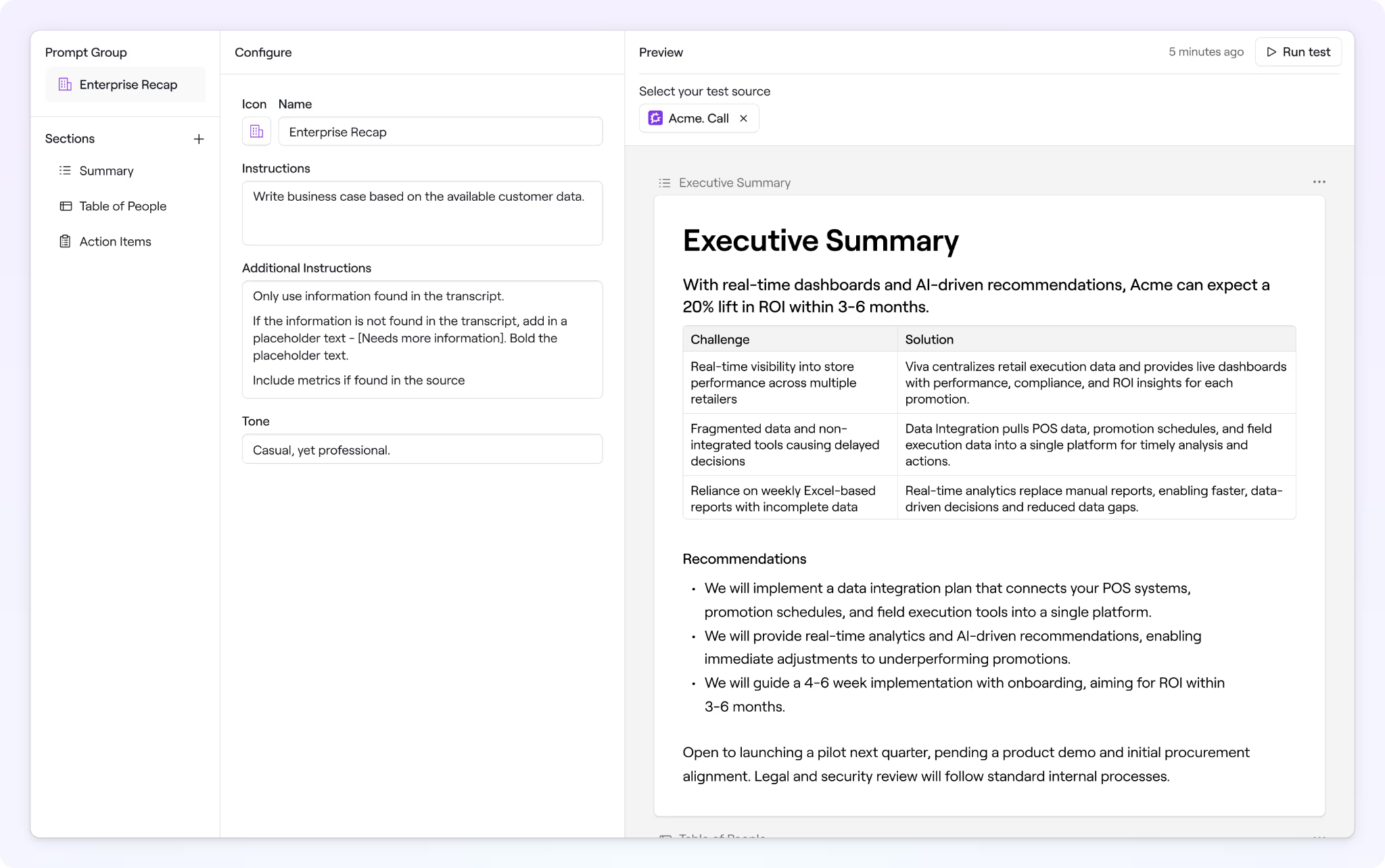
Dock packages prompts like these into custom AI agents your reps can actually reuse, scoped to your sales process and wired into the data that makes them useful: your CRM, call recordings, content library, company wiki, and the deal workspaces your buyers are already viewing.
Instead of teaching every rep to write a good business case prompt, you build a business case agent once, point it at your CRM and call transcripts, and share it with the team. Dock ships with pre-built agents for the common jobs (deal reviews, email drafting, business cases, competitor comparisons, asset lookup) that you can use as-is or rebuild around your own methodology. You also control what each agent can see, so an agent drafting a proposal pulls from approved pricing instead of a doc someone forgot to archive.
For the recurring, customer-facing documents, AI Documents turn the same connected data into business cases, recaps, and mutual action plans that generate right inside the deal room and stay shareable with the buyer.
Reps reach all of this inside Dock AI chat or right in the deal room where they're working. So after a discovery call, a rep generates a MEDDIC analysis that's visible to the buyer before the follow-up email even goes out. And because the agents are reachable through Dock's MCP connection, they also work from whatever assistant a rep is already using.
2. Gong
Gong has lots of useful tools with built-in AI prompts for sales.
Gong’s AI Builder generates battle cards, discovery questions, and coaching content from your own call library. AI Call Summaries auto-generate post-call recaps with next steps. And Gong Orchestrate surfaces methodology guidance—MEDDIC, BANT, SPICED, and others—on active deals based on conversation signals.
"You can go into AI Builder and say, 'Create a battle card for me against X competitor.' Or, 'Create discovery questions for Gong Enable for a sales professional.' And it will build the content for you... Isn't this just going to replace enablement? My answer to that is no, absolutely not. I think what it's finally doing is getting enablement to a place where you're much closer to the field, you're creating content that is actually going to impact the business."
— Stacey Justice, Vice President of GTM Enablement at Gong on Grow & Tell
Here's an example use case from Brian LaManna:
3. Gemini for Google Workspace
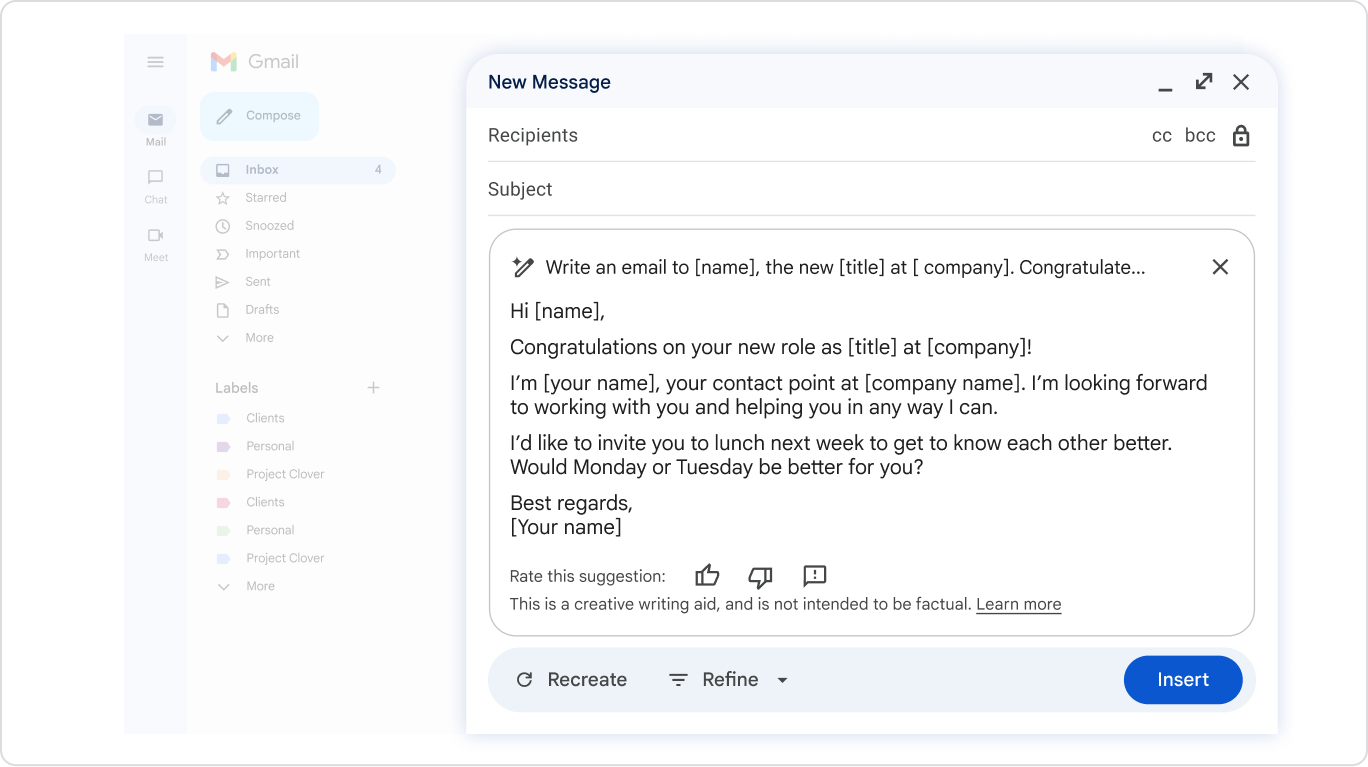
For teams already living in Gmail, Docs, Meet, and Sheets, Gemini is the lowest-friction AI prompt layer available.
Reps can prompt Gemini directly inside Gmail to draft follow-up emails from meeting notes, use Gemini in Docs to generate call scripts and discovery agendas, and pull meeting summaries from Google Meet recordings without leaving the tools they're already in.
Here’s a great resource from Gemini with lots more AI prompts for sales.
4. Clay
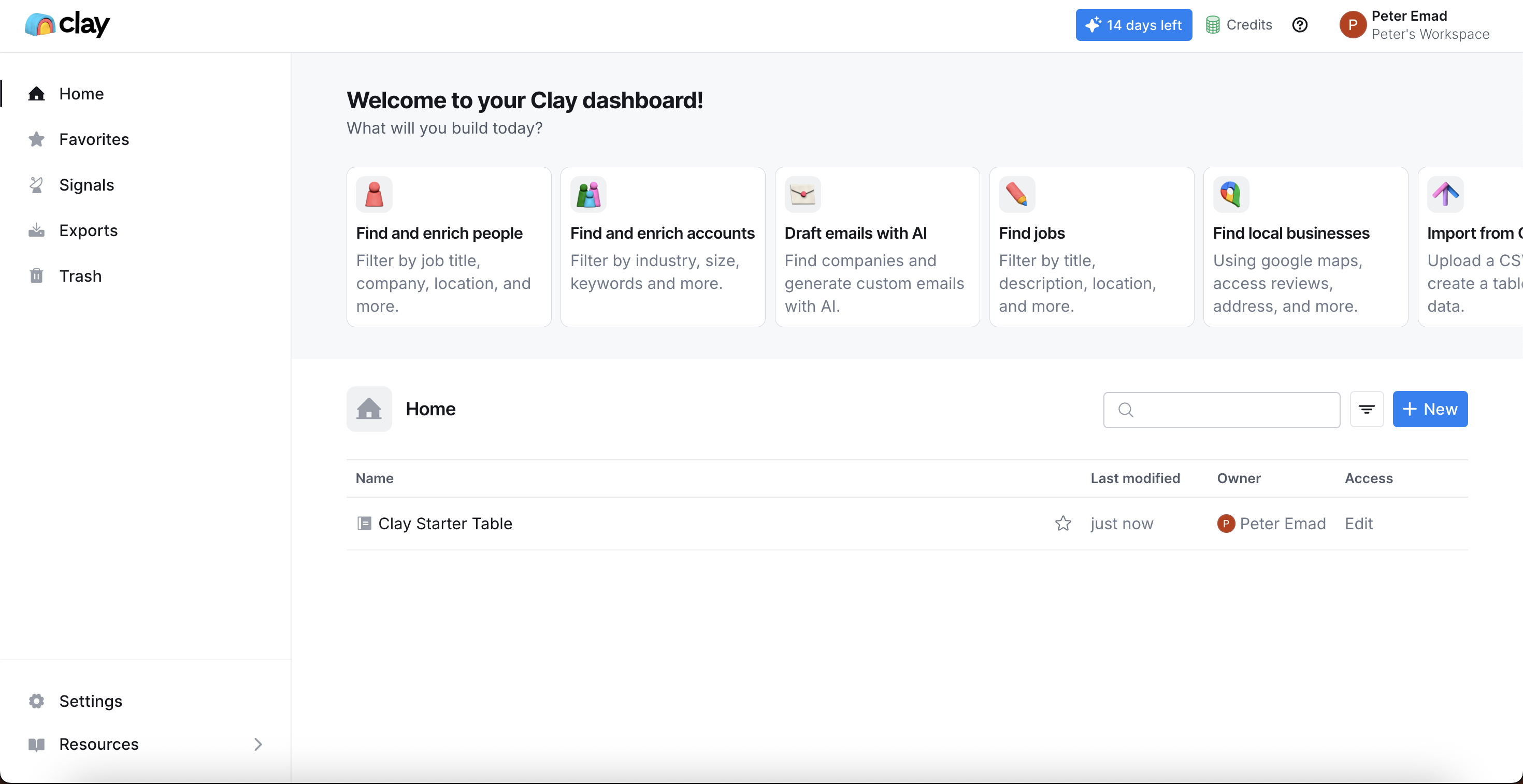
Clay pulls from 50+ data sources—LinkedIn, news, job postings, funding announcements, tech stack signals—to automatically populate account research prompts with real prospect context.
Where most AI prompts require you to paste in background information manually, Clay assembles that context for you. The result is meeting prep briefs and outreach prompts that sound like you spent an hour researching the account, because the AI actually did.
5. HeyReach
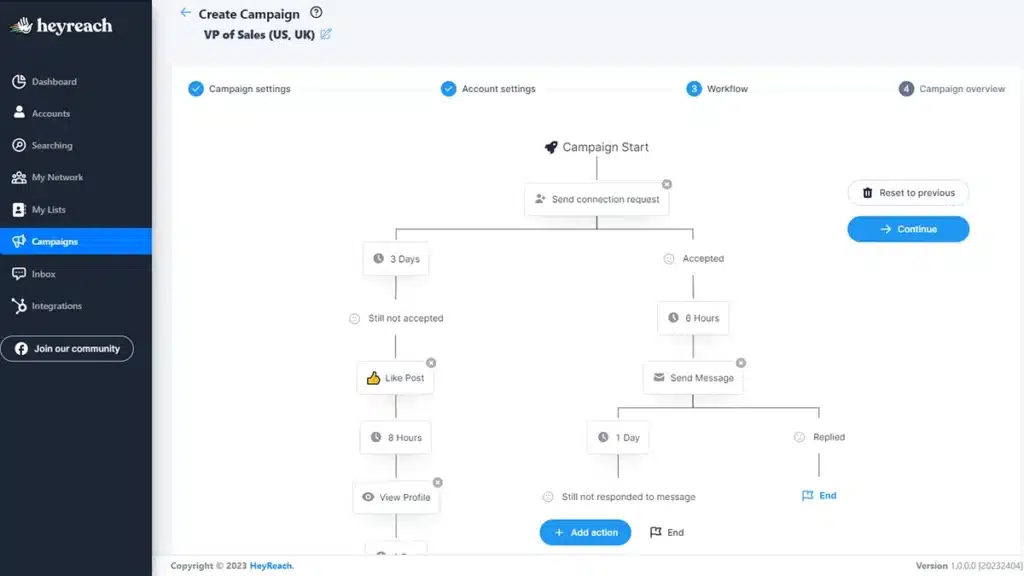
HeyReach is a LinkedIn automation platform with built-in AI prompt workflows for SDR outreach, sequencing, and list management. Reps build role-specific prompt templates for connection requests, follow-up messages, and objection responses, then run them across campaigns with built-in seat rotation and pacing controls.
The MCP integration means Claude can execute list cleanup and campaign management actions directly inside HeyReach—fetching leads, filtering by criteria, and creating cleaned lists without manual exports.
Try Dock AI for free
Your end goal isn't a big library of AI prompts. It's a sales team that executes consistently at scale, where your best rep's business case becomes the floor everyone else starts from.
That's what Dock AI is designed to do. You build agents scoped to your process, point them at your real deal data, and put them where reps actually work, whether that's Dock AI chat, the deal room your buyer is viewing, or the outside assistant a rep already uses. The output is ready to share without a round trip through ChatGPT.
What AI can do, when it's connected to your deal data, built into the workflow, and tied to your methodology, is make sure your process travels with every rep on every deal, even the ones you're not in the room for.


Related Revenue Lab Articles



Templates for Sales, Onboarding,
Projects and Portals
Customize and share with clients


