
Any seasoned enablement leader knows sales enablement content matters.
The harder question is whether your library actually covers what reps and buyers need, and what "good" looks like for each asset type.
This guide covers 25 types of sales enablement content—both internal-facing and customer-facing—with real examples from companies like Cisco, Asana, Klaviyo, and Dock.
Use it to audit your content library, spot the gaps, and see how other teams structure the assets that reps and buyers actually use.

Want more enablement content examples?
Check out Dock's Revenue Archives, a curated collection of 200+ real enablement assets from sales and customer success teams.
.png)
What is sales enablement content?
Sales enablement content is any material that helps reps sell and helps buyers buy.
That includes internal-only assets like battlecards, playbooks, and call libraries, as well as customer-facing assets like case studies, ROI calculators, and mutual action plans.
In practice, most teams skew toward one side. They build out internal training content, but give reps very little to actually share with buyers. Or they invest in polished customer-facing collateral that ends up buried in a folder no rep can find.
The teams seeing the best results treat enablement content as two connected jobs: preparing reps behind the scenes and giving buyers the materials they need to sell your product internally. This guide is organized around both, with 25 content types and real examples of each.
Internal-facing sales enablement content
Some of the most valuable sales enablement materials never reach buyers because they’re for internal eyes only.
This is the kind of stuff that helps reps walk into every conversation prepared and consistent. Below are ten types of internal-facing content creation that every enablement team should include in their sales enablement strategy.
1. Battlecards
Battlecards are a classic enablement asset built to support live sales conversations. They’re designed for speed and give sellers quick access to information they need in the moment.
When a tough question comes up, a strong battlecard gives reps a place to turn without breaking the flow of the call or digging through Slack (or even worse, Teams).
Sales battlecards
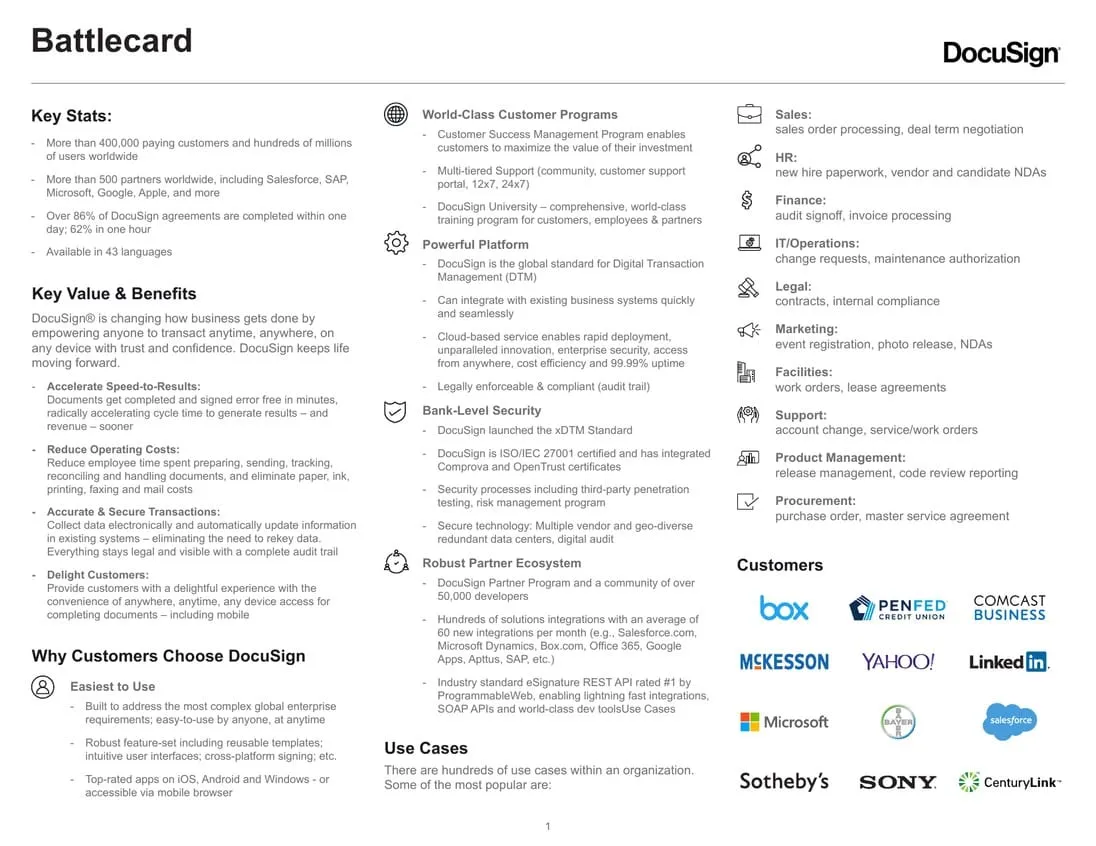
The first in-depth example comes from DocuSign. Their partner-facing battlecard is designed for resellers who need to position the Agreement Cloud against competitors like Adobe Sign and PandaDoc.
The card leads with pain points like contract delays, compliance risks, and manual workflows, and ties them to a clear, persona-specific benefit without feature dumping. Quick counters are also baked in (“We already use Adobe” or “Here’s why that’s not enough”), so teams can handle pushback without needing deep tech knowledge.
Competitive battlecards
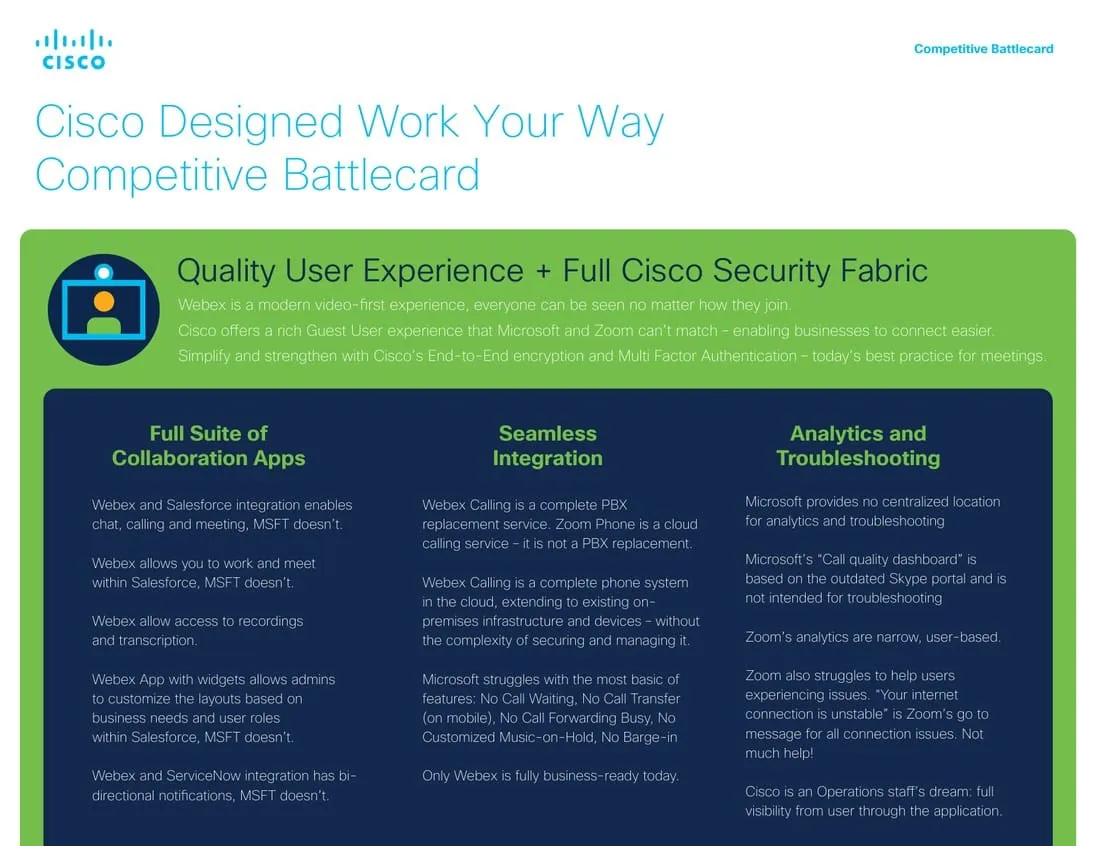
Cisco takes a different approach with its competitive Webex battlecard.
This asset is built for one thing: competing directly with Microsoft Teams and Zoom. It lays out where Cisco has an edge with security and integrations, with a lot of overcomplication. It pairs those strengths with role-based guidance for technical and economic buyers. All while the layout stays simple, with bullets and callouts designed for quick reference during a call.
2. Sales playbooks
Sales playbooks turn your best reps' instincts into a repeatable process. They document how to run specific motions, like outbound prospecting, navigating procurement, or managing a mutual action plan, so the rest of the team doesn't have to figure it out from scratch.
In Dock, internal learning playbooks live alongside customer-facing content in the same library. That means reps can reference the playbook and pull relevant content without switching tools.
3. Call & demo libraries
Call libraries give sellers access to real conversations, not theoretical training. Most teams curate recordings from discovery calls, demos, objection moments, and deals that either closed or didn't.
The difference between a useful library and a graveyard of Gong links is organization. Recordings need to be tagged by context (objection type, deal stage, persona) so a rep prepping for a call can find a relevant example in seconds, not minutes.
Curate recordings from:
- Discovery calls
- Demos
- Objections
- Closed wins
- Closed losses
These examples show your team how top reps handle the scenarios everyone faces.
4. Email templates
Email templates help reps avoid rewriting the same emails over and over, while keeping messaging from drifting across the team.
A solid template library created by content marketing usually covers a handful of repeat moments, including:
- Cold outreach emails for opening new conversations
- Post-demo follow-ups recapping what mattered and what comes next
- Objection-handling notes for top concerns like pricing or timing
- Renewal and upsell touchpoints for existing customers
- Procurement or legal updates that help buyers navigate approvals
When templates work, they give reps a solid starting point without locking them into a script. The structure helps, but there’s still plenty of flexibility to adapt to the deal (and the person they’re talking to).
5. Persona documents
Persona documents describe who your reps are actually selling to: their goals, challenges, buying behavior, and how they make decisions. They're different from your ICP (which defines the right company); personas define the right people within that company.
These docs are especially valuable during onboarding and when teams scale, because they keep messaging grounded in real buyer behavior rather than generic assumptions.

HubSpot’s buyer persona examples dig into goals, challenges, the tools buyers rely on, and how they prefer to consume information. They also cover how success is measured, communication preferences, and reporting structures, which help reps adjust their approach in more complex buying groups.
What makes this effective is specificity. Rather than a generic profile, HubSpot's persona covers how the buyer measures success, how they prefer to communicate, and who they report to. Those details help reps tailor conversations, not just understand the category.
6. Product training & certifications
Product training is the one area of enablement that never stays finished. Every launch, pricing change, and feature update creates a new gap between what reps know and what buyers ask.
The mistake most teams make is treating training as an event. A kickoff deck, a quiz, and a Slack message that says "go watch the recording." That works for the first week. It doesn't hold up three months later when a rep gets a question they haven't heard before.
With that context, here’s a practical way to think about building and maintaining product training over time.
- Collab with product and product marketing: Get the technical “what’s new” and GTM positioning. For existing products, refresh the positioning with new proof points and wins.
- Break down decks into enablement modules: Break down those larger product decks into short, digestible marketing content like guides and recordings.
- Tie training to real sales conversations: Layer in battlecards, objection handling, and sample talk tracks so reps understand what the product does, and how to use it.
- Built-in certification: Quick quizzes or peer reviews are usually enough to confirm understanding, and gamification can help keep people engaged. If you’re just doing a refresher, keep it light. For new launches, certification should be required.
- Keep everything up to date: update your training and certifications regularly. Customer and rep feedback should continuously feed into your entire process.
This is where on-demand training pays off.
In Dock’s sales training LMS, enablement teams can build product training as courses in the same platform where reps already find their battlecards and playbooks.
And when a rep hits a question that training didn't cover, the Dock AI enablement agent can pull answers from product docs, playbooks, and past deal context in real time, without filing a ticket or pinging a product manager.
7. Pricing sheets
Pricing sheets come into play when buyers start comparing options side by side. At that point, the conversation shifts from "is this worth exploring?" to "what does this actually cost, and how does it compare?"
The most effective pricing sheets make that comparison easy. They're clear about what's included at each tier, transparent about what costs extra, and structured so a buyer can forward it to their CFO without additional context.
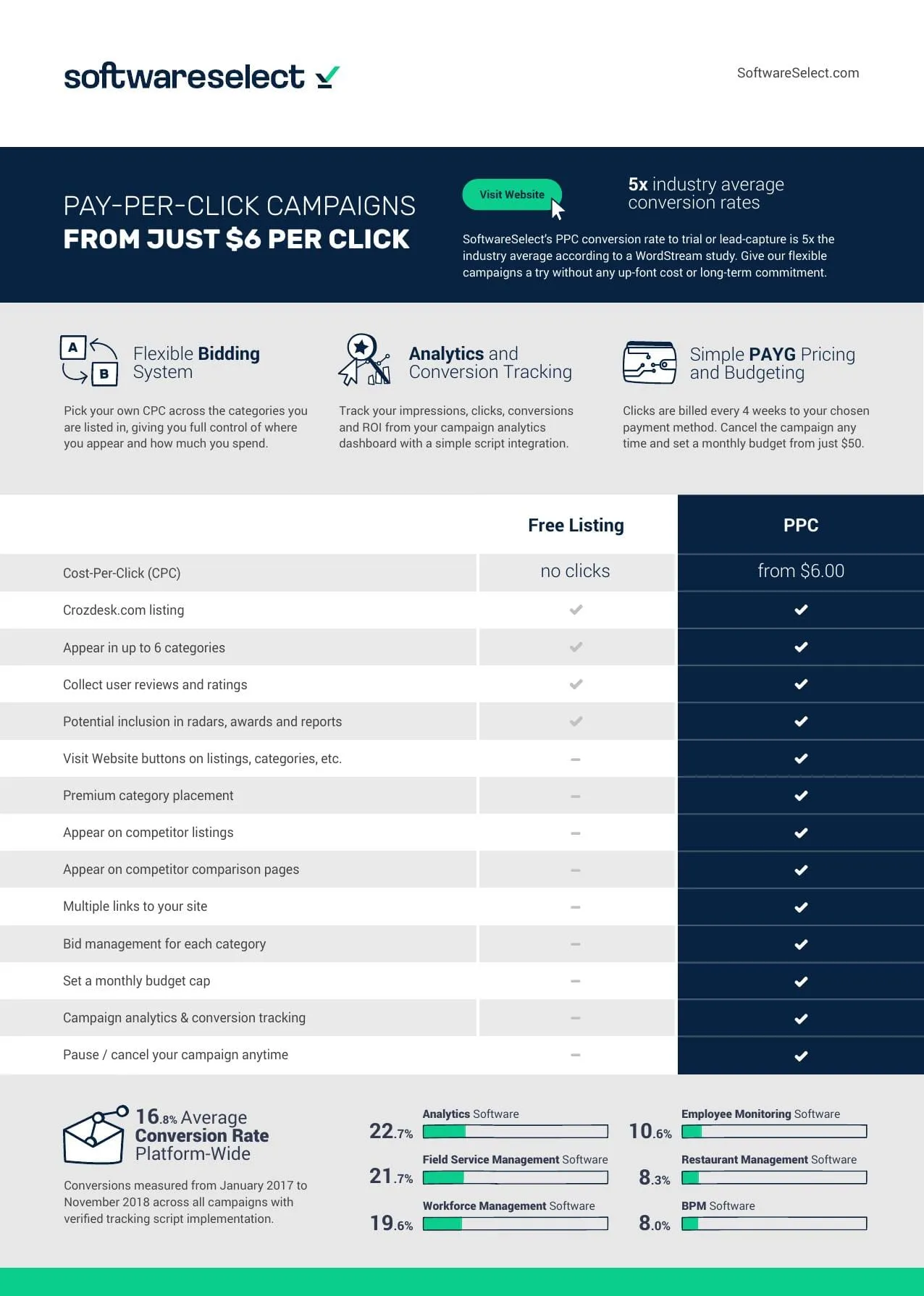
SoftwareSelect’s pricing sheet clearly frames the difference between a free listing and paid PPC campaigns. It walks through the cost structure and then shows what is available at the paid level.
The sheet also includes real data, analytics, conversion tracking, and benchmarks across software categories—giving buyers something concrete to act on rather than abstract pricing alone.
8. Scripts & talk tracks
Scripts and talk tracks exist to keep reps from freezing in the moment. They're not meant to be read verbatim. The best ones give reps a sense of direction: how to open, where to steer the conversation, and what language works when objections come up.
The reason most scripts go unused isn't quality. It's access. If a rep has to dig through a wiki to find the right talk track, they'll just wing it. Scripts need to live where reps already work, close enough to the deal that referencing one feels natural rather than disruptive.
Most scripts still focus on a few practical moments:
- How to open the conversation
- Introduce value
- Uncover pain points
- Move things forward
Talk tracks are lighter weight. They’re usually single-page guides that focus on sample language for handling objections or framing product benefits.
Over time, their value shows up in consistency. Scripts and talk tracks give new hires have a place to start, and experienced reps stay aligned on the same story without sounding rehearsed.
9. Messaging documents
Messaging documents close the gap between how the product team thinks about the product and how reps describe it to a buying committee. Without a shared reference, reps end up improvising, and the story drifts from person to person.
A strong messaging doc isn't a brand guide. It's a practical reference that gives reps language they can actually use in conversation, grounded in how buyers talk about their problems.
An example of what a messaging doc around positioning might include:
- A short description of what the product is, written in language that sounds natural.
- The main positioning angle the team should lean on, with notes on when it tends to resonate.
- Differentiators explained in plain terms, with context pulled from real deals.
- Common questions that surface during sales conversations and approved responses.
- Proof points the team can point to with confidence.
10. FAQs
Internal FAQs solve a specific problem: reps keep getting the same questions from buyers, and the answers require enough nuance that guessing is risky.
Security policies, integration details, edge-case pricing, post-signature implementation steps. These are the questions where a wrong answer creates real cleanup work.
Here’s an example of what internal FAQ docs can cover:
- How pricing works in edge cases that don’t fit neatly into standard tiers
- Questions about integrations that come up late in evaluation, especially around setup or data flow
- Security or compliance topics that usually trigger follow-up from IT or legal
- Implementation timing, including what actually happens after a contract is signed
- When a question should be escalated, and who owns the follow-up
Reps don’t have to ping product or security to answer the same question again, and buyers get a response that’s clear enough to understand.
Customer-facing content
Internal content prepares your team. Customer-facing content has to stand on its own.
That's the real bar. These assets get forwarded to decision-makers who've never spoken to your reps, reviewed in threads your team isn't part of, and used to make the case for your product when you're not in the room. They need to be scannable, credible, and current.
11. Sales decks
Most teams have a master sales deck that's 40+ slides and growing. Reps pull from it selectively, which means every buyer sees a slightly different version of the story.
That's not necessarily a problem if reps have good judgment. But it becomes one when there's no visibility into which version buyers actually saw, or which slides they spent time on after the call.

Asana’s sales deck works because it starts with something concrete. Early on, it introduces a concrete data point (87% of users say Asana clarifies responsibilities), which gives the conversation something tangible to anchor on.
From there, Asana leans heavily on the visuals. Screenshots and illustrations do most of the explaining, so prospective customers can quickly see how the product shows up in day-to-day work. There are also customer quotes from teams at Uber and Autodesk, adding credibility without turning the deck into a wall of proof slides.
12. One-pagers & datasheets
One-pagers and datasheets are the asset buyers grab when they need to explain your product to someone who wasn't in the room. That means they need to carry the argument on their own, with no rep to add context.
The best one-pagers lead with outcomes, not features. A stakeholder reviewing one doesn't care how the product works yet. They care whether the problem is worth solving and whether the numbers justify a closer look.
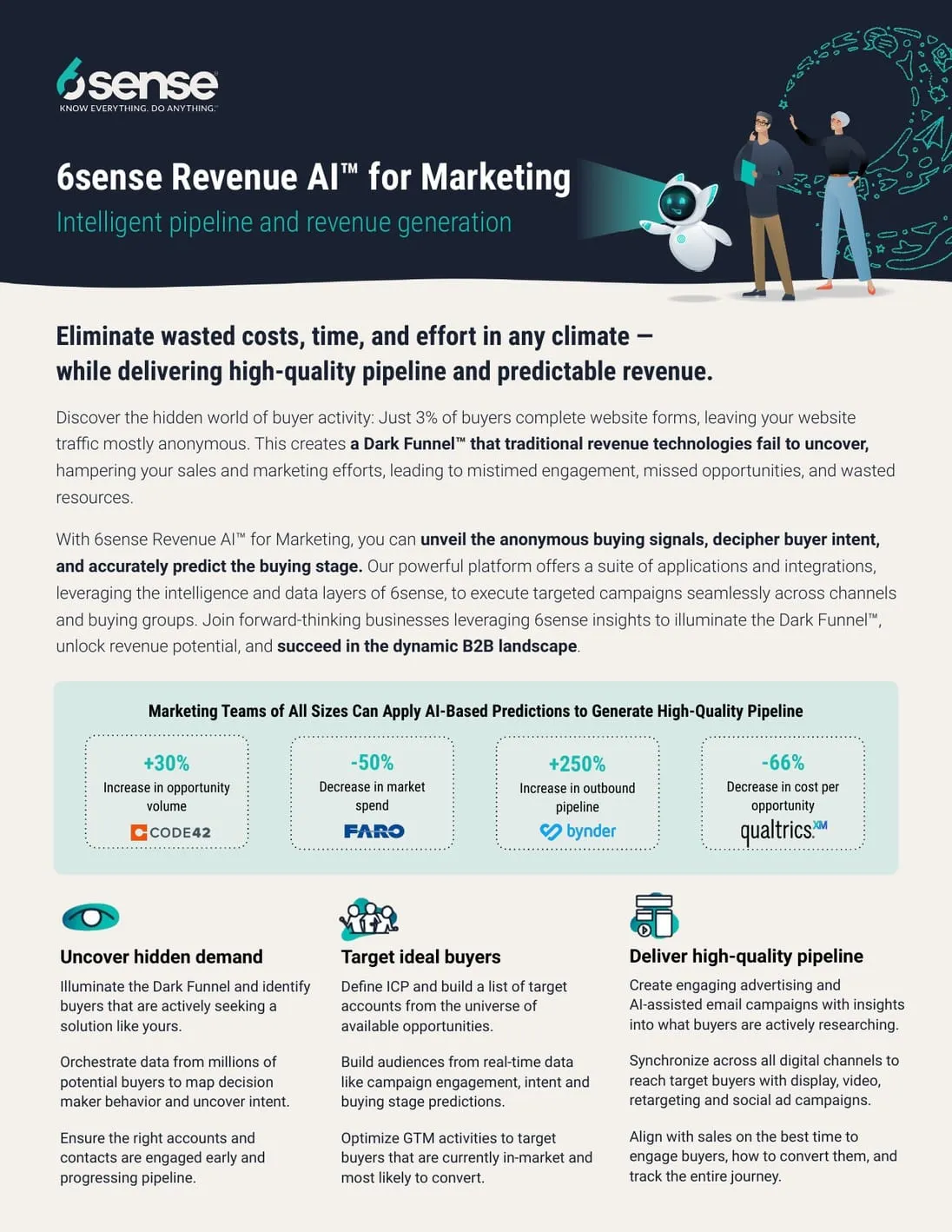
This ROI overview from 6sense is a good example of how a one-pager can carry weight without doing too much. Instead of listing product capabilities, it leads with outcomes and backs them up with real numbers, including gains in outbound pipeline and changes in cost per opportunity.
From there, the document outlines the problem 6sense addresses and how the platform fits into the buyer’s world. It stays focused on the story rather than the mechanics, making it easier to use when someone just needs a clear takeaway.
13. Mutual action plans
Mutual action plans show up once a deal has real traction and both sides need to agree on what happens next. They make the remaining steps visible and shared, so nothing stalls because someone assumes the other side is handling them.
The format matters less than the behavior. A mutual action plan only works if both the seller and the buyer treat it as the source of truth for the deal, not a formality that gets filled out and forgotten.
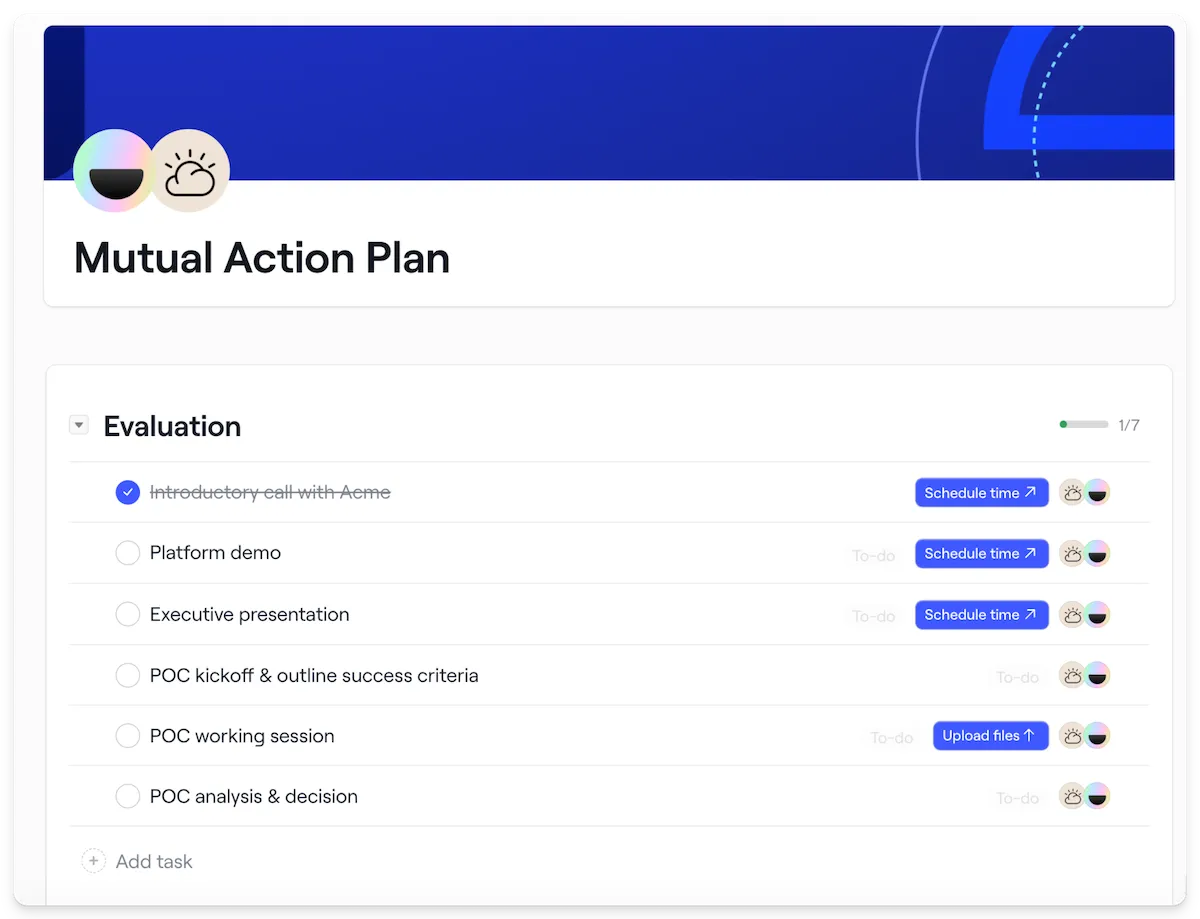
This example we’ve used in the past at Dock is a shared checklist throughout our sales process. It gives both sides a clear view of what’s required to move forward and keeps expectations grounded as things progress.
What makes it effective shows up in how it’s used:
- Ownership is clearly assigned to remove ambiguity early
- Dates follow the buyer’s timeline instead of internal deal pressure
- Tasks are ordered in a way that mirrors how deals actually move forward
- Status lives in one place, so updates don’t require extra check-ins
Dock's mutual action plans are built directly into the sales room, so buyers and reps work from the same view. Tasks update in real time, ownership is visible to both sides, and reps don't need to send status update emails because the buyer can see progress whenever they check in.
14. Business case templates
Business case templates solve a problem that happens after your champion is sold: they need to convince someone else. Usually a VP or CFO who wasn't in any of the demos and is evaluating the purchase on risk, cost, and strategic alignment.
Your champion probably isn't a professional proposal writer. A strong template gives them a structure they can fill in with your help, so the business case reads like it came from inside their organization rather than from your sales team.
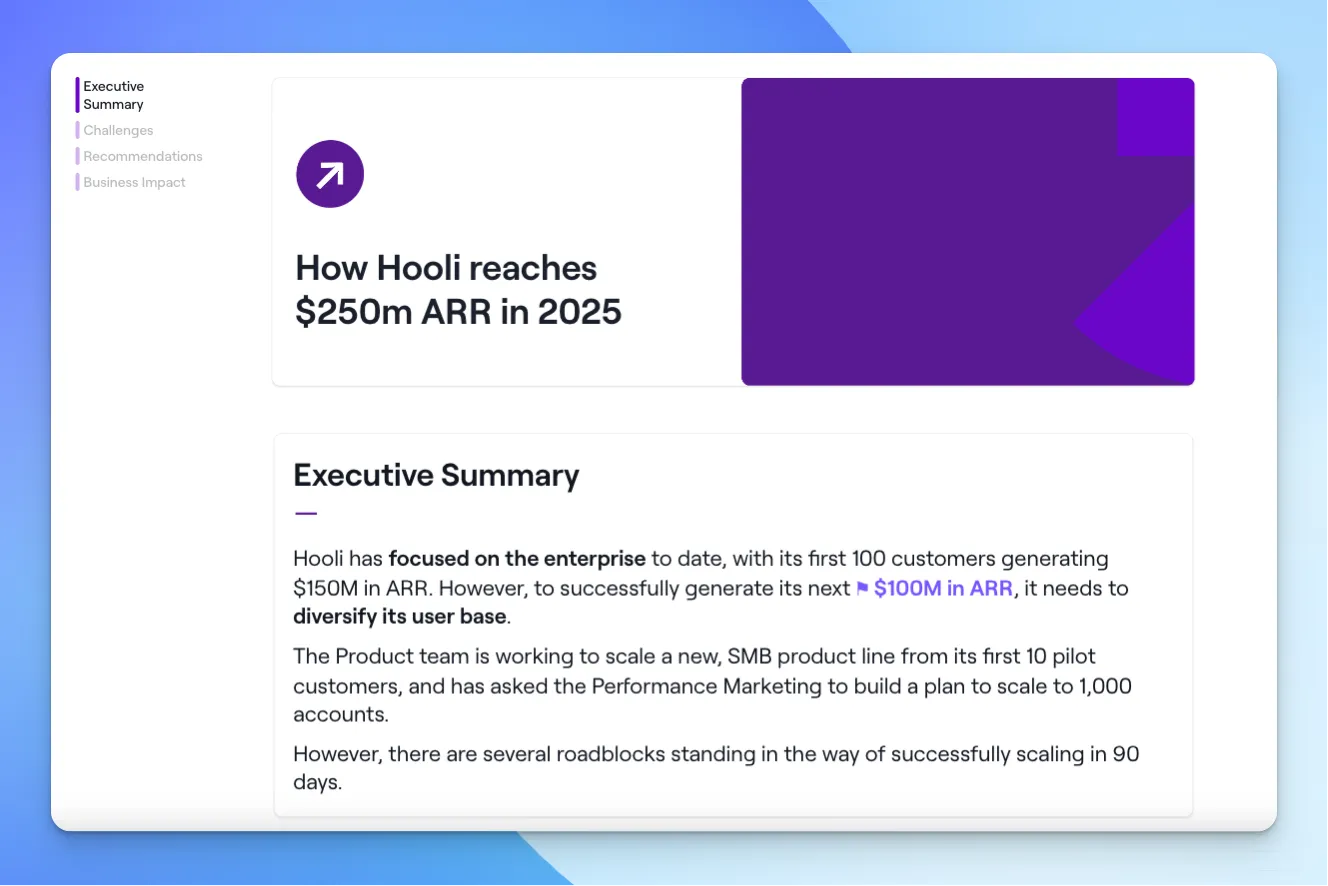
Dock’s business case template is grounded in the buyer’s context.
- It starts by naming the core challenge the organization is trying to solve
- Then it connects that challenge to expected impact once a change is made
- After that, financial implications are explicit
- Finally, supporting detail is added only where it strengthens the argument
15. Competitor comparisons
Competitor comparisons exist because buyers are going to compare you to alternatives whether you help them or not. The question is whether they use your framing or whatever they find on G2 and Reddit.
The strongest comparison assets are specific and honest. They acknowledge where competitors are strong, then redirect to the dimensions where your product wins. Buyers trust comparisons that feel fair more than ones that feel like attack ads.
Existing example: Butter vs. Zoom Comparison Page
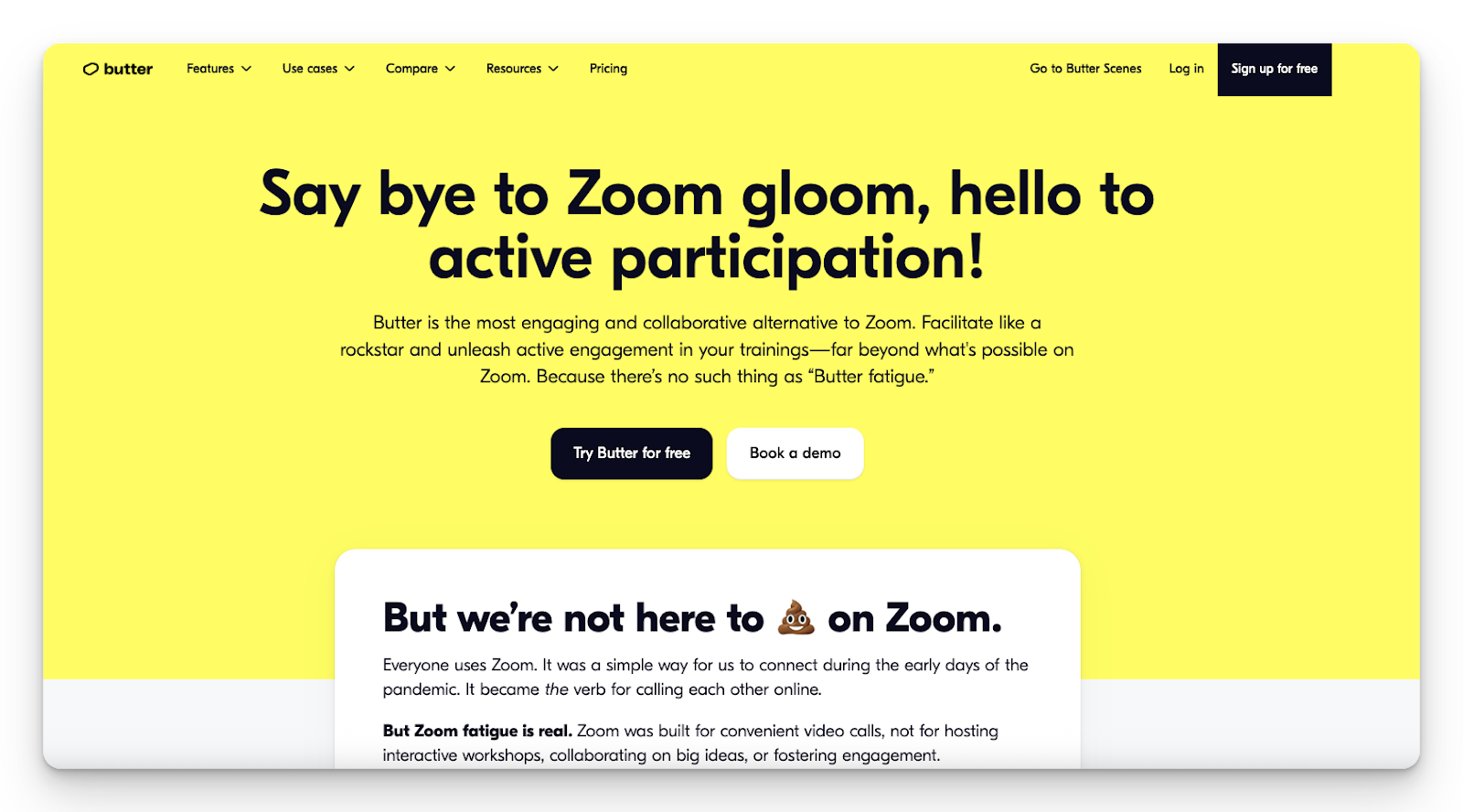
Butter’s comparison page takes a fun approach with headlines like “Say bye to Zoom gloom.” (Honestly, who doesn’t love a good rhyming header?) It directly calls out Zoom fatigue and positions Butter as the better alternative for interactive workshops and training sessions.
While lighthearted, the content is clear: Zoom was built for convenient video calls, while Butter is built for active participation.
16. Calculators & diagnostic tools
Calculators and diagnostic tools give buyers a way to quantify the problem before they ever talk to a rep. That makes them powerful at two moments: early, when a buyer is deciding if the problem is worth solving, and late, when the numbers need to hold up under scrutiny from finance.
On the sales side, these tools also capture structured inputs (budget, team size, current spend) that signal readiness for a real conversation.

Klue’s Competitive Revenue Gap Calculator puts a number on a problem most teams already feel: revenue lost to competitors. The tool uses a small set of inputs, like win rates and deal size, to show how much money is slipping away.
The value here is in the focus. It shows the cost of not having a competitive strategy, which makes the output easy to react to (and even easier to carry into a sales conversation).
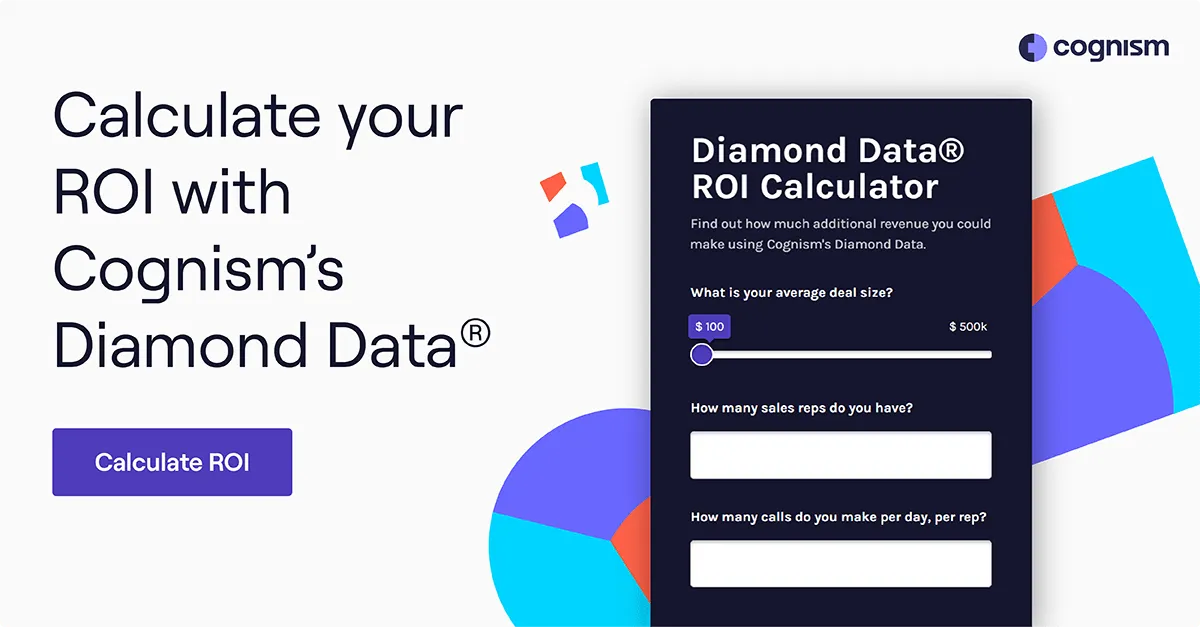
Cognism’s calculator estimates potential revenue impact based on how the platform is used. It turns assumptions into a number that can be pressure-tested and reused when the conversation moves beyond surface-level value.

Another great example, GoodTime, takes a similar approach for hiring. Its calculator quantifies time spent coordinating interviews and translates that effort into cost, making efficiency easier to evaluate in practical terms.
These tools also tend to perform well across paid and outbound channels because they give prospects a reason to engage before they're ready for a full sales conversation. If you're looking for a high-converting TOFU asset, a calculator is worth the investment.
17. Case studies & testimonial videos
Case studies answer the one question that no amount of product messaging can: "Has this actually worked for a company like ours?" They're credibility assets, and buyers rely on them most in the middle and late stages of a deal, when they're building confidence or defending their recommendation internally.
The format matters more than most teams realize. A case study that requires five minutes to read won't be forwarded. The ones that work are structured for two things: scanning and sharing.

Dock’s customer stories are structured for two specific elements:
- Scanning
- Sharing
A testimonial video sits at the top to establish credibility quickly. Below that, clearly labeled sections walk through context and results, so someone can understand the story without needing extra explanation.
Another great (and cheeky) example is this case study from Klaviyo. Revenue impact is visible right away, which makes the value of the product hard to miss.
This kind of framing works well later in the buying process, when buyers are pressure-testing ROI and looking for confirmation that results aren’t limited to one narrow use case.

A bit different from the first two examples, Pendo’s case study leans more heavily on narrative. A customer video establishes trust early, while the written sections focus on how the problem was approached and what changed after implementation.
The takeaway across these examples is usability. Strong case studies hold up when they’re skimmed, forwarded, or reviewed by someone who wasn’t part of the original conversation, which is usually when they matter most.
The common thread across all three examples is that they hold up without context. A stakeholder who has never spoken with your team can skim one of these and understand the problem, the approach, and the result. That's the bar.
18. Pricing calculators & pricing comparison calculators
Pricing calculators are different from the ROI and diagnostic tools above. Those help buyers quantify the problem. Pricing calculators help buyers quantify the solution, typically by allowing them to model costs based on their usage, team size, or configuration.
The best ones are transparent. They show what's driving the number so buyers can adjust inputs and understand tradeoffs without waiting for a rep to walk them through it.

DigitalOcean’s pricing calculator lets users work through cost the same way the product is actually configured. You can adjust things like compute type or storage and the total dynamically updates as you go.
What works here is the transparency. Costs are itemized clearly, so it’s easy to see what choices are driving the number. For products with usage-based pricing, that level of visibility is key.
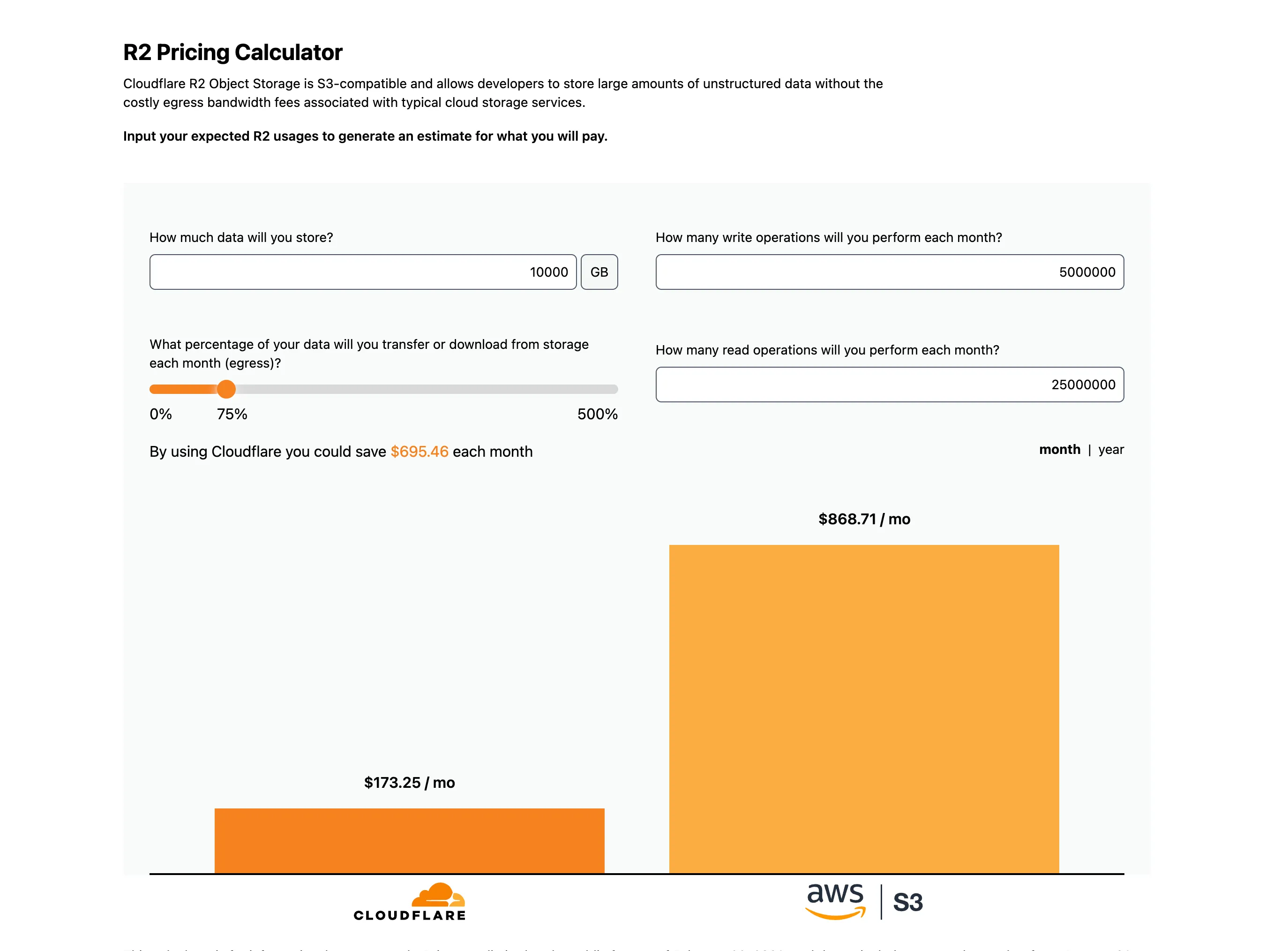
Cloudflare’s R2 pricing calculator puts its cost model directly next to Amazon S3. Users enter basic inputs like storage volume and data egress, then see how pricing compares across both services.
The comparison is the point. By laying costs side by side and calling out where the models differ, the calculator makes the tradeoffs obvious without needing a long explanation. It’s straightforward, opinionated, and easy to sanity-check.
19. Demo & Explainer Videos
Demo and explainer videos serve as a credibility check. Buyers aren't looking for a pitch. They want to see whether the product matches how they expect to work, and whether the interface feels like something their team would actually adopt.
There are three common approaches, and the right one depends on your audience's familiarity with the category.

Vimeo shows the product in use, assuming the viewer already understands what the product is.

Airtable spends time orienting the viewer first, then introduces the product as a solution.
Linear skips narration entirely and lets the interface speak for itself.
Each approach works because it's matched to its audience.
20. Interactive demos
Interactive demos let buyers experience the product on their own terms. They're especially useful when the interface is a key part of the value proposition, but you can’t offer a free trial, and screenshots don't do it justice.
Unlike a recorded demo, an interactive demo puts the buyer in control. That changes the dynamic from "watch this" to "try this," which tends to generate more engagement and more qualified questions in the follow-up conversation.
Example: Lattice Interactive Product Demo
Lattice’s interactive demo shows the product in a realistic but guided environment. Screens are pre-filled, and prompts explain what’s happening (but without getting in the way).
21. Customer Success & onboarding collateral
Customer success collateral answers the question that shows up late in every deal: "What happens after we sign?"
It's a buying question disguised as an implementation question, and the quality of your answer can make or break a deal that's already at the finish line.
The best onboarding content doesn't just describe the process. It gives the buyer enough detail to assess effort, timeline, and internal resources needed, so they can plan for success rather than hoping for it.
Example: Databricks Migration Guide
Databricks’ Redshift-to-Databricks Migration Guide walks through what it takes to move existing workloads onto the platform. It’s practical and direct. It’s also written for teams evaluating the effort before they commit.
The guide covers how current architecture maps over and where automation reduces risk. It also addresses operational concerns (like security and cost), making it usable beyond the tech or IT team.
22. Research/ROI reports & whitepapers
Some deals stall because the buyer needs more context, not more product detail. The champion is sold, but the executive sponsor wants to understand the broader risk or industry trend before approving budget.
Research reports and whitepapers exist for that moment. They reframe the conversation around the problem rather than the solution, which makes them useful when the audience isn't yet ready to evaluate specific tools.
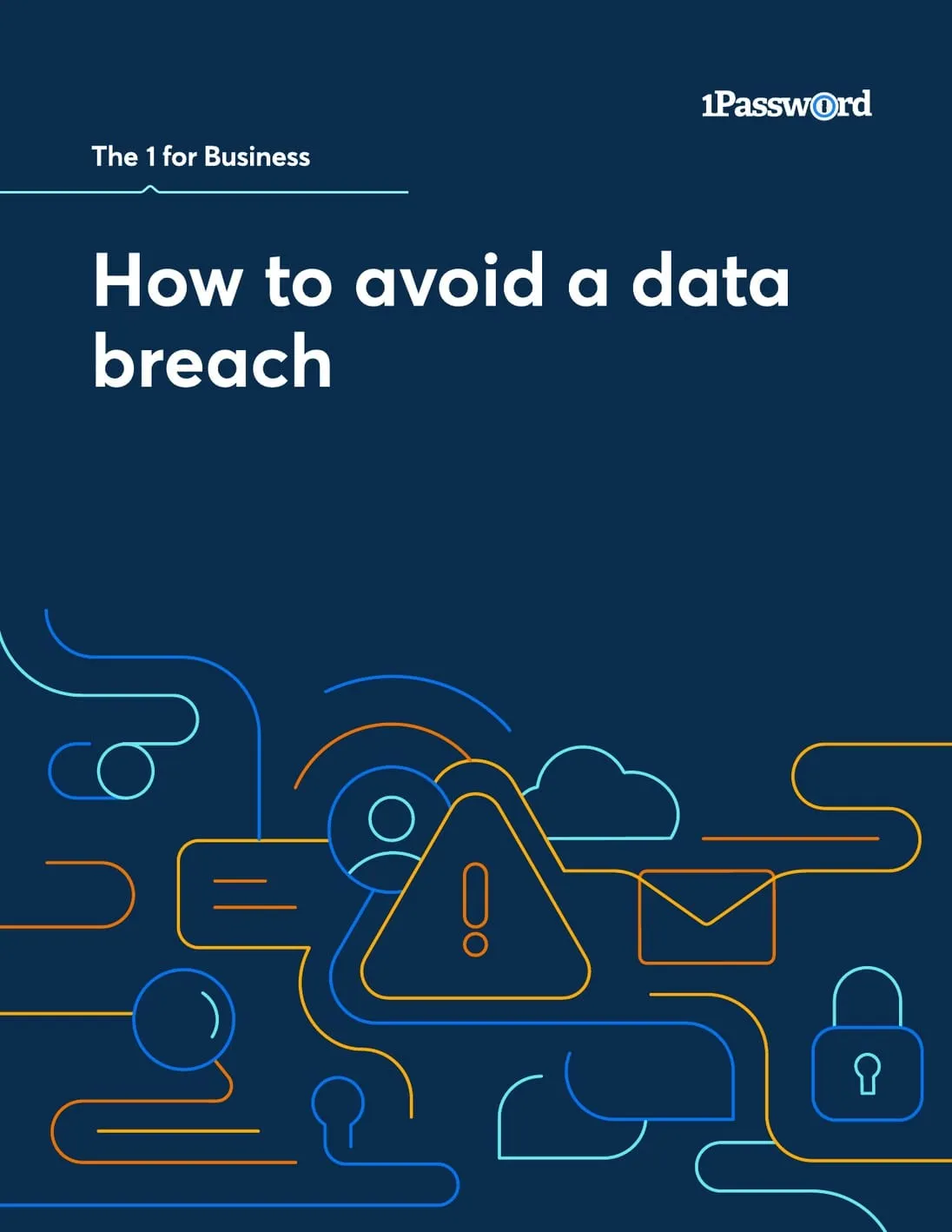
1Password’s data breach whitepaper frames password management as a security issue with actual business impact. The focus stays on breach exposure and compliance risk, making sure the topic is relevant beyond the IT team.
Industry data and threat patterns are used to support the argument. And the paper also addresses rollout and adoption, so it holds up to implementation questions, too.
23. Security, trust, & procurement guides
At some point in every enterprise deal, the conversation shifts from value to risk. Legal wants to review your security posture. IT needs to verify compliance certifications. Procurement has a vendor questionnaire that needs answers.
The teams that handle this well don't treat security content as a one-off response. They build a structured, self-serve resource that buyers can share with their internal review teams without needing another call.

Miro’s Trust Center is a great (and incredibly comprehensive) example of security, trust, and procurement guidance. Here’s what it offers:
- Certifications: SOC 2, ISO, GDPR, and AI standards are clearly listed and current.
- Controls and governance: Plain-language detail on access control, audit logging, and AI governance.
- Documentation: Reports and policies are easy to view or request without email chains.
- Subprocessors: Clear visibility into vendors, data residency, and third-party risk.
These elements let teams quickly confirm that Miro meets their requirements (without more “let’s hop on a call” or back-and-forth) so they can move forward with confidence and trust.
The goal is to remove yourself as the bottleneck. If a buyer's security team can find your SOC 2 report, review your subprocessors, and confirm your compliance certifications without emailing your rep, the deal keeps moving.
In Dock, you can embed security documentation directly in the sales room with a dedicated security section. Reps can see when the buyer's legal or IT team accesses those documents, which is one of the strongest buying signals in enterprise deals.
24. Buyer enablement content (e.g., buying checklists)
Most enablement content is designed to help sellers sell. Buyer enablement content flips the direction: it helps buyers buy.
That distinction matters because most of the buying process happens without a rep present. Gartner's research puts the number at 83% of the buying journey. Your champion is evaluating vendors, comparing options, building internal alignment, and defending their recommendation in meetings you'll never be in.
Buyer enablement is about giving them the tools to do that effectively.
Example: Stampli Buyer’s Guide Checklist
The Stampli Buyer’s Guide Checklist breaks AP software evaluation into specific areas their buyers already care about (think: invoice processing, approvals, fraud prevention, and integrations). It gives them a way to compare vendors using the same set of questions. Here’s what it includes:
- Eval questions grouped by workflow and capability
- Prompts buyers can reuse across multiple vendors
- Coverage of common concerns, e.g. security, pricing, and usability
- Demo-focused questions that go beyond product features
This is the category where traditional enablement tools tend to fall short. They're built to manage internal content and train reps, not to equip buyers.
Dock takes a different approach. Every sales room is a buyer enablement tool by design: a single, shareable workspace where your champion can find everything they need to make the case internally, from product collateral to business cases to security documentation, without digging through email threads or asking the rep to resend something.
25. Customer enablement content (e.g., migration guides)
Customer enablement content picks up where onboarding collateral leaves off. While onboarding content helps buyers understand what happens after they sign, customer enablement content is what teams rely on as they adopt, expand, and get ongoing value from the product.
This is a broad category, and the best teams don't try to cover it with a single guide. It usually includes:
- Onboarding and implementation guides
- Training programs and certifications
- Adoption playbooks
- Admin and operator documentation
- Change management resources
- Ongoing customer success frameworks
Existing Example: Snowflake Migration Kit
Snowflake’s enablement content works because it doesn’t try to cram adoption into a single guide. Different materials show up depending on what a team is trying to do.
Some pieces help teams sanity-check their effort before they start, while others help with setup once a decision is made. There’s also content that sticks around after launch to address new questions or when usage expands.
In Dock, customer-facing content lives in the same platform where the sales process started. A buyer's workspace can evolve from a sales room to an onboarding hub to a long-term client portal without losing context or forcing the customer to start over in a new tool. That continuity matters, especially for accounts where adoption and expansion drive most of the revenue.
Where to store your sales enablement content
Having the right enablement content doesn't matter if reps can't find it or buyers never see it. The way you store, organize, and deliver enablement content is just as important as the content itself.
Here's how the workflow looks in Dock.
Content library
Dock's content library is where both internal and customer-facing assets live. Battlecards, playbooks, case studies, one-pagers, pricing sheets, demo videos: everything covered in this guide goes in one place rather than being scattered across Drive folders, wikis, and Slack pins.
AI handles the organization. When you upload content, Dock auto-tags it by type, topic, and use case, so the library stays searchable as it grows. That removes the biggest bottleneck with most content management setups: someone has to maintain it, or it falls apart within a few months.
Internal playbooks
Playbooks aren't just another asset to store. They're the operational guides that tell reps how to run a specific motion, and they need to be easy to find and reference on their own. Think of them like a wiki for revenue teams.
But playbooks can still link directly to assets in the content library. So a rep reading the outbound playbook can pull the email templates, talk tracks, and battlecards it references without switching tools. When a linked asset is updated, the playbook automatically reflects the change.
Ask Dock AI
Even a well-organized library can't help a rep who doesn't know what to look for.
Dock’s AI enablement agent lets reps describe what they need in plain language, like "what should I send after a first demo with a VP of Sales?" or "do we have a case study for a fintech company?" and get a recommendation based on what's in the library, what's worked in similar deals, and the current deal context.
That shifts discovery from "browse and hope" to "ask and get an answer," which is especially valuable for newer reps who haven't memorized the full content library yet.
Sales rooms
Once a rep finds the right content, they need a consistent way to share it. Dock's sales rooms give buyers a single workspace where everything for their deal lives: product collateral, pricing, mutual action plans, security docs, and business cases.
Sales rooms standardize how content gets delivered without making every deal feel identical. Reps start from a template and personalize from there, so the buyer gets a tailored experience and enablement leaders get confidence that the right content is reaching every deal.
Content analytics show which assets buyers actually open, how long they spend, and who on the buying team is engaging, giving reps a clear signal for when and how to follow up.
Want more sales content examples?
And if you want to see what effective enablement content actually looks like, browse Dock's Revenue Archives.
It's a curated collection of real assets from sales, onboarding, and customer success teams, including partner materials, testimonial videos, datasheets, diagnostic tools, and research reports. Use it as a benchmark for your own library.


Related Revenue Lab Articles


.webp)


.webp)
Templates for Sales, Onboarding,
Projects and Portals
Customize and share with clients


