



Sales teams LOVE battlecards. Product marketing and sales enablement teams, less so.
If you're managing competitive intel across 20+ reps, you already know: battlecards are time-consuming to make and somehow always needed right now—usually five minutes before a deal review or mid-call when a competitor comes up.
To make things harder, you'll almost never see real battlecard examples out in the wild. Companies keep them pretty close to the vest—they're the internal competitive positioning playbooks that sales enablement teams and product marketers use to help sellers close deals.
Sharing them feels like giving away trade secrets…
…but luckily for you, we were able to scrounge up 24 real examples of sales battlecards that were already floating around online.
Some polished, some rough around the edges, but all genuinely useful to inspire your own battlecards. You'll see how different teams tackle the same problem: what do your sellers need to know when they're sitting across from a prospect?
So if you're trying to figure out what goes into a competitive battlecard, you'll find real answers here.

Want to see our full archive of curated B2B sales assets?
Check out 200+ examples of sales decks, one-pagers, battlecards, and more in The Revenue Archives.
Our favorite competitive battlecards from real companies
We've broken down each battlecard into three questions you can skim in 20 seconds:
- Who is this built for, and which competitor does it address?
- What stands out about the positioning, messaging, or structure?
- What’s worth borrowing for your own battlecards?
1. Cisco Webex
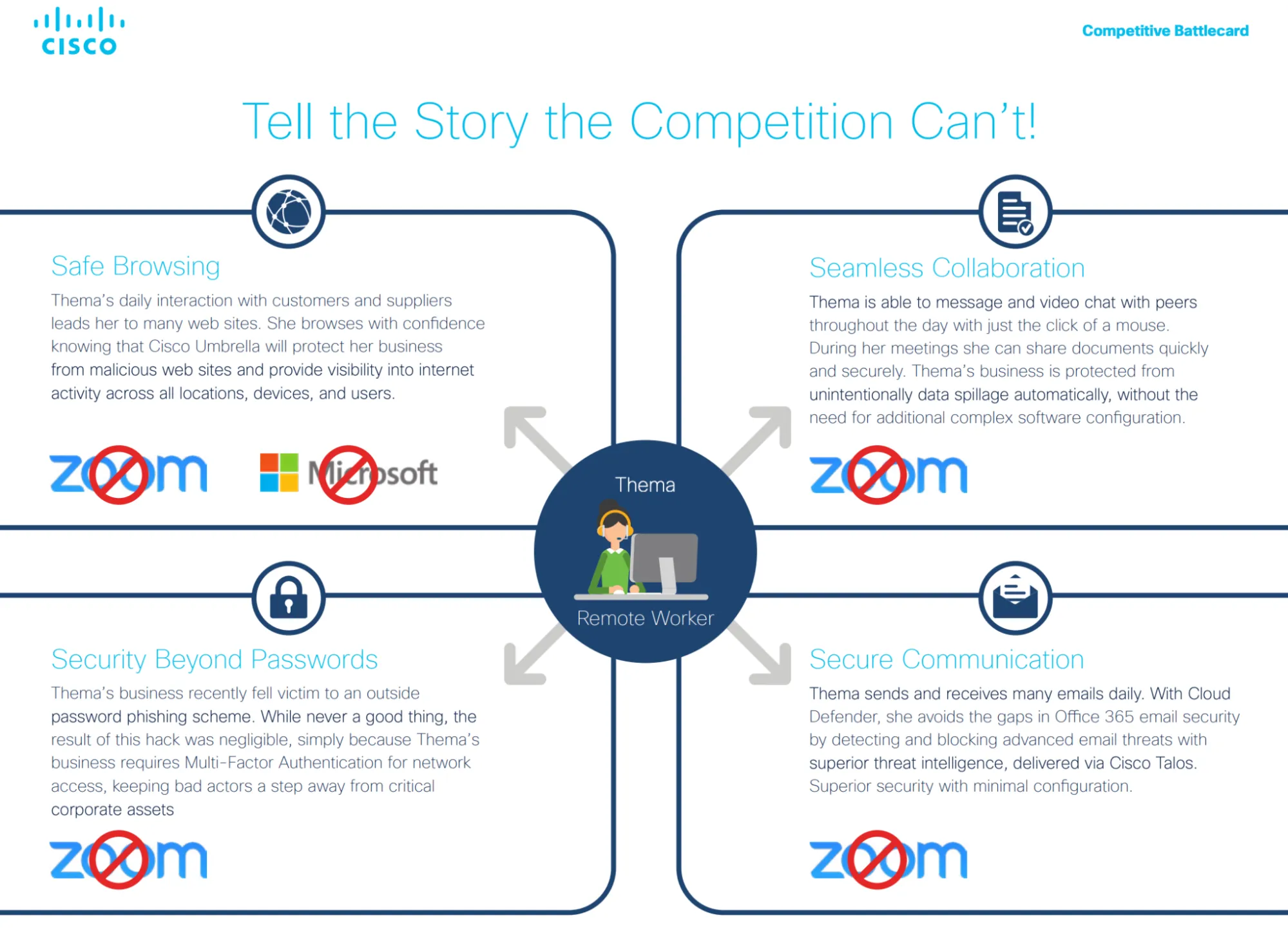
This battlecard is designed for Cisco sellers working competitive deals against Zoom (and Microsoft) in remote-work environments. The core audience, in addition to IT, is operations, security, and business buyers who need remote work to be secure by default.
The asset centers on a single persona (“Thema, Remote Worker”) to ground the conversation in real day-to-day scenarios.
What stands out?
- Cisco doesn’t try to out-Zoom Zoom. Instead, the battlecard reframes the decision around end-to-end security and control across browsing, collaboration, identity, and communication.
- Each section pairs a real remote-work moment with a clear competitive contrast: Cisco as a fully integrated stack versus Zoom and Microsoft as partial or fragmented solutions, then visually disqualifies them.
- On page three, the battlecard embeds specific sales coaching: "Ask about MFA for Apple Macs, Samsung devices, or general IoT machines," turning a key feature gap into a discovery question.
💡 Borrow this: Anchor competitive positioning to everyday scenarios. Framing the comparison around how work really happens gives sellers a clear story to tell, and an easy way to move beyond feature-by-feature debates.
2. Parallels
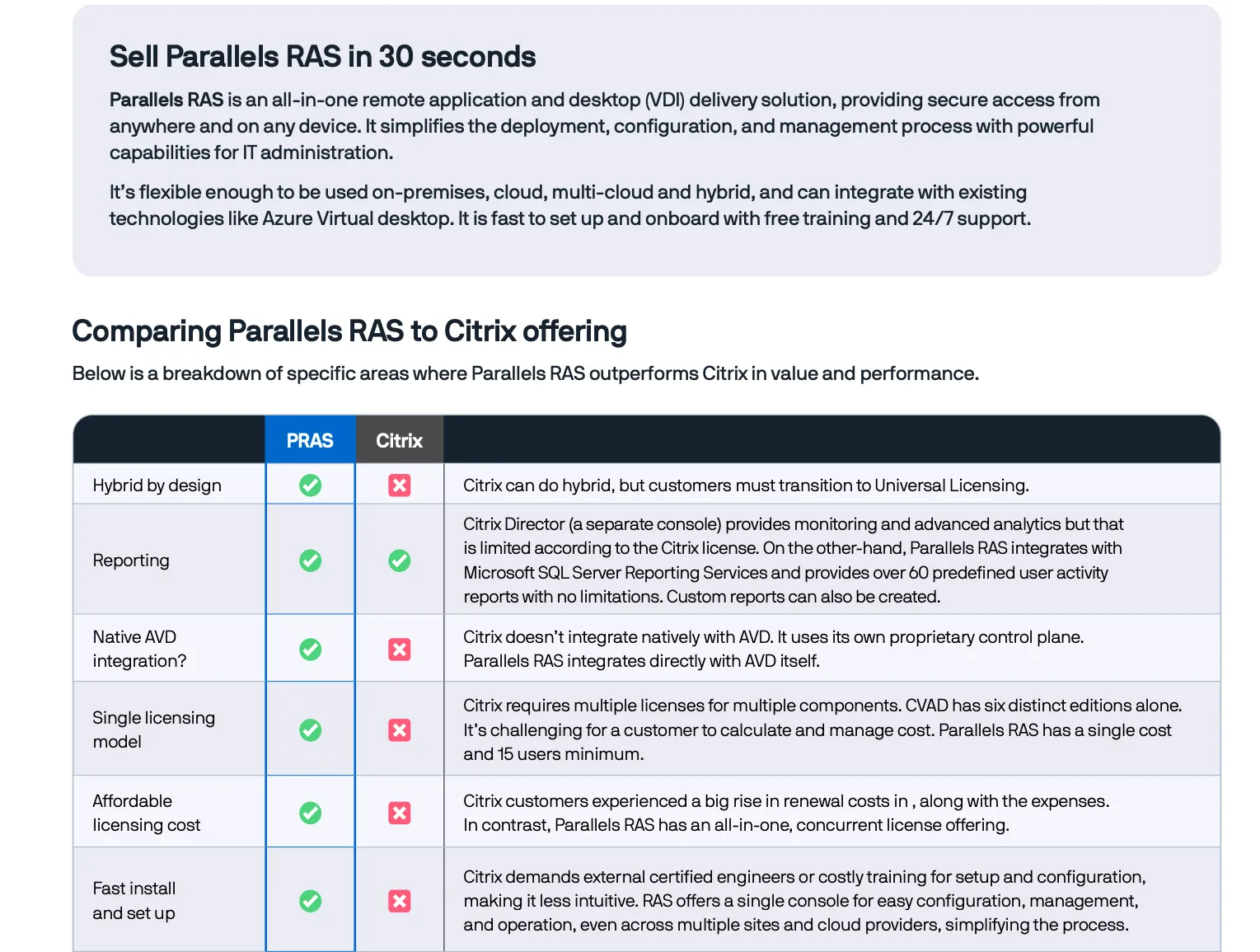
The Parallels RAS battlecard is built for sellers targeting frustrated Citrix customers, especially IT teams managing large virtual desktop environments that have become expensive or hard to operate.
Their buyer is usually technical, but under pressure from finance and leadership to simplify and cut costs.
What stands out?
- We like that the comparison is blunt and table-driven. Citrix is described as powerful but overengineered; Parallels as “good enough” where it counts, with a single console, one license model, native AVD integration, and faster setup.
- There’s very little narrative flourish; the asset is built to enable fast, defensible replacement conversations.
- At just two pages, the asset relies on tables, checkmarks, and short labels, making it easy for a seller to scan or reference during a call without breaking flow.
💡 Borrow this: If you’re selling against an incumbent, create a short-form pitch your sales reps can deliver in under a minute. The “30 seconds” framing forces discipline, so only the arguments that help win a replacement deal make the cut.
3. Netskope
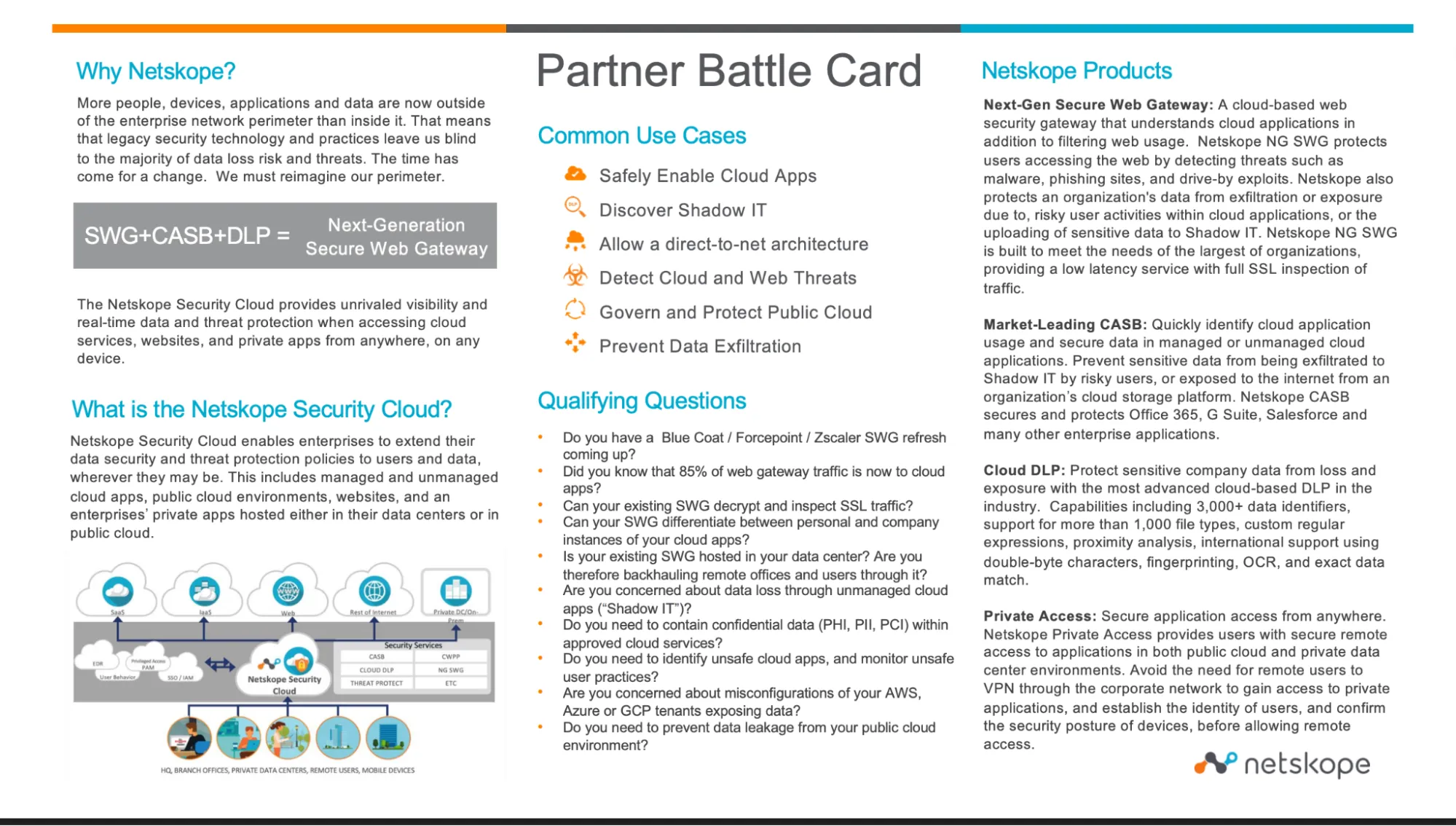
The Netskope Partner battlecard is designed for channel partners competing against legacy web gateways and cloud security tools such as Blue Coat, Forcepoint, Zscaler, McAfee, and Symantec.
The buyer is typically a CISO, CIO, or security leader, often supported by compliance, audit, and data governance teams focused on visibility, control, and data loss prevention.
What stands out?
- The battlecard leads with buyer questions, arming sellers with qualifying questions like, “Can your SWG inspect SSL traffic?” These questions are designed to expose gaps in legacy tools early in the conversation.
- Netskope groups multiple products (SWG, CASB, and DLP) into a single outcome: safely enabling cloud apps. That framing helps sellers avoid long architectural explanations and keeps the pitch anchored to business risk.
- We like how the card includes micro case studies against Symantec, McAfee, and Zscaler—naming company size, use cases, and exactly why Netskope won. This gives sellers concrete proof points they can reference.
💡 Borrow this: When you’ve got strong competitive wins, include them. Short, anonymized success stories that explain why you won help sellers build confidence and credibility fast, especially in security and compliance-heavy deals.
4. Salesforce
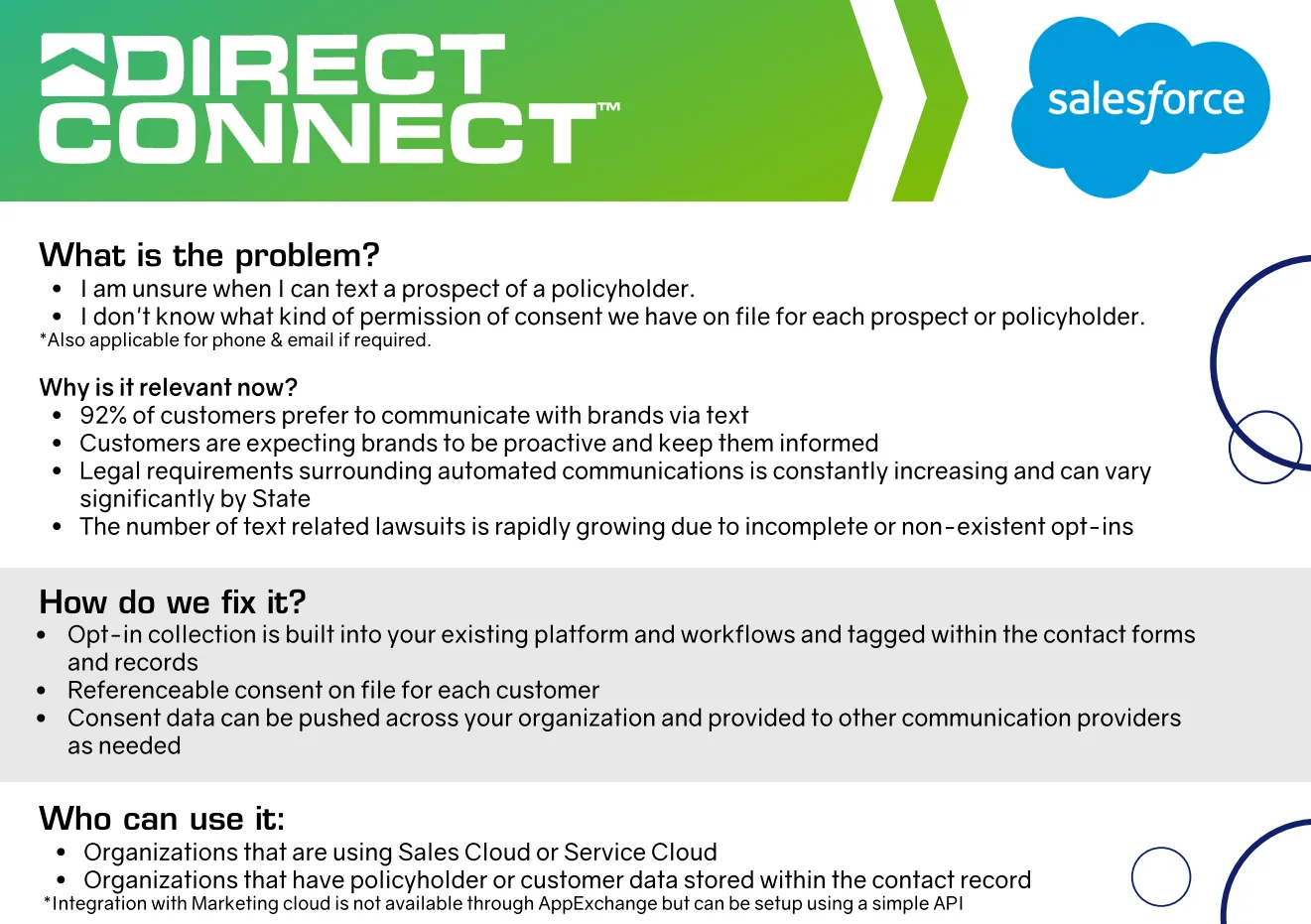
Salesforce’s Direct Connect battlecard is built for sellers working with organizations on Sales Cloud or Service Cloud that communicate with customers via text, phone, or email—especially regulated industries with policyholders or sensitive customer data.
The buyer is typically a Salesforce administrator, operations leader, or compliance-minded business owner who’s worried about consent and legal exposure, but still needs teams to communicate quickly with customers.
What stands out?
- The battlecard opens with statements rooted in fear that buyers already feel, such as “I don’t know when I can text a prospect” and “I don’t know what consent we have on file,” immediately framing the problem as risk.
- Instead of asking teams to change tools, the card emphasizes that opt-in collection happens inside existing Salesforce workflows, which lowers adoption friction.
- Sections like “Who can use it?”, “When can I use it?”, and “Why should you sell it?” make this easy to pitch mid-call. Pricing, setup effort, and timing are all spelled out.
💡 Borrow this: Start with the exact sentence your buyer is already thinking. Battlecards that name the problem in the buyer’s own words make it much easier for sellers to earn trust before pitching a solution.
5. Dell ATTO 360
The Dell + ATTO 360 battlecard is built for partners selling to performance-sensitive customers using Dell OneFS storage.
The buyer is usually a technical operator or infrastructure lead who cares deeply about performance, but doesn’t want to become a networking expert just to get there.
What stands out?
- The messaging is performance-first, not product-first; so instead of leading with product features, the card focuses on outcomes buyers care about, like hitting aggressive performance targets.
- The “Ask This/Listen for…” section does real selling work—the battlecard gives reps specific questions to surface performance pain.
- We like that the structure assumes the reader is not a Dell expert. Everything is designed to help partners quickly understand the value proposition, rather than forcing them to learn the whole product portfolio.
💡 Borrow this: If you sell through partners, write your battlecard for someone who doesn’t live in your product every day. Clear questions, defined buyer pain, and outcome-led framing help partners get to value quickly without becoming experts.
6. OnRamp
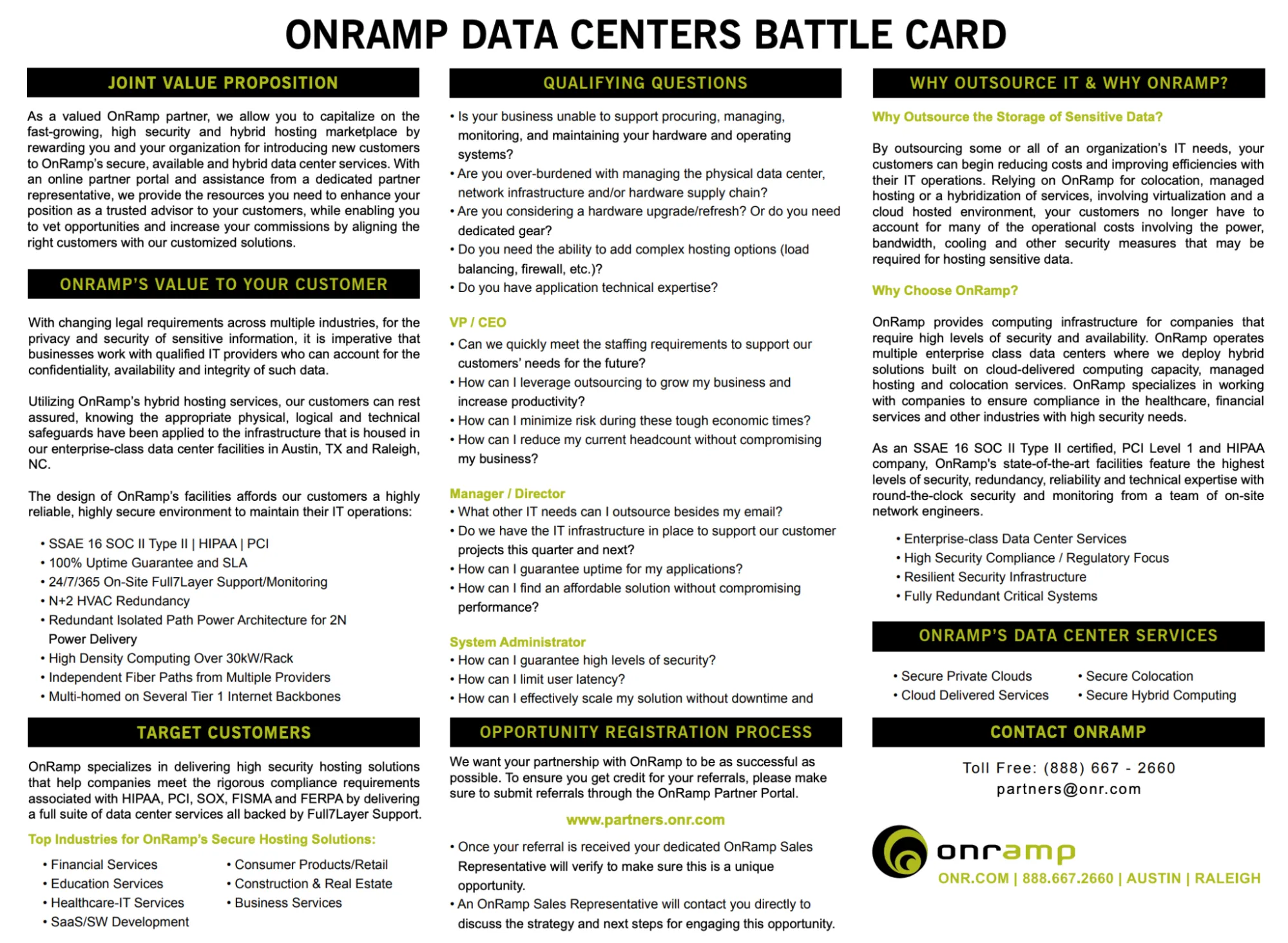
The OnRamp Partner battlecard is designed for OnRamp’s channel partners who sell secure hosting and data center services to organizations with strict compliance and security requirements.
The buyer varies by deal; often IT leaders, operations teams, or executives responsible for sensitive data, but the asset assumes the seller is a partner, not an OnRamp insider.
What stands out?
- The one-page, scannable layout makes it usable during live calls, not just as pre-read material.
- Certifications, uptime guarantees, and redundancy are clearly surfaced and communicated early, making it easier for partners to sell into regulated industries without overexplaining risk or security posture.
- The language is straightforward and avoids deep technical jargon. The goal is to help partners explain OnRamp’s value quickly, without needing to understand every detail of the underlying infrastructure.
💡 Borrow this: If partners are selling into multi-stakeholder deals, give them persona-level guidance in one place. When sellers know who to target, what to ask, and how to frame value across roles, they can run the deal without pulling in an AE.
7. IntelePeer
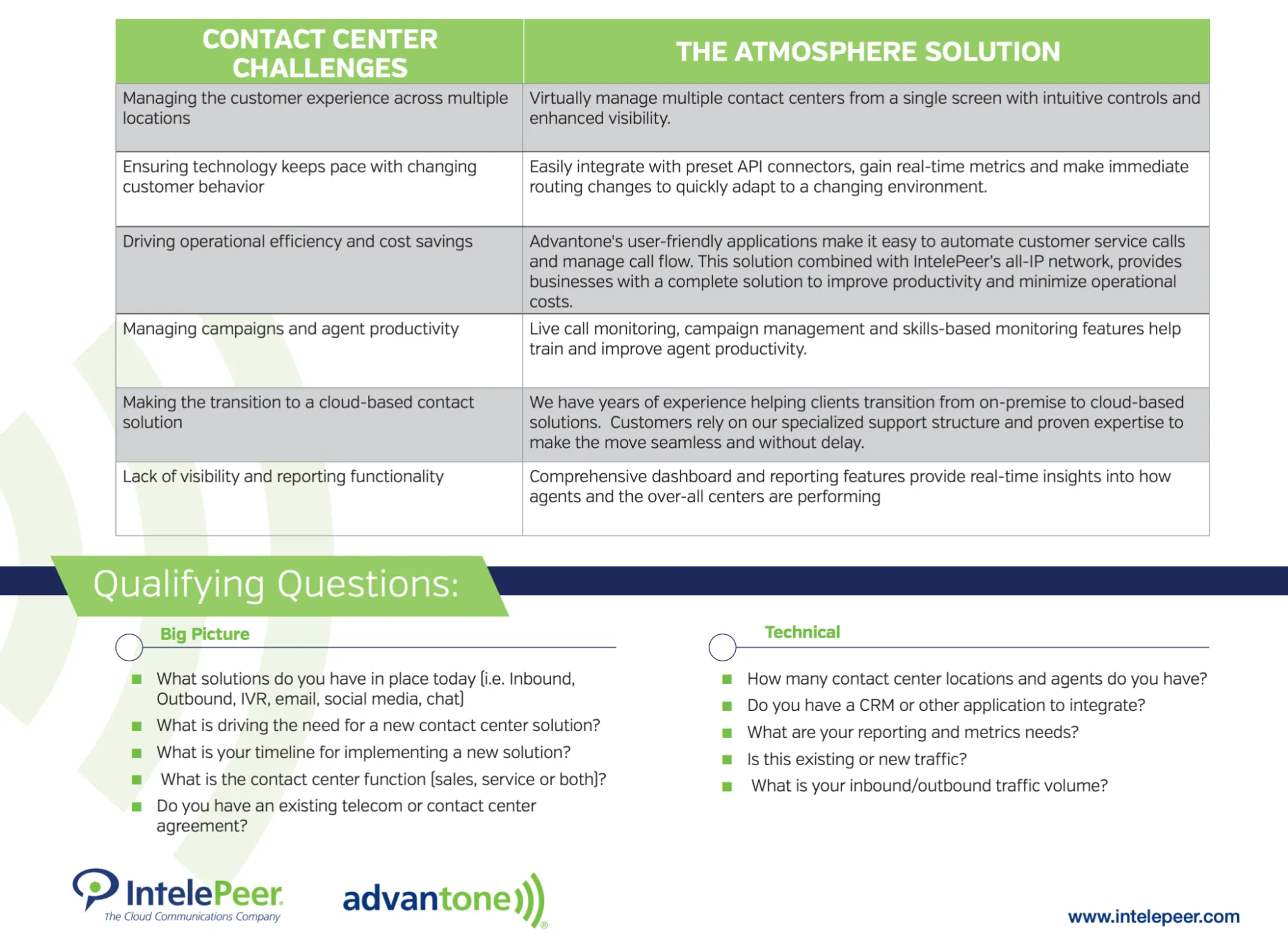
IntelePeer’s asset is a partner-facing sales battlecard designed to help channel reps sell IntelePeer’s Communications Automation Platform (CAP) to IT leaders and digital transformation stakeholders.
The battlecard is built for early-stage deal conversations, where partners need to establish value quickly without deep telecom expertise.
What stands out?
- The messaging is segmented by buyer type, helping partners adjust the pitch for IT, operations, or procurement without guessing what each role cares about.
- The card is written for non-experts, with messaging that avoids telecom jargon and focuses on clear outcomes like automating contact center workflows, improving call routing, and reducing support volume.
- We like that common objections are handled in context, with short, practical responses to concerns like existing Twilio usage or reluctance to replace current systems.
💡 Borrow this: If partners are selling a technical platform, remove the need for technical fluency. Clear objections, role-based framing, and short talk tracks help partners sound confident early.
8. Pipe17
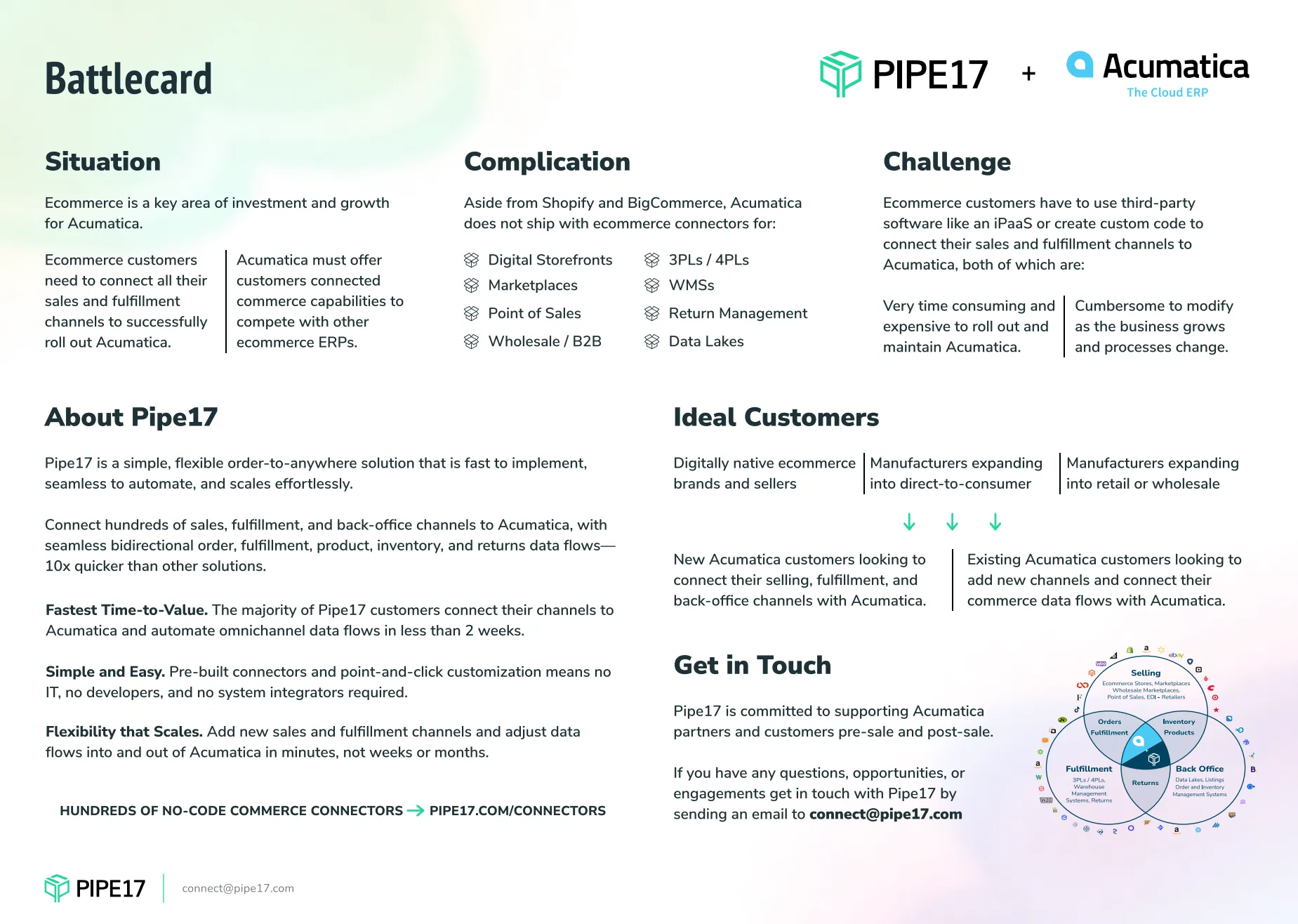
Pipe17’s partner-facing sales battlecard is built to help Pipe17’s partners sell its ecommerce operations platform to DTC and multichannel retailers.
The buyer is an ecommerce or operations leader, often supported by IT, who’s dealing with growing channel complexity and fulfillment issues.
What stands out?
- We like that good-fit customers are obvious. Platform signals (Shopify, marketplaces, 3PLs) and red flags (manual routing, growing SKUs) make it clear who this is—and isn’t—for.
- The layout is built for live conversations: white space and clear sections make this easy to scan without losing the thread of the call.
- The objections are handled quickly; pushback like “We already use an ERP” or “We’re not ready for automation” is met with short reframes.
💡 Borrow this: Make it obvious when a deal is broken. Battlecards that surface failure points early help sellers qualify faster and avoid forcing a fit that isn’t there.
9. Docusign
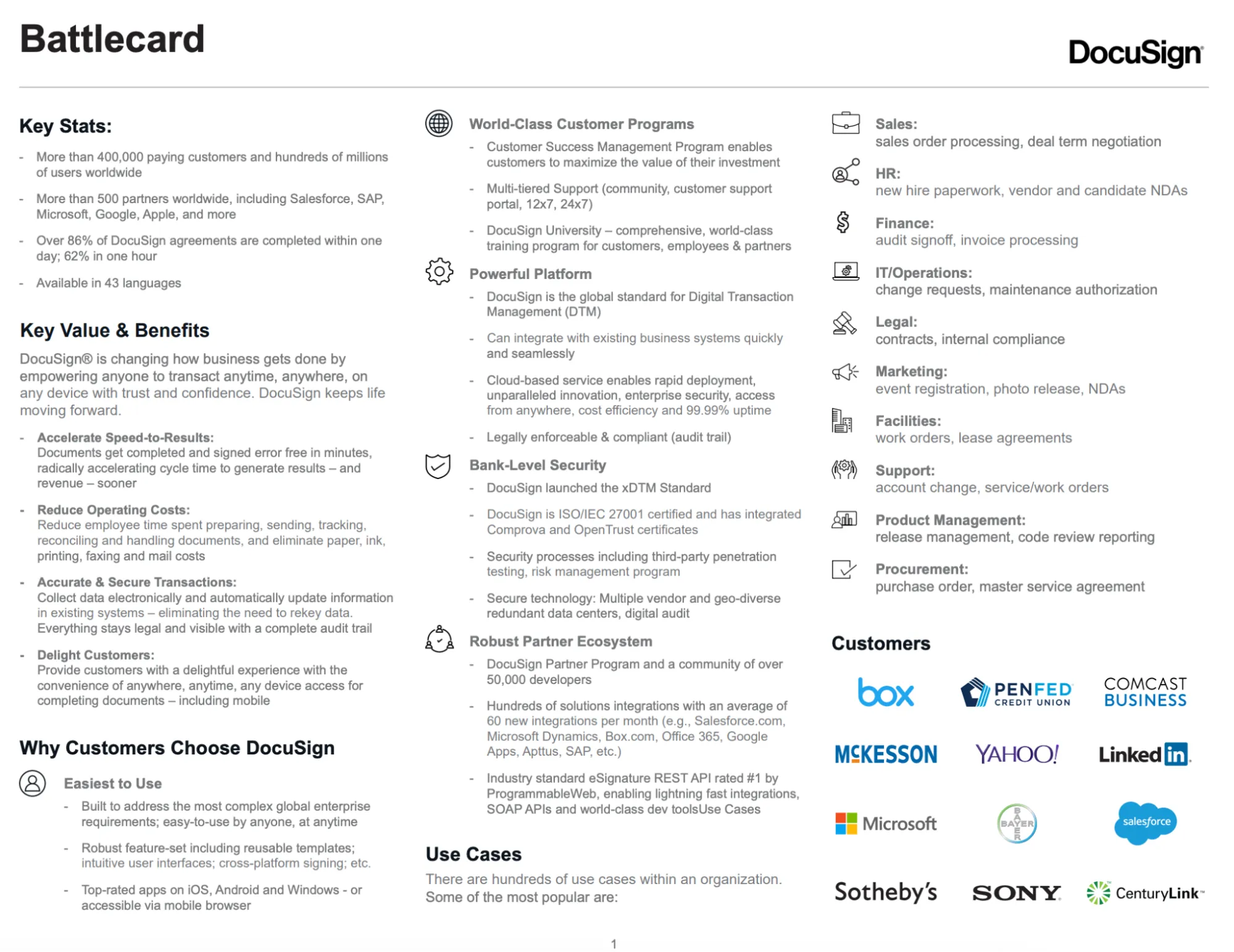
Docusign’s partner-facing sales battlecard is designed to help resellers and channel partners position Docusign’s Agreement Cloud against competitors’ products like Adobe Sign and PandaDoc.
The buyer varies by deal, but the entry point is usually sales, legal, or procurement teams that are dealing with slow contract cycles, compliance risk, or manual approval workflows.
What stands out?
- The value story shifts by role, so salespeople get faster deal cycles, legal gets audit trails and enforceability, and operations gets fewer manual handoffs.
- The layout is built for speed with clear sections like key statistics, use cases, and reasons to choose Docusign make this easy to scan during a live sales call.
- We like how competitive differentiation is handled in plain language. The card explains why Docusign wins on trust and global compliance without leaning on jargon or technical deep dives.
💡 Borrow this: Treat objections as waypoints, not blockers. Short, role-aware counters help partners stay in the conversation without escalating too early.
10. Addigy
Addigy’s partner-facing sales battlecard is built for MSPs and resellers selling Addigy’s Apple device management platform into education, SMB, and mid-market IT environments; often where Apple devices coexist with Windows-heavy stacks.
The buyer is usually an IT lead or systems administrator managing a growing Apple footprint, frequently without dedicated Apple expertise or tooling.

What stands out?
- The card makes it obvious who Addigy is for: teams managing 50+ Apple devices, often in mixed environments, who are unhappy with manual processes or underpowered tools.
- We especially like how it competes against inertia as much as competitors. Instead of positioning only against Jamf or AirWatch, the messaging helps partners displace “we’ve always done it this way” workflows.
- The language stays accessible; the card avoids deep Apple IT jargon, making it usable for partners who don’t specialize in Apple but still need to sound credible with technical buyers.
💡 Borrow this: Name the status quo as a competitor. Battlecards that spell out the before-and-after make positioning easier without relying on feature comparisons.
11. Lenovo
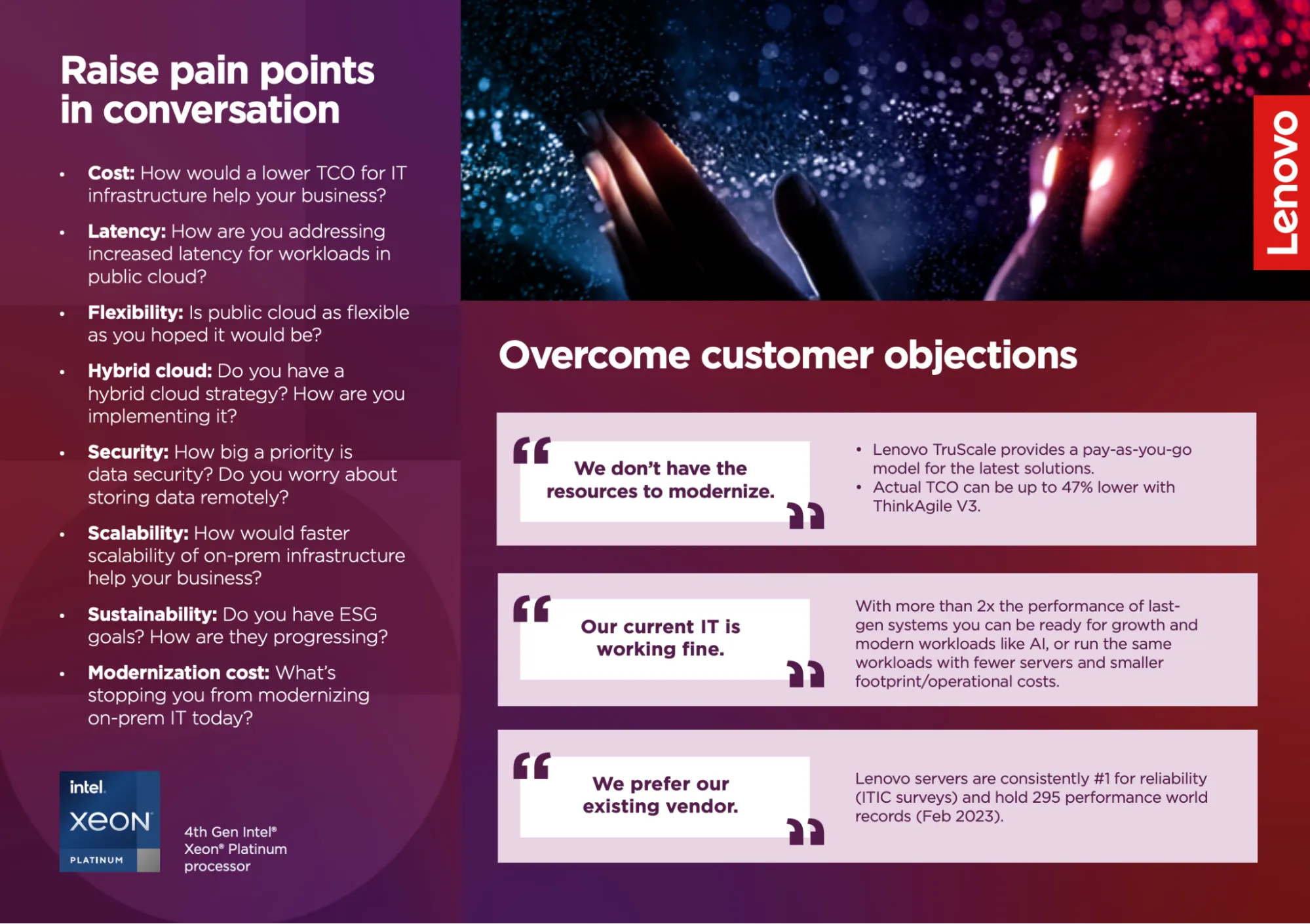
Lenovo’s partner-facing sales battlecard is built to help channel sellers position Lenovo’s ThinkAgile and ThinkSystem infrastructure against incumbents like Dell, HPE, and Cisco.
The card is designed for early- to mid-stage conversations with IT buyers who are weighing performance, cost, and flexibility in hybrid cloud environments.
What stands out?
- The card tells sellers exactly what to ask; the left-hand section on page three is explicitly framed as “Raise pain points in conversation,” with concrete prompts on cost, latency, hybrid cloud, security, scalability, sustainability, and modernization blockers.
- Objections are written in the buyer’s own words—statements like “We don’t have the resources to modernize” and “Our current IT is working fine” are surfaced verbatim.
- This is one of the better-designed battlecards in the set, with large pull quotes, short bullets, and clear visual separation that make it easy to scan mid-call.
💡 Borrow this: Design for the moment the seller is talking. Large quotes, tight bullets, and visual separation matter just as much as the messaging when battlecards are used live.
12. Windows Server 2019
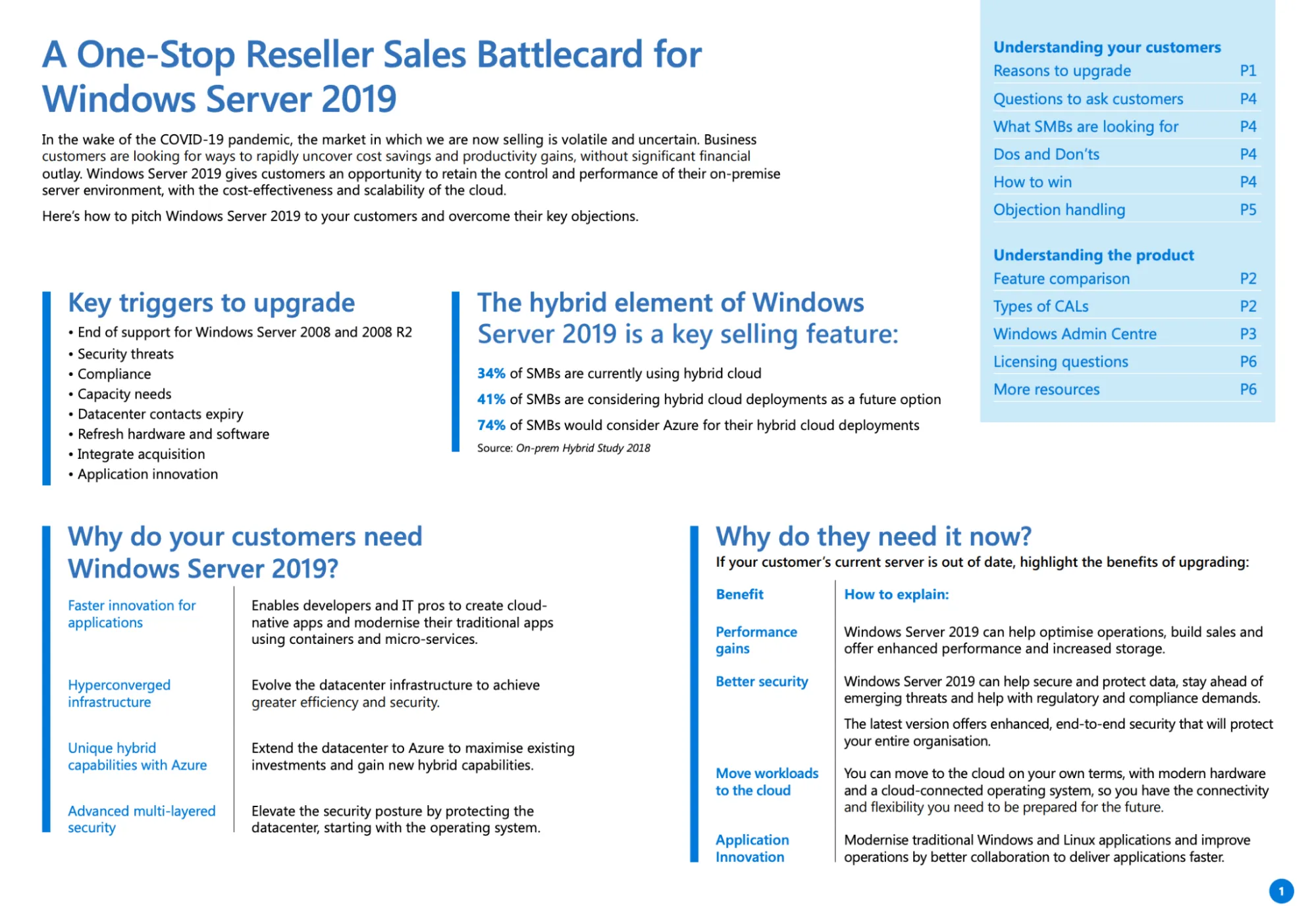
Microsoft's partner-facing sales battlecard is built to help resellers and systems integrators position Microsoft’s core stack—Windows Server, Microsoft 365, Azure, and Dynamics 365—against alternatives like Google Workspace, AWS, and Salesforce.
The buyer mix is broad by design: business leaders focused on cost and risk, IT leaders responsible for modernization and security, and end users impacted by daily workflow changes.
What stands out?
- The card spells out specific questions to ask—about hardware age, security exposure, cloud plans, and workload growth—so partners don’t have to invent their own talk tracks.
- We like how the asset starts with why now, not what to buy; so triggers like end of support, security risk, compliance pressure, and capacity constraints are called out upfront, giving partners a natural opening.
- This is one of the longer battlecards in this set, at six pages, but that length is doing real work. The battlecard includes clear explanations of CALs, External Connector licenses, additive licenses, and edition differences, helping partners answer common “Do we need this?” and “What’s the right license?” questions.
💡 Borrow this: Make discovery explicit. Battlecards that tell partners exactly which questions to ask—and why—are easier to use than ones that assume sellers already know how to run the conversation.
13. AWS
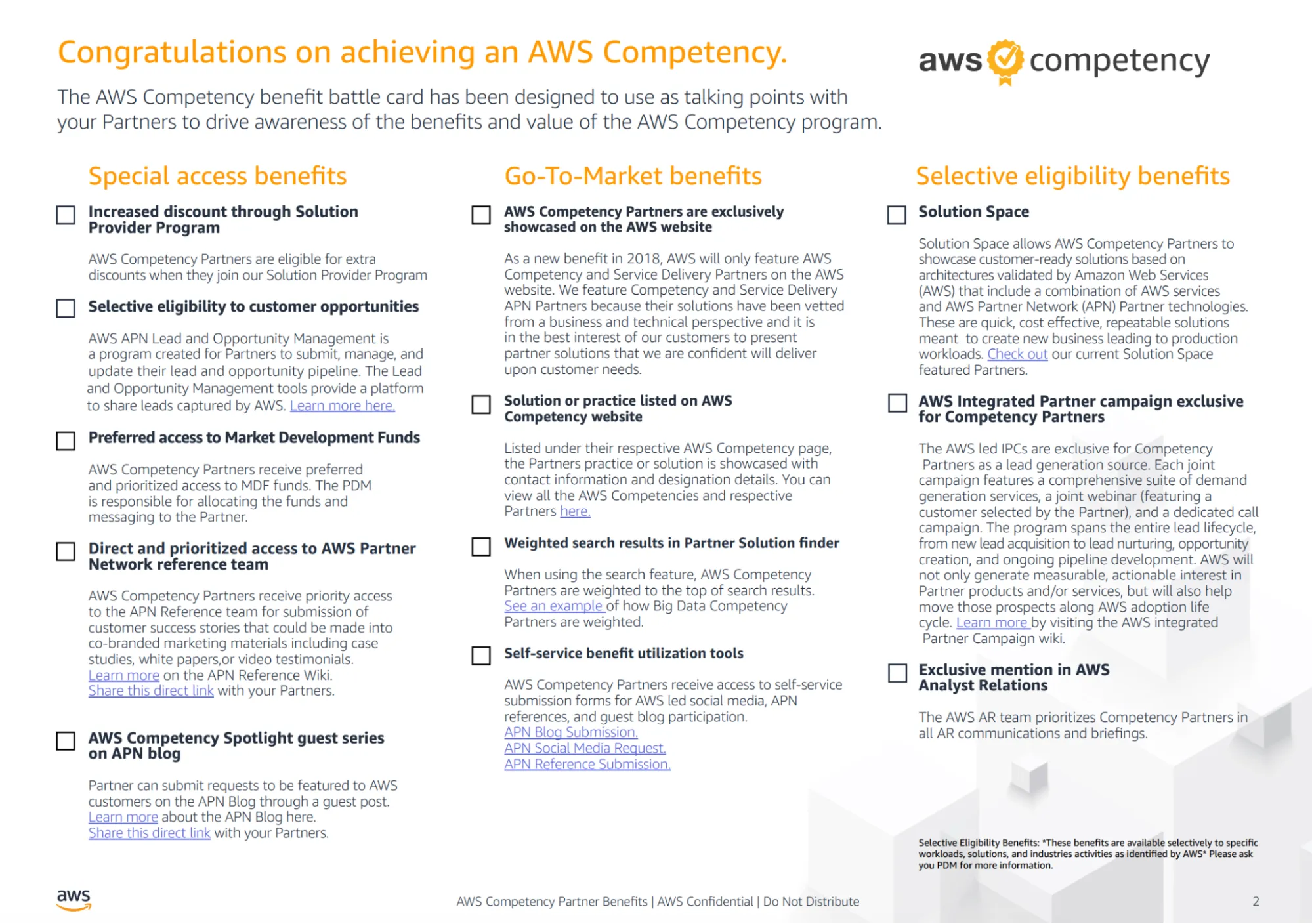
AWS’s battlecard is designed to help AWS sellers and partner managers position the value of AWS Competency status itself during competitive and co-sell conversations.
The “buyer” here isn’t an end customer; it’s AWS partners weighing where to invest, how to differentiate within the APN ecosystem, and how to compete more effectively against Azure- or GCP-aligned partners.
What stands out?
- At three pages, it’s comprehensive without being sprawling, pulling together marketing, sales, and event benefits into a single reference.
- The card is explicitly about competitive advantage inside the partner ecosystem; it frames AWS Competency as a way to stand out in crowded markets through visibility and access.
- Eligibility and limits are clearly defined, which helps reps set expectations without overselling.
💡 Borrow this: If the “product” is a program or status, sell the outcomes of participation. Battlecards like this work because they translate internal benefits into competitive leverage that partners can actually understand and evaluate.
14. ManageEngineLog 360
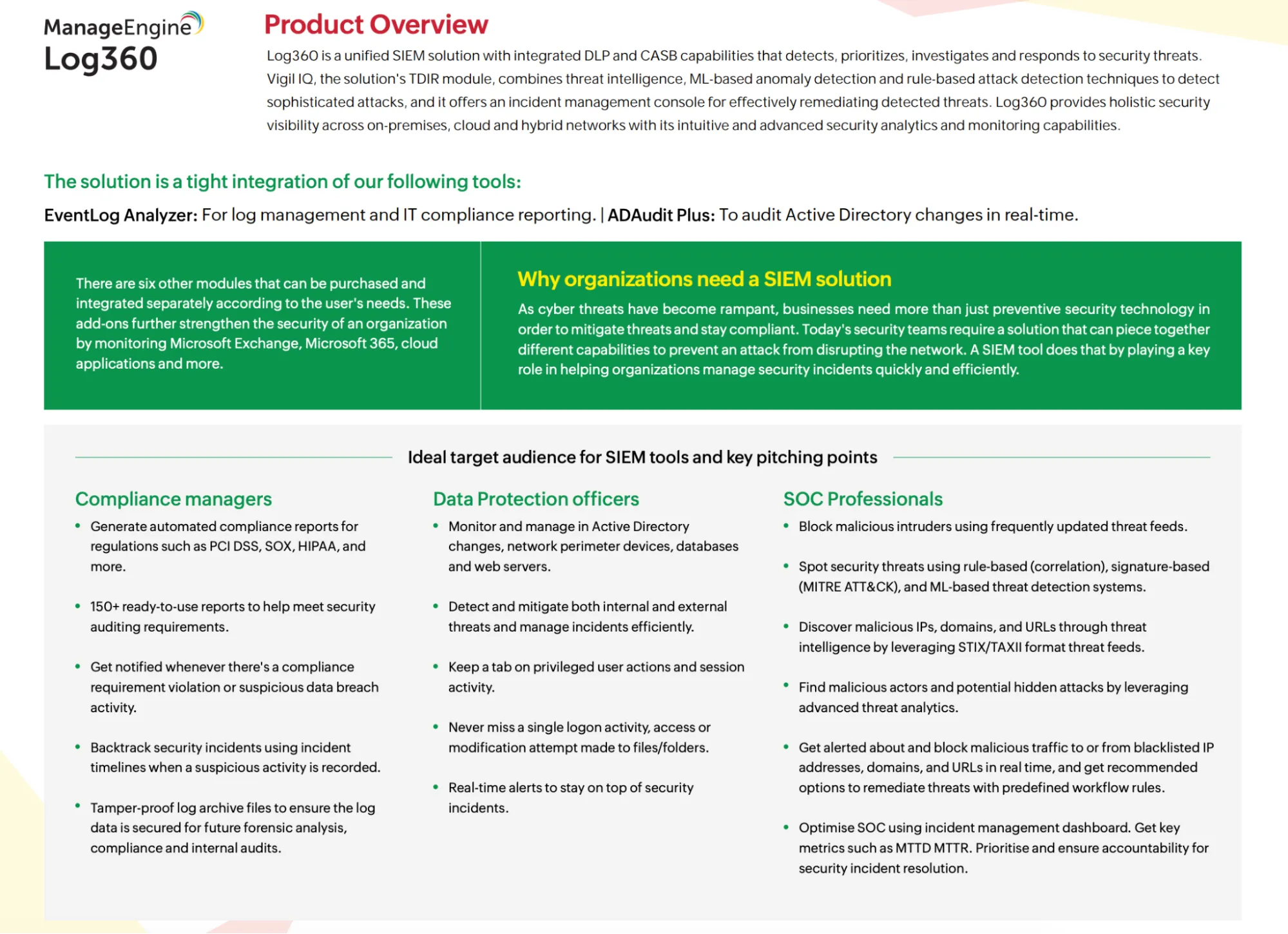
ManageEngineLog’s sales battlecard is designed to help reps position ManageEngine’s IT management and security products, including Log360, against heavy enterprise-grade alternatives such as SolarWinds, ServiceNow, and Ivanti.
The buyer set spans IT operations teams, security leaders, and compliance stakeholders, with decision-makers often concerned about implementation risk and long-term overhead.
What stands out?
- The messaging works across roles—it speaks to practitioners who care about visibility, alerts, and threat detection, while also reassuring decision-makers on pricing transparency, deployment options, and support.
- We like how competitive comparisons are factual and restrained; side-by-side positioning highlights where ManageEngine differs from ServiceNow or SolarWinds without turning the conversation into a teardown.
- The card is built around common doubts about enterprise IT tools: cost, complexity, and time to value, and gives reps clear language to address those concerns early.
💡 Borrow this: When competing against heavyweight platforms, lead with approachability. Battlecards that show how buyers can start small and reduce risk give sellers a cleaner entry point than feature-for-feature comparisons.
15. Safe Security
Safe Security’s battlecard helps reps position Safe Security’s Cyber Risk Quantification and Management (CRQM) platform in conversations with CISOs, risk leaders, and business executives.
The buyer is often a CISO or security leader who’s under pressure to explain risk to the board, justify security spend, or improve cyber insurance outcomes.
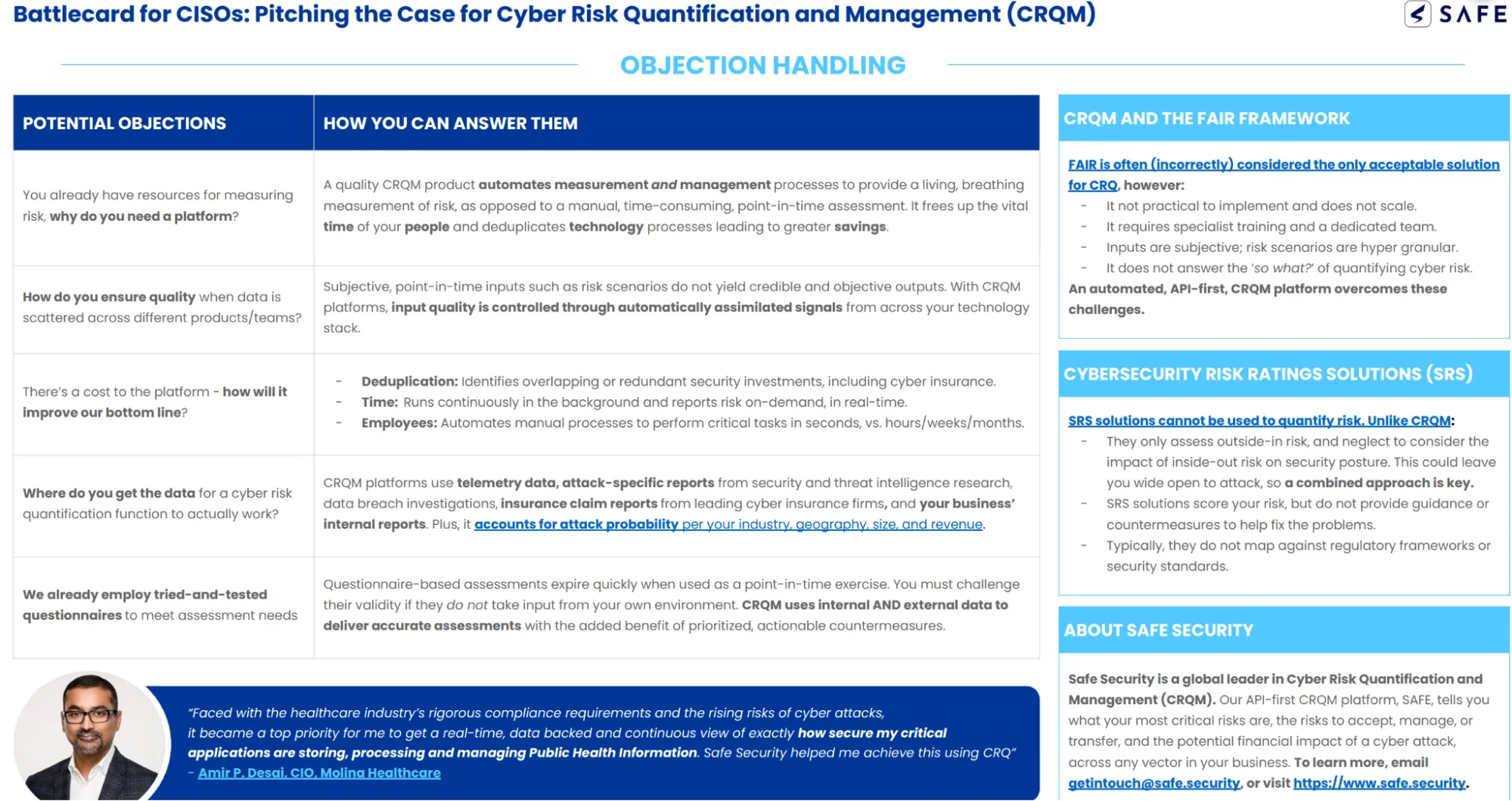
What stands out?
- We appreciate that the messaging resonates with both technical and non-technical stakeholders. CISOs get language on attack-surface coverage and prioritization, while business leaders get clarity on breach likelihood, financial exposure, and ROI.
- The customer testimonial does specific work: it reinforces the need for continuous, real-time risk visibility in regulated environments.
- Objections to CRQ are anticipated and addressed directly; pushback around questionnaires, FAIR, data quality, or cost is handled with clear explanations of why point-in-time assessments fall short
💡 Borrow this: When you’re introducing a new category, don’t skip the education. Battlecards that explain why existing approaches fail make it easier for sellers to earn credibility before asking buyers to rethink how they measure success.
16. Motorola Cybersecurity Assessment
This battlecard is built for Motorola sellers, positioning its cybersecurity risk assessment services with public safety agencies, government organizations, and regulated enterprises.
The asset is explicitly services-led—it’s about selling an independent, high-stakes assessment of whether an organization’s “crown jewels” are actually protected.
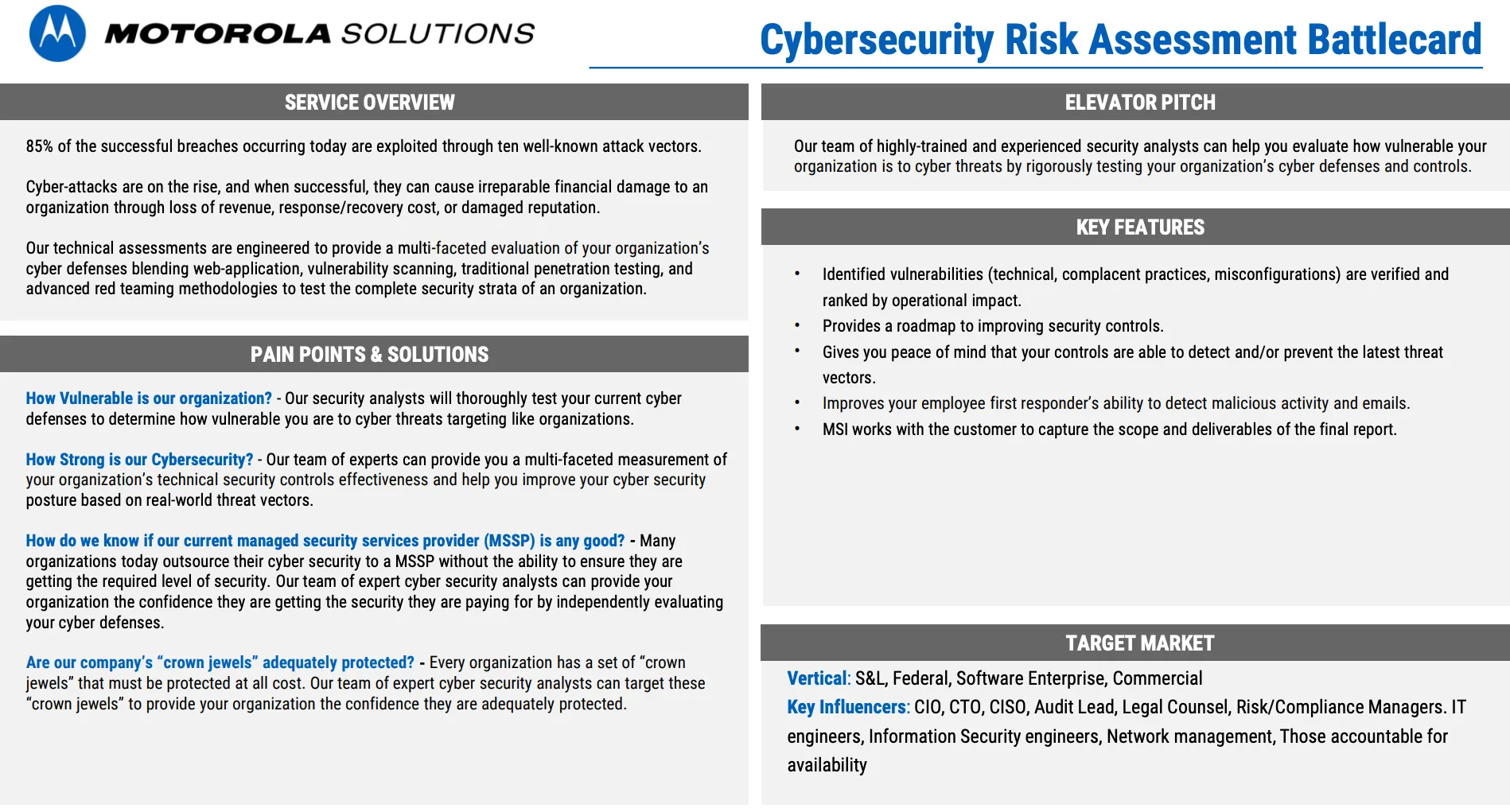
What stands out?
- The card opens with direct, uncomfortable questions—”How vulnerable are we?” “What happens if we’re breached?”—and anchors risk to downtime, public trust, and operational failure, which is especially effective in public safety and government contexts.
- We like how Motorola leans hard on who’s doing the work: former military and intelligence analysts, dedicated security labs, and experience across 1,000+ customers in 100+ countries.
- The pricing ranges, timelines (4–6 weeks), deliverables, and remediation options are all spelled out, making this easier to sell as a concrete engagement.
💡 Borrow this: Sell who does the work before what the work is. Motorola anchors the pitch in expertise and independence, which matters more than tooling when buyers are evaluating risk.
17. CallTower
CallTower’s partner-facing sales battlecard is built to help reps position CallTower’s UCaaS and cloud voice services across Microsoft Teams, Zoom, Webex, and contact center environments.
The card assumes the buyer already uses tools like Teams or Zoom, and reframes the decision around how voice is managed and supported across the organization.
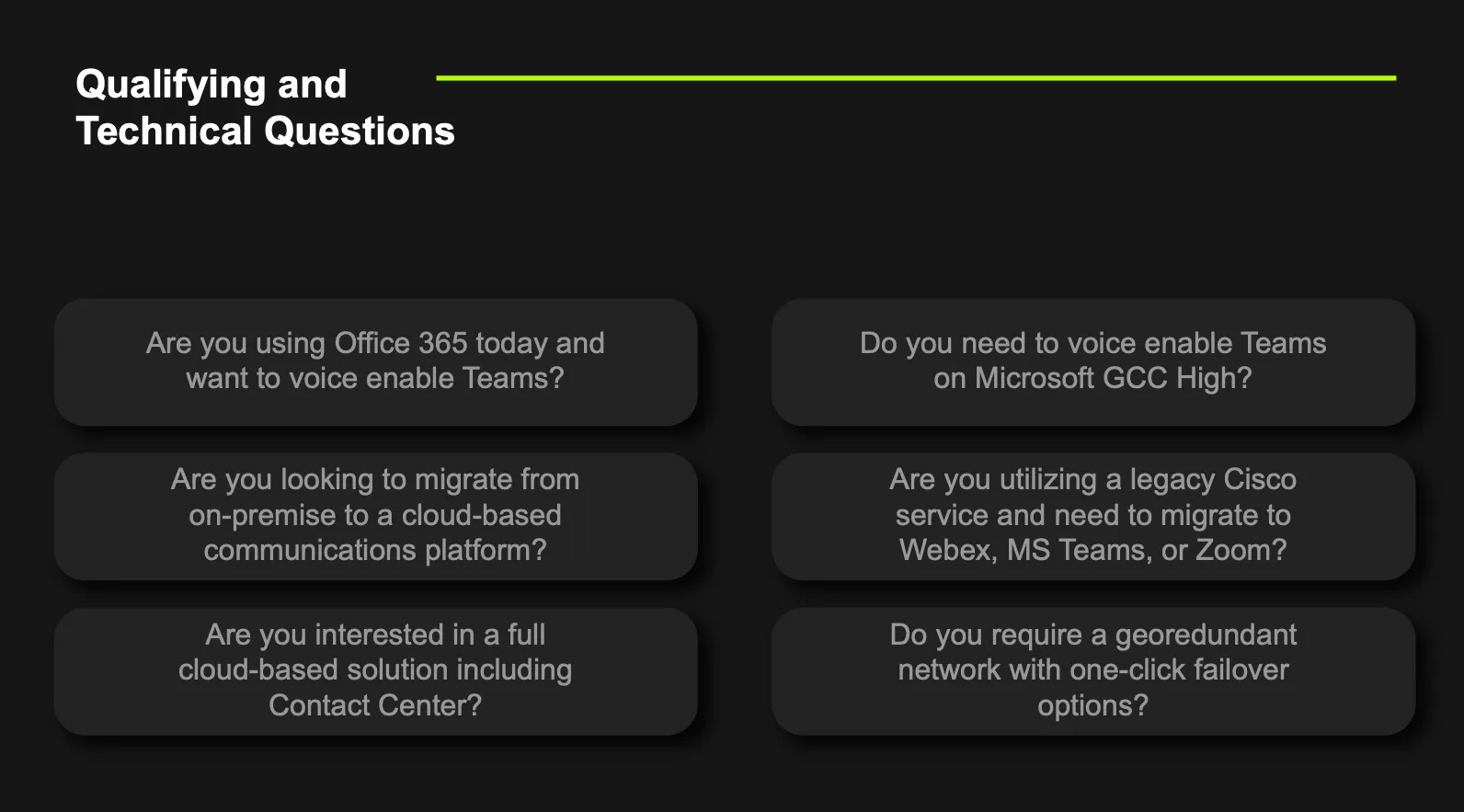
What stands out?
- The battlecard is explicit about letting customers keep Teams, Zoom, or Webex, while CallTower handles enterprise-grade voice, PSTN, failover, and global coverage behind the scenes.
- This is one of the nicer designs in the set, with large headings, short bullets, visual separation, and modular sections that make it scannable mid-call.
- The messaging stays operational, so instead of promising “better collaboration,” the card focuses on reliability, uptime, support ownership, and simplification—exactly where UCaaS deals tend to stall or close.
💡 Borrow this: If you’re selling infrastructure that sits behind tools buyers already love, make that explicit. CallTower’s battlecard works because it clearly separates “what the customer keeps” from “what you replace,” reducing resistance and accelerating consensus across IT and procurement.
18. Infoblox
Infloblox’s sales battlecard helps sellers position Infoblox’s enterprise DDI platform against legacy, fragmented, or manual setups, as well as competitors like BlueCat and Cisco.
The buyer is typically a network or infrastructure leader, with IT ops and security teams heavily involved once reliability and risk enter the conversation.
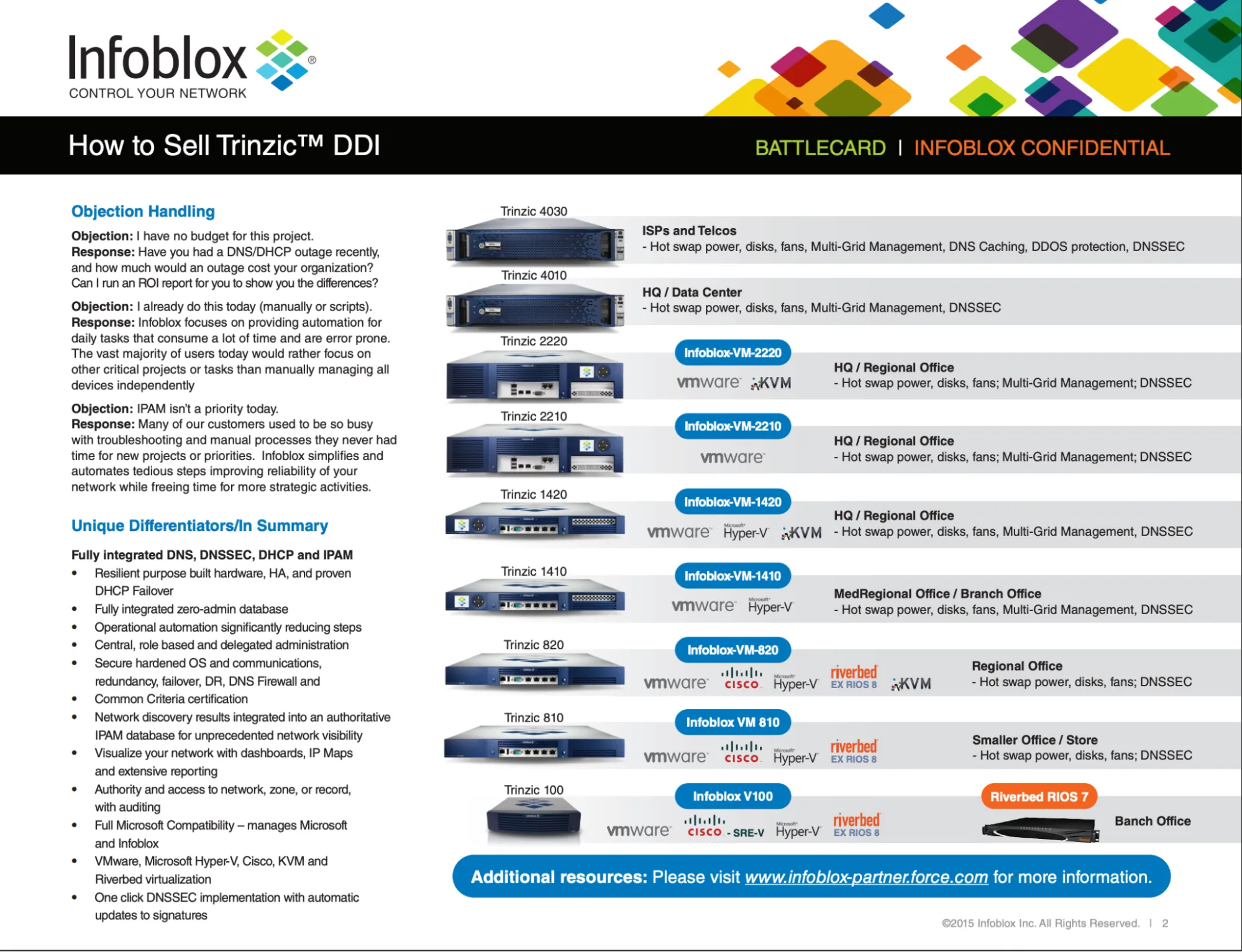
What stands out?
- We especially like how objection handling is framed around the cost of failure. So, pushback like “We don’t have budget” or “We already do this manually” is countered by reframing outages and downtime as business risk.
- The qualification is extremely explicit; the battlecard spells out exactly what a “problem state” looks like.
- Automation is positioned as relief—the messaging emphasizes fewer steps, fewer errors, and less firefighting, rather than advanced architecture diagrams or protocol-level detail.
💡 Borrow this: If you’re selling something buyers underestimate, over-index on qualification. Infoblox’s battlecard works because it teaches reps to recognize the pain before they pitch the solution.
19. Broadvoice
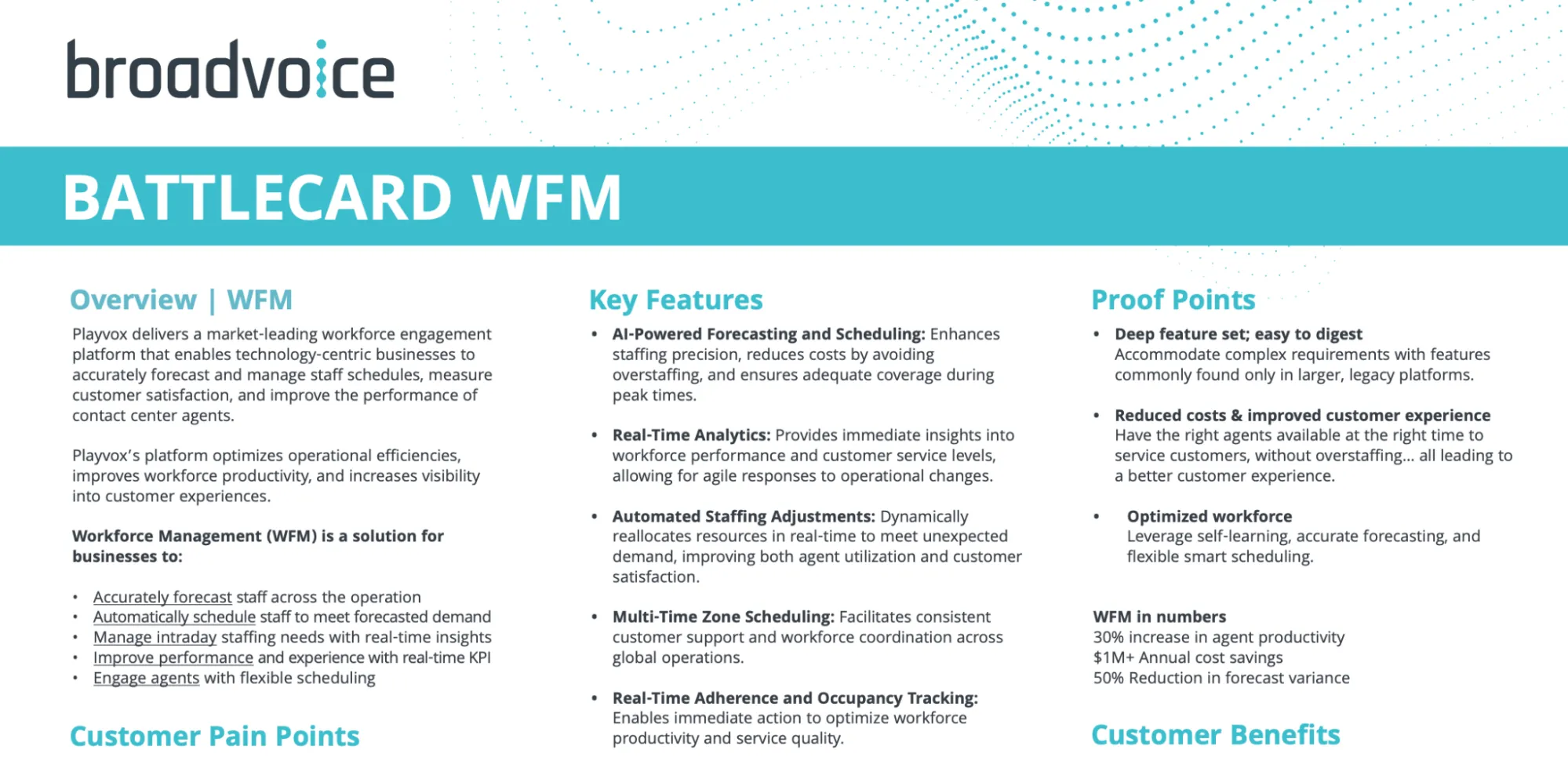
Broadvoice’s sales battlecard is designed to position its cloud phone and messaging platform against UCaaS competitors like RingCentral, 8x8, and Vonage.
The buyer is typically a small or mid-sized business owner or IT lead, with finance often involved once contracts, billing, and migration risk come into play.
What stands out?
- The card leans heavily on operational reassurance; Broadvoice positions itself as the “won’t surprise you” option with clear pricing, real onboarding support, and accessible customer support.
- We like how migration anxiety is handled directly—porting, downtime, and training are addressed head-on with concrete assurances about process and support ownership.
- The battlecard consistently reinforces that real humans help customers get live and stay live—something SMB buyers actually care about but rarely hear stated plainly.
💡 Borrow this: Name the switch-risk explicitly and neutralize it in the same breath. Broadvoice spells out porting support, onboarding ownership, and who’s accountable if something breaks. That makes the decision feel operationally safe.
20. Samsung Knox Workspace
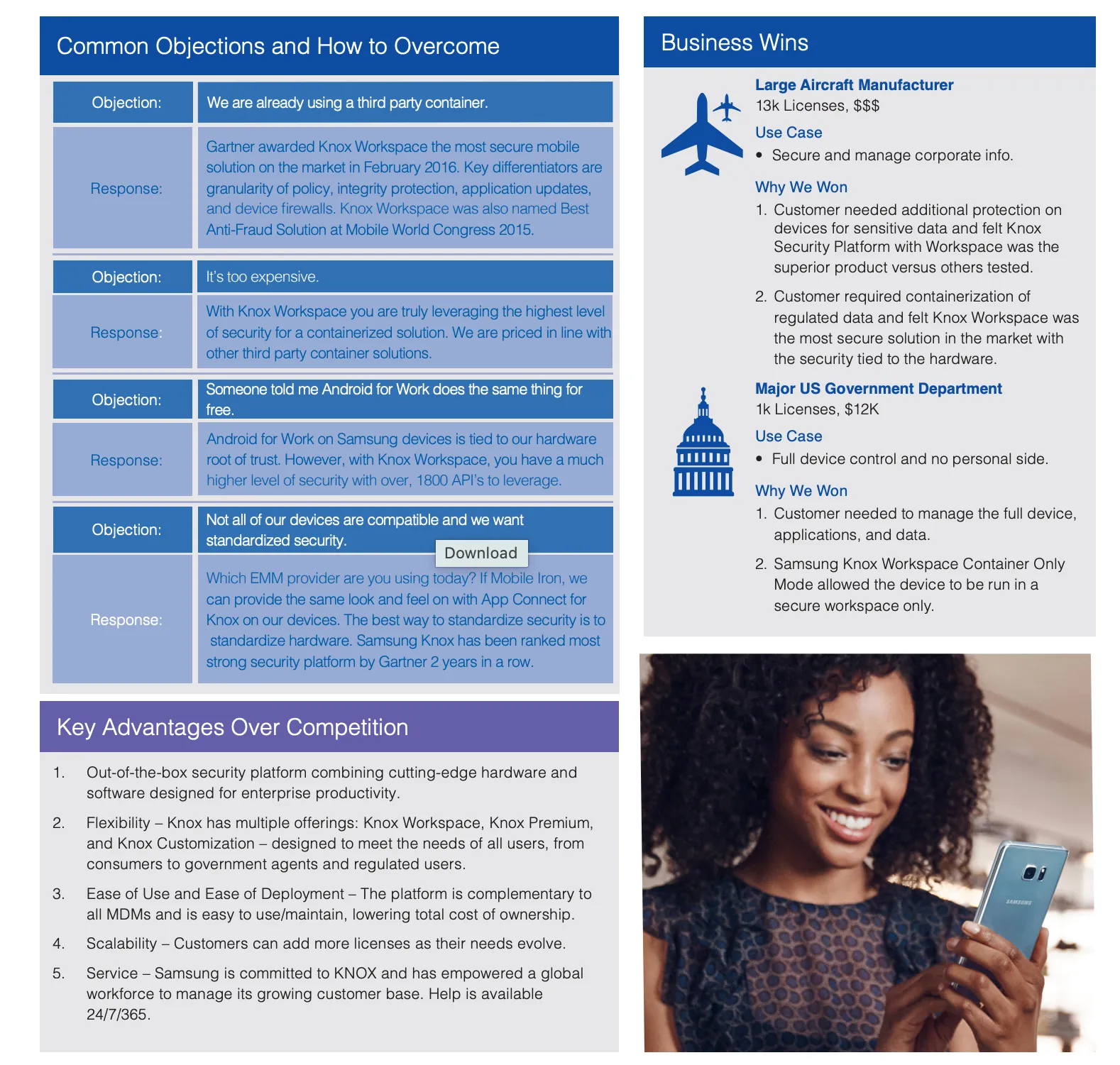
This battlecard arms Samsung sellers with a clear answer to a familiar objection: “Why do we need a secure container at all?” From there, it positions Knox Workspace against third-party containers and competing enterprise mobility stacks with precision.
The buyer is typically an IT or mobility lead, with security teams deeply involved once data separation, encryption, and compliance come into play.
What stands out?
- Alongside objection handling, the card includes concrete business wins (like large aircraft manufacturers and U.S. government departments) that give sellers real-world validation they can reference.
- We like how the layout itself reinforces confidence: large quotes, short response blocks, and clear visual separation make this one of the more polished battlecards in the set.
- The card repeatedly anchors Knox Workspace in external authority: #1 security platform ratings from Gartner (2015 and 2016), top security awards at Mobile World Congress, and FIPS certification; so reps don’t have to “sell” trust from scratch.
💡 Borrow this: If you’re selling a preventive product that buyers assume they already have, anchor every objection response to what fails without it. Samsung shows where “good enough” security breaks down (free containers, mixed hardware, software-only controls) and why that gap matters before a breach,
21. ManageEngine
ManageEngine’s sales battlecard helps reps position its IT management suite against heavier, more complex platforms like SolarWinds, ServiceNow, and Ivanti—especially in organizations that need breadth without bloat.
The buyer is usually an IT operations or infrastructure lead, often supported by security and compliance teams, with procurement getting involved early.
What stands out?
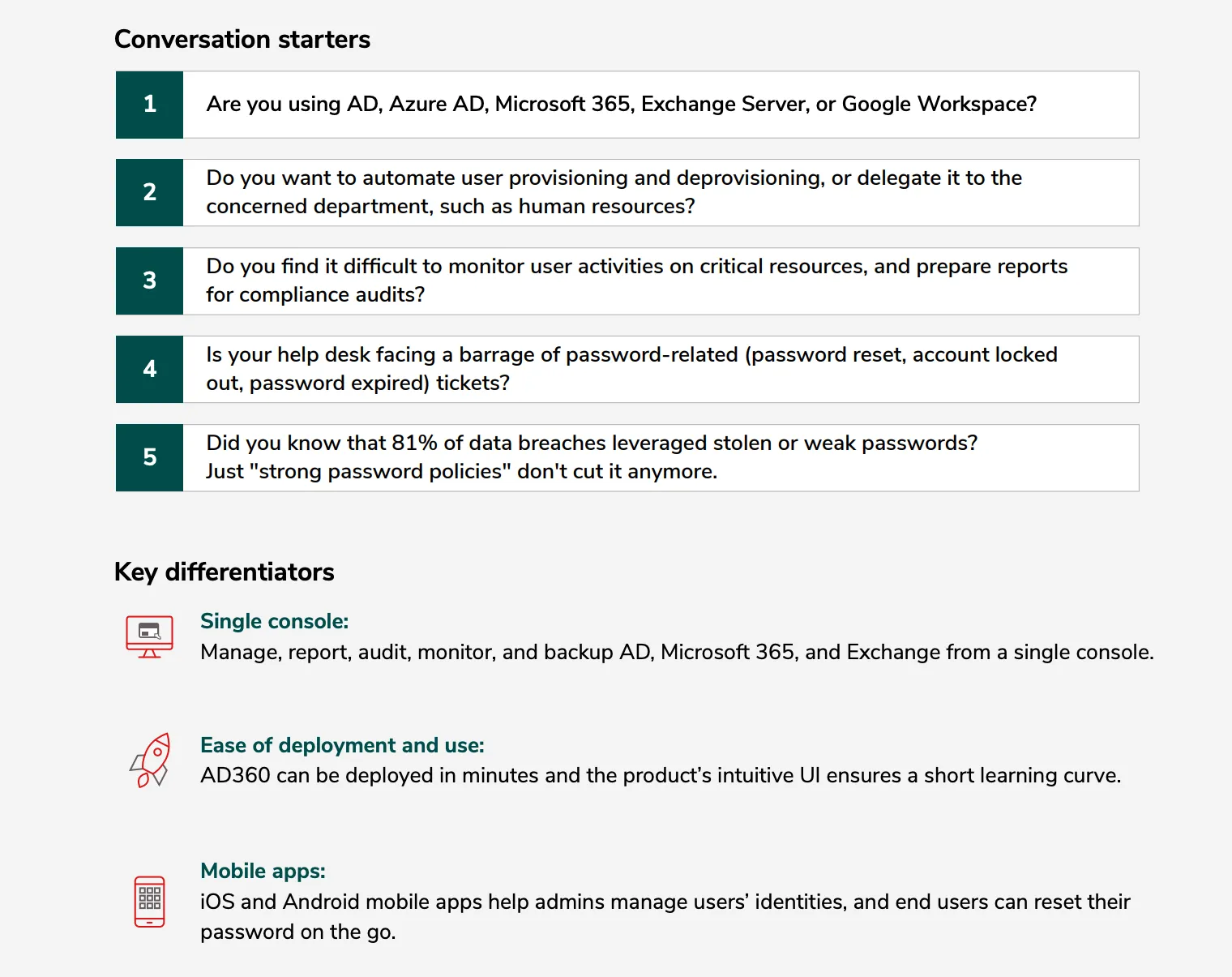
- The battlecard consistently frames ManageEngine as an “operational shortcut”: It emphasizes fast deployment, pre-built reports, and day-one usefulness—appealing to teams that don’t have time for long implementations.
- We like that the “Conversation starters” give reps exact questions to open with, rooted in tools buyers use (AD, Azure AD, Microsoft 365) and problems they already feel.
- The structure itself supports speed: short sections, direct language, and side-by-side contrasts.
💡 Borrow this: Hard-code your discovery. ManageEngine provides sellers with five specific questions tied to specific systems and customer pain points. Write the questions into the battlecard so every rep opens the same way and surfaces the same signals.
22. Intuitive
Intuitive’s battlecard helps partners and print IT resellers position Intuitive for PaperCut MF, a BI and analytics layer for print management, against manual reporting, spreadsheets, or underused PaperCut data.
The buyer is typically an IT manager in healthcare, education, or government, with budget holders and sustainability teams entering the conversation once cost compliance and environmental impact become relevant.
What stands out?
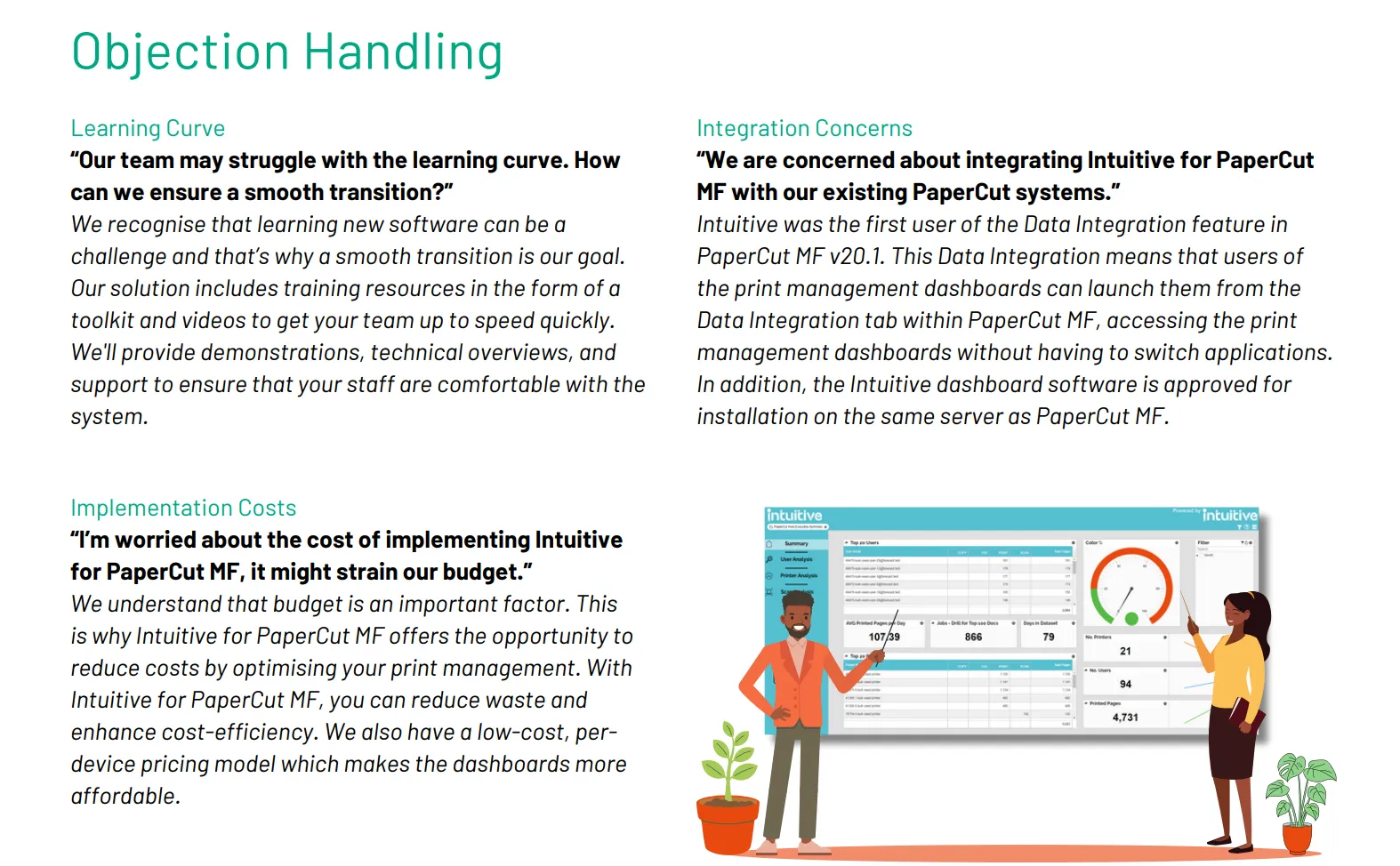
- We like how the card gives reps full prospecting scripts, qualifying questions, and objection responses they can use verbatim, down to suggested next steps like “Let’s book a time” built directly into the language.
- The card spells out exactly what to ask, who to ask it to, and what signal to listen for across healthcare, education, government, and reseller-led deals—making it easy to qualify without improvising.
- Pushback on implementation costs, learning curve, or integration is addressed with specifics: per-device pricing, built-in training assets, and native integration within PaperCut MF.
💡 Borrow this: Write the next step into the card. Shows reps exactly how to progress the deal, with clear prompts for booking follow-ups, expanding stakeholders, or moving into evaluation.
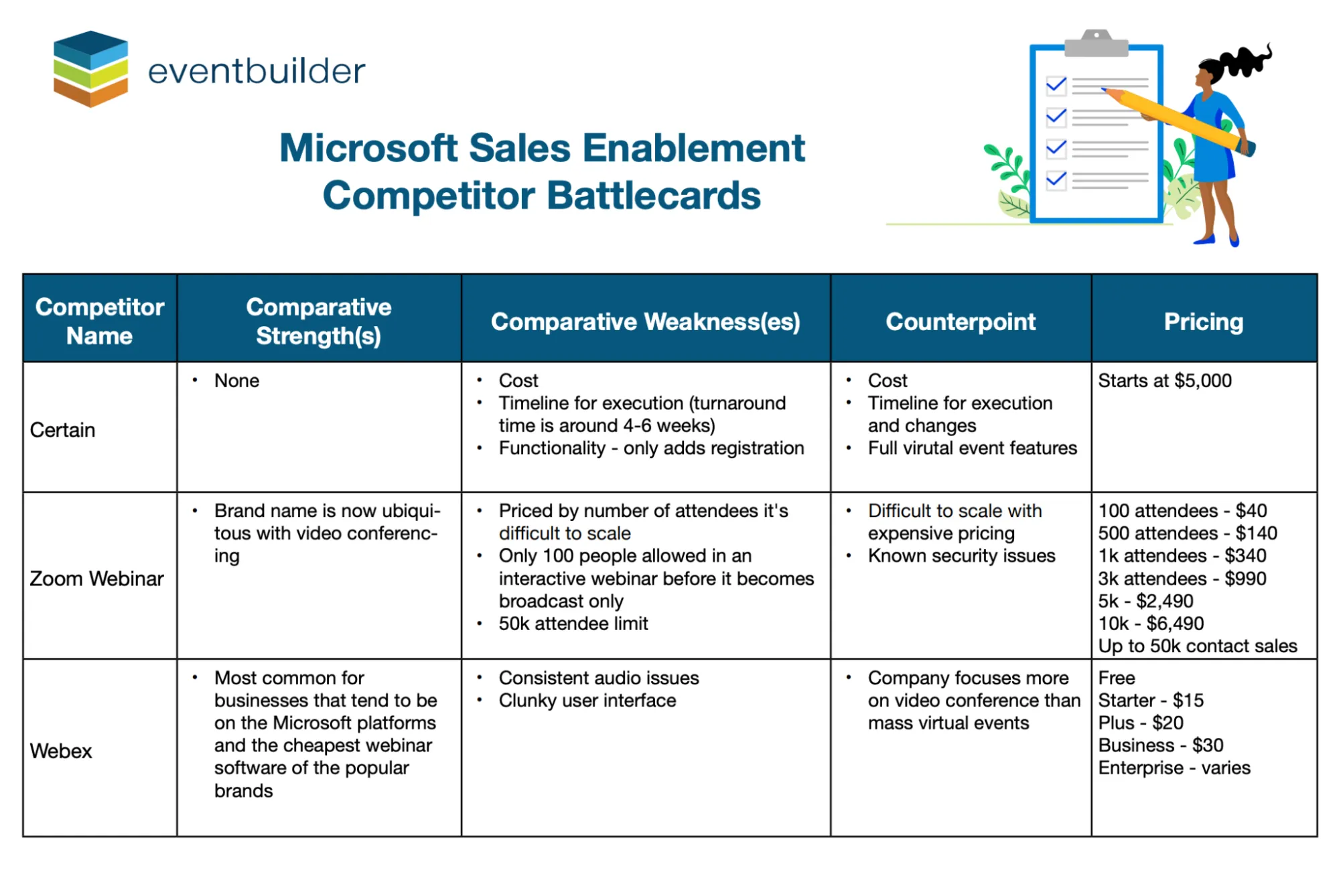
23. Microsoft Sales Enablement
Microsoft’s sales enablement battlecards are designed to help sellers and partners position EventBuilder against competing virtual and hybrid event platforms like Zoom Events, Webex, ON24, and Cvent.
The primary buyer is typically a marketing team lead or events lead running webinars, field events, or hybrid programs, with sales and RevOps closely involved once pipeline attribution, CRM sync, and post-event follow-up enter the conversation.
What stands out?
- Instead of stopping at “here’s how we’re different,” the asset tells sellers exactly how to redirect the conversation once a competitor is mentioned—and then each comparison pairs a limitation (e.g., poor CRM integration, manual follow-up, fragmented reporting) with a clear Microsoft-aligned alternative.
- We like how it consistently ties key differentiators to sales outcomes: better lead handoff, faster follow-up, cleaner attribution, and fewer manual steps for reps after an event.
- The cards make it clear who EventBuilder is for—teams running revenue-driven events in Microsoft Dynamics or Salesforce—and who it’s not for, helping reps avoid dragging lightweight webinar tools into enterprise buying conversations.
💡 Borrow this: Don’t just explain why competitors fall short. Tell reps what to do next when one comes up. So, for example, if Zoom is mentioned, the card points to CRM gaps; if ON24 is mentioned, it redirects to cost and operational overhead. Every comparison includes a built-in pivot that moves the deal forward.
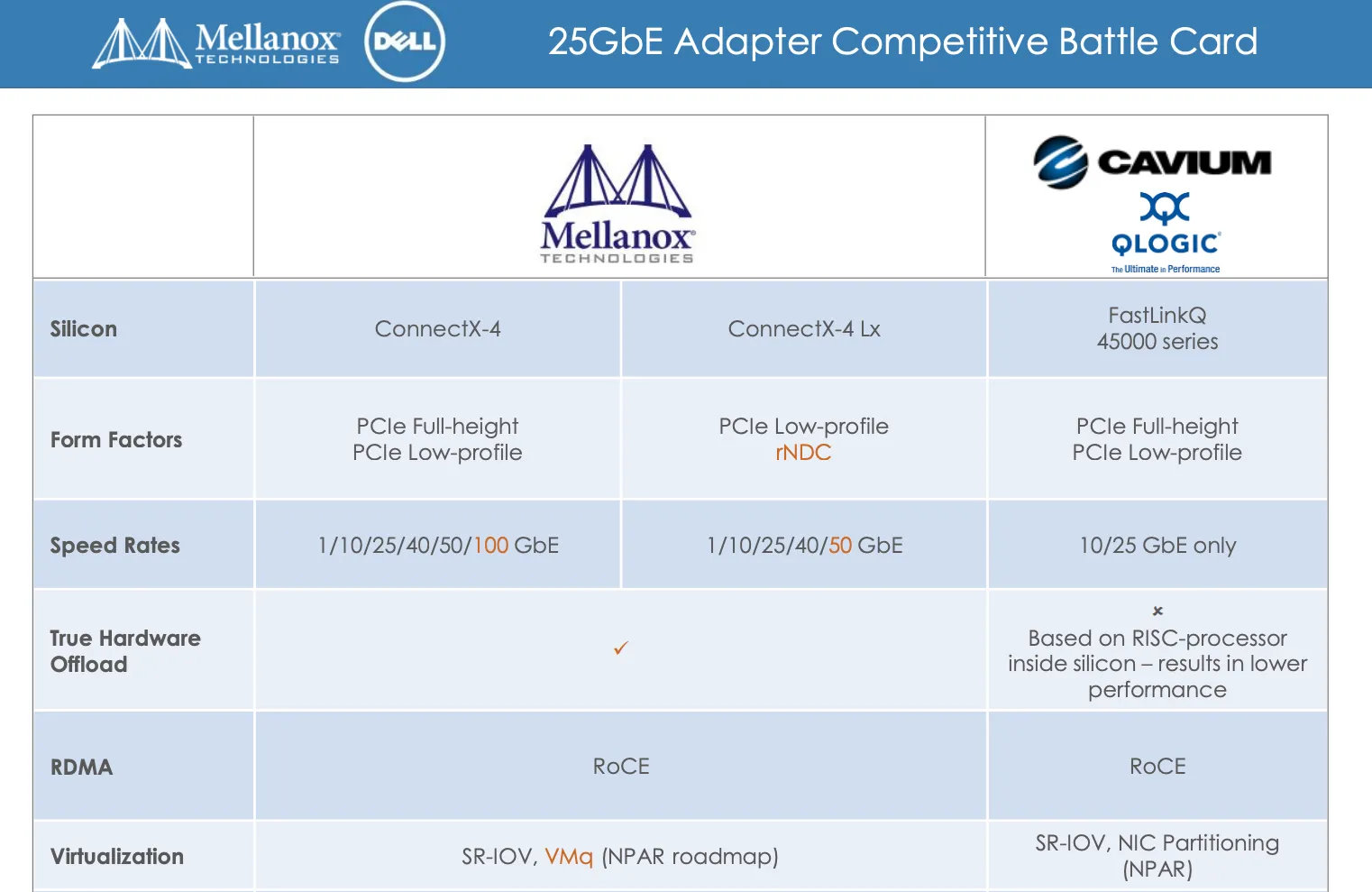
24. Mellanox Technologies
Mellanox’s competitive battlecard helps sellers position Mellanox Ethernet adapters against alternatives like QLogic in performance-sensitive data center environments.
The buyer is typically a data center, storage, or virtualization architect, often operating inside Dell environments, where performance ceilings, CPU overhead, and future scalability become hard blockers very quickly.
What stands out?
- We like how hardware offload is the real hero of the story. Mellanox is positioned not just as a faster NIC, but as a way to give “CPU cycles back”; competitors are explicitly framed as software- or processor-dependent, with clear implications for bottlenecks at scale.
- If the buyer cares about storage bottlenecks, VM density, RoCE latency, or scaling virtual networks without CPU tax, the card makes it obvious Mellanox belongs in the conversation—and just as obvious when it doesn’t.
- The card shows how teams can move from 10GbE to 25/50/100GbE without ripping out existing infrastructure, making it easier to support newer workloads like NVMe-oF and large-scale virtualization.
💡 Borrow this: When you’re selling deep infrastructure, don’t shy away from metrics and numbers. If your product wins on architecture, write the benchmarks directly into the pitch and let competitors explain the gap later.
What can we take away from these examples?
Now let's step back. If you're the person responsible for building these—probably while also managing onboarding, running SKO, and answering Slack requests for one-off decks—you're not just looking at these examples for inspiration. You're looking for a system that makes this sustainable.
Looking across these 24 examples, the strongest battlecards reduce stress for sellers and for the people who maintain them. Here's what the good ones get right.
That brings us to the bigger question:
What makes a great competitive battlecard?
A great competitive battlecard helps a rep answer a hard question without panicking, without guessing, and without Slack-pinging three people mid-call.
That’s the bar.
Here’s what the good ones get right.
1. They reflect what buyers really say
The language sounds like buyers because it came from buyers. So how can you replicate that
The best source is sales calls: the objections that keep repeating and the competitors that keep showing up uninvited.
Ask your team what they hear most often, listen to call recordings, or ask AI to analyze your call transcripts.
Competitive intelligence tools like Klue and Crayon are also useful here. They help sales teams track competitor messaging and changes over time so your battlecards aren’t frozen in last year’s narrative.
2. They help reps qualify and disqualify
An effective battlecard spells out exactly when to compete and when to gracefully bow out.
Clear signals like "If they need real-time sync, we win" or "If HIPAA compliance is mandatory, recommend Partner X instead."
The best versions go a step further and make disqualification explicit by calling out:
- Deal sizes that rarely close.
- Technical requirements you can’t meet without custom work.
- Buyer profiles that churn or stall late-stage.
The net effect is fewer zombie deals and sales conversations that feel advisory instead of defensive.
3. They put the numbers in a "break glass in case of emergency" box
The strongest battlecards surface key numbers in a clearly labeled sidebar or callout that reps can scan in seconds.
Think of this as a can’t-miss reference panel with the details sellers get asked for repeatedly but never remember, like:
- Typical deal size or contract range
- Implementation or time-to-value expectations
- Customer count or scale signals (e.g., “used by 1,000+ enterprises”)
- Performance benchmarks or limits that matter in competitive comparisons
Use distinct blocks, bold headers, and plenty of white space.
4. They script the awkward moments before they happen
The best battlecards anticipate the stomach-drop moments: "Actually, we just switched from you guys to [competitor]," and include proven recovery talk tracks.
That means writing out responses that:
- Acknowledge the decision without getting defensive.
- Name the trade-off the buyer likely accepted.
- Reference a real, comparable customer who made the same call.
For example: "That's fair—we’ve seen teams move to [Competitor] when speed was the top priority. MegaCorp did that last year, but they came back six months later when reporting and admin overhead became a problem."
5. They're easy to update without becoming your full-time job
Competitive context changes constantly—new features, pricing shifts, repositioning, customer wins.
If updating a battlecard requires a redesign, re-export, and manual distribution, it won't get updated. Your reps end up using stale materials, and you're stuck in reactive mode chasing version control instead of doing strategic work.
The cleanest way to manage battlecards is to house them as living documents that your team can update in minutes, not hours—with Dock Playbooks.
Dock’s Playbooks are internal-only workspaces that act as your internal source of truth for a product or motion. So, one page might cover positioning, another might cover discovery questions, while one of those pages can be the competitive battlecard.
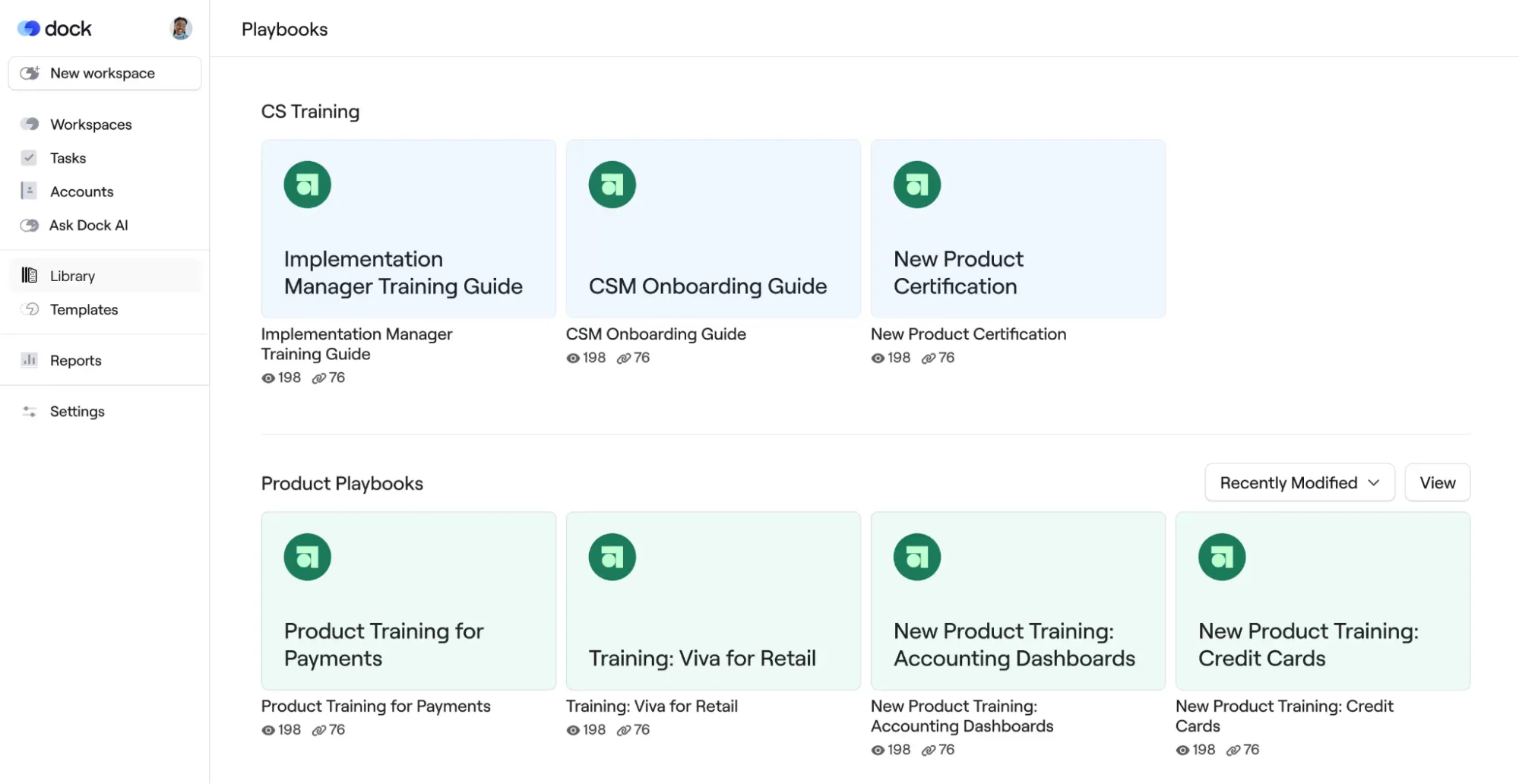
This has a few advantages, namely:
- Playbooks are internal-only, so battlecards don't accidentally get shared with customers
- Updates are instant—no re-exporting or re-sending files
- You can track usage: see which battlecards your reps are opening, when they reference them in deals, and which competitive scenarios appear most often. That data makes it easier to prove what's working and justify future investment.
You can either build your battlecard natively as a Dock Playbook, or if you already have PDFs, you can embed them in Playbooks. They’ll still be accessible—but framed as internal guidance.
6. They show up where reps already work
Your reps are already using ChatGPT to draft emails, prep for calls, and respond to objections. They're doing it whether you have a plan or not.
So if battlecards live within the tools reps already reach for—connected to your AI workflows—they’ll actually get used.
Dock AI can reference what's in your Playbooks and content library.
When a rep asks the AI enablement agent, "How do we position against competitor X?" or generates an email using Dock to answer a client's competitive question, your battlecard guidance shows up automatically.
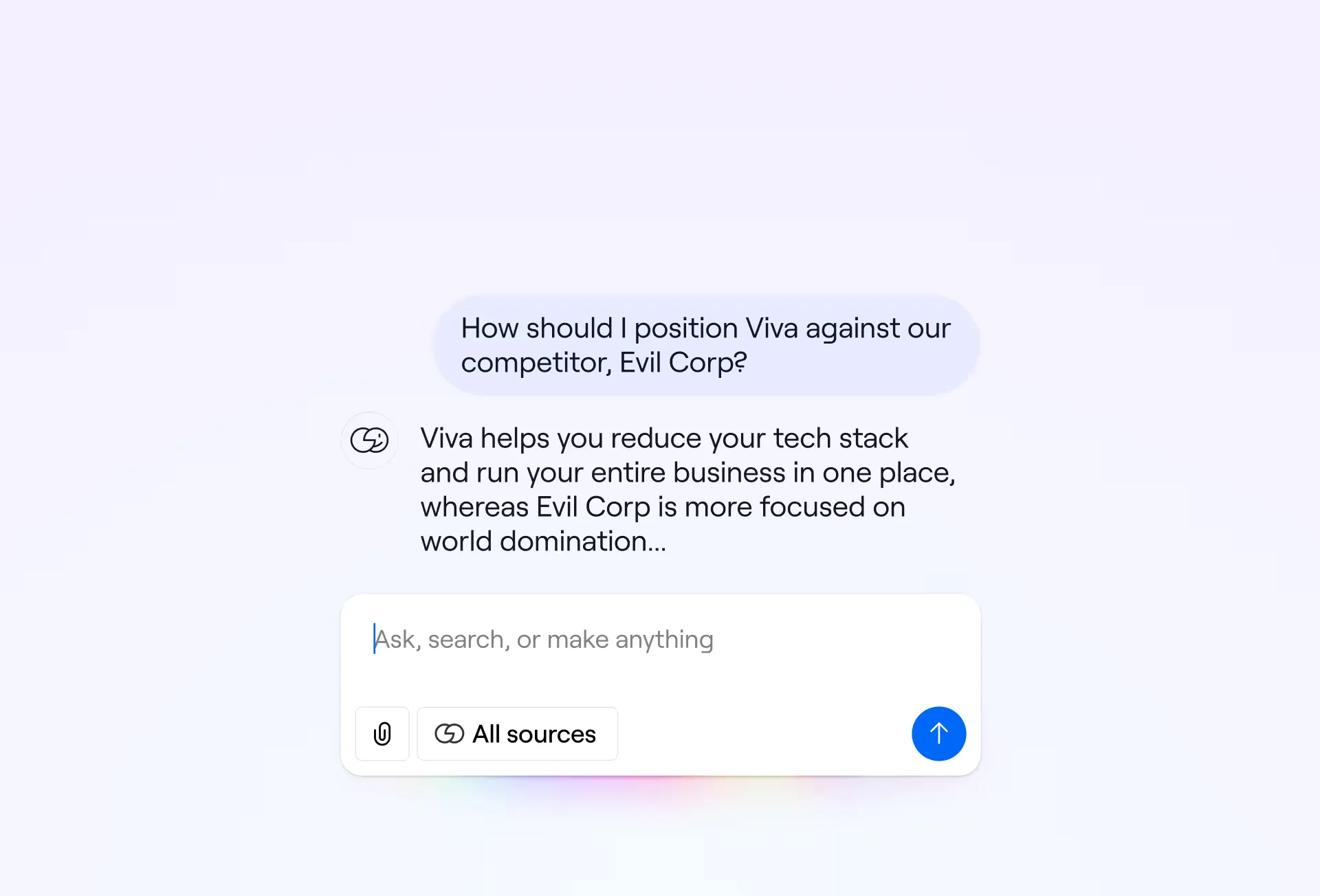
The AI-generated response stays aligned with your real positioning rather than straying off-brand.
AI Documents work the same way: they can pull from your battlecards as source material, so proposals, battle plans, and competitive overviews stay consistent.
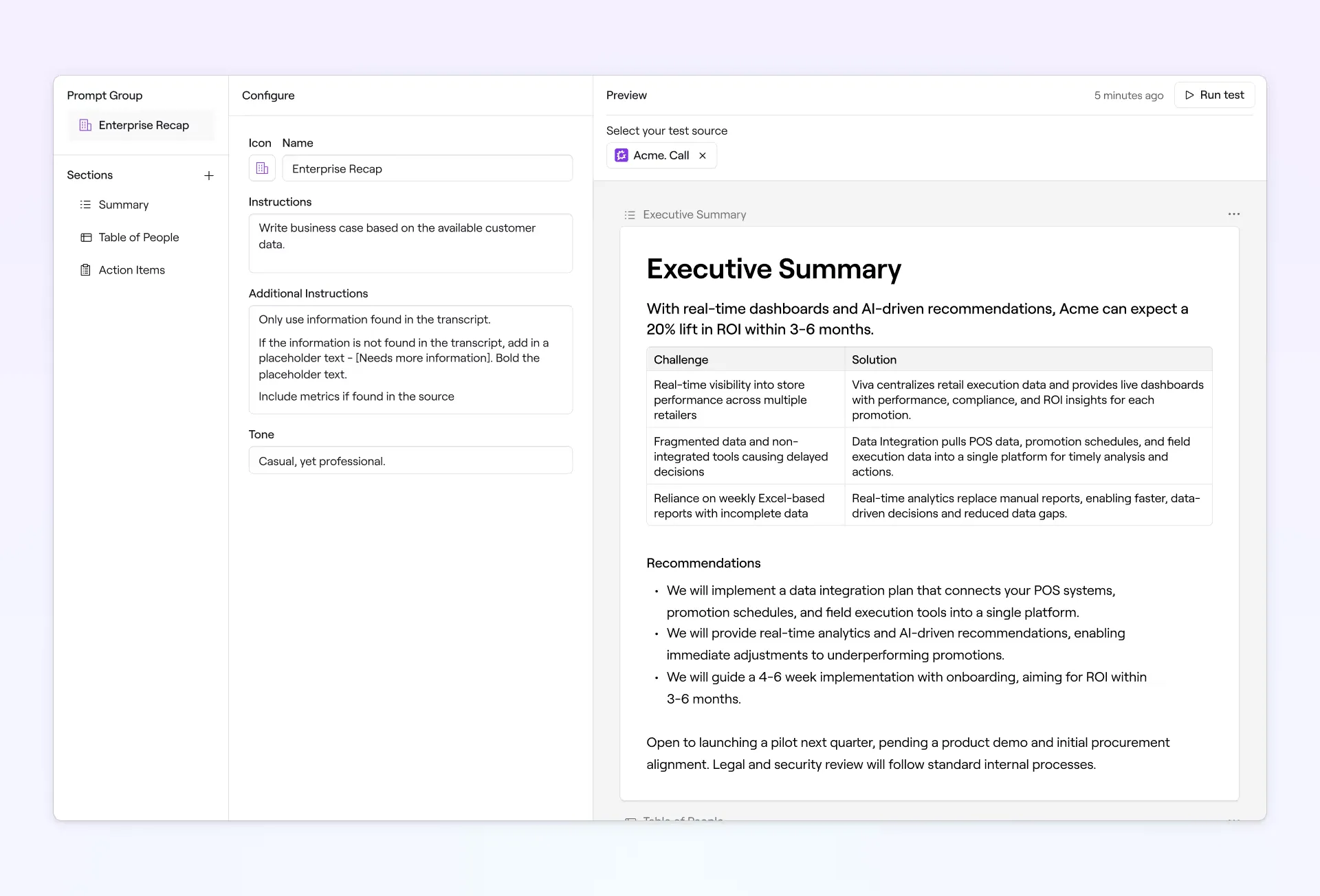
And because battlecards live right there in Playbooks next to all your other content, reps find them in their flow of work.
Use Playbooks, not PDFs
If you're looking for more on competitive enablement, explore our Revenue Archives.
And if you want battlecards that influence deals, stay current without a redesign cycle, and show up in the AI workflows your reps are already using—Dock's your move.
Dock Playbooks keep battlecards live and updatable, Dock AI references them automatically, and you finally get to see which ones your team really uses.
👉 Sign up for Dock for free. Your first 50 client workspaces are free.
Sales battlecard FAQs
What is a sales battlecard?
A sales battlecard is an internal enablement asset that gives reps fast, structured guidance on how to position a product, qualify a buyer, handle objections, and navigate competitive conversations.
Battlecards are designed to be used before or during a sales call, not studied like training material. They help sellers:
- Stay consistent in how a product is positioned.
- Ask better discovery questions.
- Handle common objections without escalating every deal.
- Adjust messaging based on buyer role (IT, finance, exec, etc.).
- Compete more effectively when another vendor is already in play.
Sales battlecards are typically created and owned by Product Marketing (PMM) that defines positioning, differentiation, and messaging; and Sales Enablement that ensures the content is usable in real sales workflows.
✏️Note: A battlecard is never customer-facing. If the content is meant to be shared with prospects, it’s no longer a battlecard. That would typically be called a competitor comparison, a comparison page, or a sales one-pager.
What is a competitive battlecard?
A competitive battlecard is a sales battlecard focused on winning against a competitor's offering. The core structure is the same, but the emphasis shifts from general positioning to direct comparison.
What are the different types of battlecards?
Below are the six most common types:
- A core positioning battlecard helps reps explain what the product is, who it’s for, and why it matters—often grounded in a clear customer profile—without referencing a specific competitor.
- A competitive battlecard helps reps win deals against a named alternative.
- An objection-handling battlecard focuses on the objections that consistently slow or kill deals, regardless of which competitor is involved. A good one gives reps ready-to-use talking points they can rely on mid-conversation.
- A persona-based battlecard helps reps tailor their message to who they’re talking to, not which product they’re selling against.
- A program or an ecosystem battlecard sells participation, alignment, or status.
- A service or assessment battlecard is used when the “product” is a service, audit, or assessment.
Most real-world battlecards blend multiple types, though. An effective battlecard might combine competitive positioning with persona guidance, or mix objection handling into a services-focused card.
The general rule of thumb: if the card helps a rep say the right thing at the right moment, it’s doing its job.
How to design a sales battle card
A good battlecard follows a simple structure:
1. Start with where it fits in the sales process: Before you design anything, be clear on when this battlecard is intended to be used. Is it for:
- Early discovery, when buyers are still mapping the competitive landscape?
- Mid-funnel, when a competitor is explicitly named?
- Late-stage deals, when procurement or execs are pushing back?
2. Don’t blindly follow a sales battlecard template: Sales battlecard templates are useful starting points, but they’re not the goal. Instead of asking “Did we include everything?”, ask:
- What does a rep need to say in this moment?
- What’s the one mistake we don’t want them to make?
- What should they avoid saying about the competitor?
3. Design around competitors: Strong competitor battlecards are built around:
- How buyers compare options in their heads
- Where competitors’ strengths actually matter
- Where those strengths turn into trade-offs
4. Anchor everything to real talk tracks: Every section of the battlecard should answer one question: “What do I say next?” That means:
- Short, speakable bullets (not paragraphs)
- Objections written in the buyer’s voice
- Responses that sound like something a human would actually say
5. Keep the layout simple on purpose: Use headers, short bullet points, and clear sections. Skip heavy design, clever layouts, or dense tables. The goal is speed.


Related Revenue Lab Articles

.webp)
.webp)


Templates for Sales, Onboarding,
Projects and Portals
Customize and share with clients


